The Tech Edvocate

Top Menu

  • Advertisement
  • Apps
  • Home Page
  • Home Page Five (No Sidebar)
  • Home Page Four
  • Home Page Three
  • Home Page Two
  • Home Tech2
  • Icons [No Sidebar]
  • Left Sidbear Page
  • Lynch Educational Consulting
  • My Account
  • My Speaking Page
  • Newsletter Sign Up Confirmation
  • Newsletter Unsubscription
  • Our Brands
  • Page Example
  • Privacy Policy
  • Protected Content
  • Register
  • Request a Product Review
  • Shop
  • Shortcodes Examples
  • Signup
  • Start Here
    • Governance
    • Careers
    • Contact Us
  • Terms and Conditions
  • The Edvocate
  • The Tech Edvocate Product Guide
  • Topics
  • Write For Us
  • Advertise

Main Menu

  • Start Here
    • Our Brands
    • Governance
      • Lynch Educational Consulting, LLC.
      • Dr. Lynch’s Personal Website
      • Careers
    • Write For Us
    • The Tech Edvocate Product Guide
    • Contact Us
    • Books
    • Edupedia
    • Post a Job
    • The Edvocate Podcast
    • Terms and Conditions
    • Privacy Policy
  • Topics
    • Assistive Technology
    • Child Development Tech
    • Early Childhood & K-12 EdTech
    • EdTech Futures
    • EdTech News
    • EdTech Policy & Reform
    • EdTech Startups & Businesses
    • Higher Education EdTech
    • Online Learning & eLearning
    • Parent & Family Tech
    • Personalized Learning
    • Product Reviews
  • Advertise
  • Tech Edvocate Awards
  • The Edvocate
  • Pedagogue
  • School Ratings

logo

The Tech Edvocate

  • Start Here
    • Our Brands
    • Governance
      • Lynch Educational Consulting, LLC.
      • Dr. Lynch’s Personal Website
        • My Speaking Page
      • Careers
    • Write For Us
    • The Tech Edvocate Product Guide
    • Contact Us
    • Books
    • Edupedia
    • Post a Job
    • The Edvocate Podcast
    • Terms and Conditions
    • Privacy Policy
  • Topics
    • Assistive Technology
    • Child Development Tech
    • Early Childhood & K-12 EdTech
    • EdTech Futures
    • EdTech News
    • EdTech Policy & Reform
    • EdTech Startups & Businesses
    • Higher Education EdTech
    • Online Learning & eLearning
    • Parent & Family Tech
    • Personalized Learning
    • Product Reviews
  • Advertise
  • Tech Edvocate Awards
  • The Edvocate
  • Pedagogue
  • School Ratings
  • Ramp’s Staggering $60 Billion Valuation: 8 Reasons Why Investors Are Piling In

  • Uncovering the Cost: Why This AI Startup’s Collapse Is a Troubling Sign for Tech

  • The Silent Crisis: Why Your Next Console Will Cost a Fortune

  • Advisers urged to steer clear of ‘hyperscale’ AI models

  • The Quiet Crisis: Is AI in Education Creating an ‘Illusion of Learning’?

  • 84% of Ransomware Attacks Use AI: This Is How Your Own Systems Are Turning Against You

  • The Staggering Truth About Healthcare Cyberattacks: 76.6 Million Records Exposed in 2026

  • This Crucial Deadline For Rogue AI Is Much Closer Than You Think

  • This RNA Breakthrough Could Rewrite Alzheimer’s Treatment

  • This One Thing Is Silently Crushing US Consumer Inflation — And Your Wallet

Digital & Mobile Technology
Home›Digital & Mobile Technology›GNOME Explained: A Look at One of Linux’s Most Popular Desktops

GNOME Explained: A Look at One of Linux’s Most Popular Desktops
By Matthew Lynch
June 21, 2023
0
Spread the love

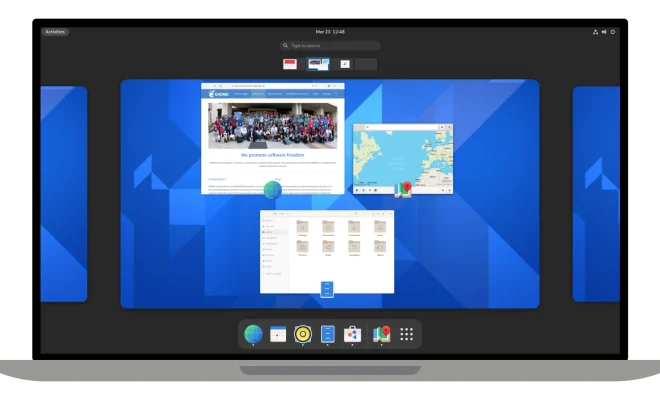
GNOME is one of the most popular desktop environments for Linux-based operating systems. It is an open-source desktop environment that provides users with a customizable and feature-rich graphical user interface. GNOME is maintained by the GNOME Foundation, which is a non-profit organization that manages and develops the GNOME project.

GNOME is designed to be easy to use, powerful, and flexible. It is built on top of the Linux operating system and provides users with a modern and intuitive desktop environment that is suitable for both beginners and advanced users. GNOME supports a wide range of applications, tools, and extensions that allow users to customize their desktop environment to meet their specific needs.

One of the defining features of GNOME is its focus on simplicity and elegance. The desktop environment is designed to be easy to use and visually appealing. The developers of GNOME have worked hard to create a desktop environment that is both elegant and functional. This is achieved through the use of simple and clean design elements, such as minimalistic icons and a consistent user interface.

Another important feature of GNOME is its flexibility. The desktop environment is highly customizable and provides users with a wide range of customization options. This includes the ability to change the look and feel of the desktop environment with themes, icons, and wallpapers. Users can also add new features and functionality to GNOME using extensions, which are small programs that add new features or modify existing ones.

GNOME provides users with a wide range of applications that are designed to be easy to use and powerful. This includes applications for browsing the web, managing files, editing documents, and more. One of the most popular applications included with GNOME is the Nautilus file manager, which provides users with a simple and intuitive interface for managing files and folders.

One of the advantages of using GNOME is that it is open source. This means that the source code for the desktop environment is freely available and can be modified and distributed by anyone. This has led to the development of a large and active community of developers and users who work to improve and enhance the desktop environment.

In conclusion, GNOME is one of the most popular desktop environments for Linux-based operating systems. It provides users with a modern and customizable desktop environment that is suitable for both beginners and advanced users. GNOME is designed to be easy to use, powerful, and flexible, and it includes a wide range of applications, tools, and extensions that allow users to customize their desktop environment to meet their specific needs. As an open-source project, GNOME has a large and active community of developers and users who work together to improve and enhance the desktop environment for everyone.

Previous Article

How to Use the SUMIFS Function in ...

Next Article

Is It Bad to Charge Your Kindle ...

Matthew Lynch

Related articles More from author

  • Digital & Mobile Technology

    What Is InPrivate Browsing in Microsoft Edge?

    July 31, 2023
    By Matthew Lynch
  • Digital & Mobile Technology

    The Best Apps for Finding, Rating, and Sharing Craft Beer

    June 12, 2023
    By Matthew Lynch
  • Digital & Mobile Technology

    Best Apps to Help You Improve Your Singing Voice

    June 23, 2023
    By Matthew Lynch
  • Digital & Mobile Technology

    How to Build and Maintain the Best Home Network

    June 6, 2023
    By Matthew Lynch
  • Digital & Mobile Technology

    Unlocked vs. Locked Phone: Which One Should You Buy?

    June 23, 2023
    By Matthew Lynch
  • Digital & Mobile Technology

    How to Tell if an Email Attachment Is Malware

    May 29, 2023
    By Matthew Lynch

Search

Login & Registration

  • Log in
  • Entries feed
  • Comments feed
  • WordPress.org

Newsletter

Signup for The Tech Edvocate Newsletter and have the latest in EdTech news and opinion delivered to your email address!

About Us

Since technology is not going anywhere and does more good than harm, adapting is the best course of action. That is where The Tech Edvocate comes in. We plan to cover the PreK-12 and Higher Education EdTech sectors and provide our readers with the latest news and opinion on the subject. From time to time, I will invite other voices to weigh in on important issues in EdTech. We hope to provide a well-rounded, multi-faceted look at the past, present, the future of EdTech in the US and internationally.

We started this journey back in June 2016, and we plan to continue it for many more years to come. I hope that you will join us in this discussion of the past, present and future of EdTech and lend your own insight to the issues that are discussed.

Newsletter

Signup for The Tech Edvocate Newsletter and have the latest in EdTech news and opinion delivered to your email address!

Contact Us

The Tech Edvocate
910 Goddin Street
Richmond, VA 23231
(601) 630-5238
[email protected]

Copyright © 2026 Matthew Lynch. All rights reserved.