The Tech Edvocate

Top Menu

  • Advertisement
  • Apps
  • Home Page
  • Home Page Five (No Sidebar)
  • Home Page Four
  • Home Page Three
  • Home Page Two
  • Home Tech2
  • Icons [No Sidebar]
  • Left Sidbear Page
  • Lynch Educational Consulting
  • My Account
  • My Speaking Page
  • Newsletter Sign Up Confirmation
  • Newsletter Unsubscription
  • Our Brands
  • Page Example
  • Privacy Policy
  • Protected Content
  • Register
  • Request a Product Review
  • Shop
  • Shortcodes Examples
  • Signup
  • Start Here
    • Governance
    • Careers
    • Contact Us
  • Terms and Conditions
  • The Edvocate
  • The Tech Edvocate Product Guide
  • Topics
  • Write For Us
  • Advertise

Main Menu

  • Start Here
    • Our Brands
    • Governance
      • Lynch Educational Consulting, LLC.
      • Dr. Lynch’s Personal Website
      • Careers
    • Write For Us
    • The Tech Edvocate Product Guide
    • Contact Us
    • Books
    • Edupedia
    • Post a Job
    • The Edvocate Podcast
    • Terms and Conditions
    • Privacy Policy
  • Topics
    • Assistive Technology
    • Child Development Tech
    • Early Childhood & K-12 EdTech
    • EdTech Futures
    • EdTech News
    • EdTech Policy & Reform
    • EdTech Startups & Businesses
    • Higher Education EdTech
    • Online Learning & eLearning
    • Parent & Family Tech
    • Personalized Learning
    • Product Reviews
  • Advertise
  • Tech Edvocate Awards
  • The Edvocate
  • Pedagogue
  • School Ratings

logo

The Tech Edvocate

  • Start Here
    • Our Brands
    • Governance
      • Lynch Educational Consulting, LLC.
      • Dr. Lynch’s Personal Website
        • My Speaking Page
      • Careers
    • Write For Us
    • The Tech Edvocate Product Guide
    • Contact Us
    • Books
    • Edupedia
    • Post a Job
    • The Edvocate Podcast
    • Terms and Conditions
    • Privacy Policy
  • Topics
    • Assistive Technology
    • Child Development Tech
    • Early Childhood & K-12 EdTech
    • EdTech Futures
    • EdTech News
    • EdTech Policy & Reform
    • EdTech Startups & Businesses
    • Higher Education EdTech
    • Online Learning & eLearning
    • Parent & Family Tech
    • Personalized Learning
    • Product Reviews
  • Advertise
  • Tech Edvocate Awards
  • The Edvocate
  • Pedagogue
  • School Ratings
  • Cybersecurity vs. Green Energy: Which Path Will Make You Richer in 2026?

  • Why These 10 Renewable Energy Certifications Are Quietly Reshaping Careers by 2026

  • Why Millions Are Rushing to Online Renewable Energy Certifications Right Now

  • August AI vs. USMLE: The Unsettling Future of Medical Licensing

  • One AI’s Perfect USMLE Score Just Blew Up Medical Education As We Know It

  • This AI Just Aced the USMLE: Why Your Medical Career Might Never Be the Same

  • The Quiet Exodus: Why Senior FinTech Developers Are Abandoning Corporate Life

  • The Quiet Revolution: Where Elite FinTech Developers Are Fleeing in 2026

  • The Quiet Exodus: Why Senior FinTech Developers Are Ditching Corporate Life

  • AI Governance Software: Pricing and Features Comparison

Tech Advice
Home›Tech Advice›Getting more spam text messages? How to avoid and report the latest schemes

Getting more spam text messages? How to avoid and report the latest schemes
By Matthew Lynch
July 17, 2023
0
Spread the love

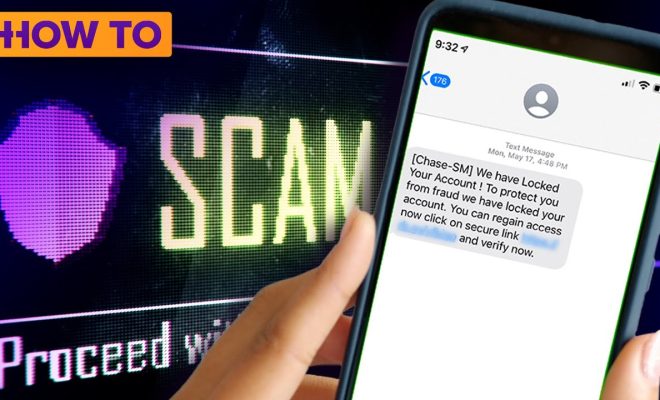
In today’s digital age, spam text messages have become increasingly common and even more sophisticated. With advances in technology, these irritating messages continue to find their way into our lives, causing frustration and potential threats to our privacy and security. In this article, we will discuss how to avoid and report the latest spam text message schemes.

1. Recognize spam text messages

To avoid falling victim to spam text messages, it’s crucial to recognize common telltale signs. These could include:

– Unexpected messages from unknown numbers

– Messages containing links or shortened URLs

– Requests for personal information or passwords

– Offers that seem too good to be true

2. Block the sender

Upon receiving a suspicious text message, block the number immediately. Most smartphones have built-in features for blocking numbers – look for this option in your device settings or consult your user manual.

3. Don’t click on links or respond to the text

To avoid exposing yourself to potential dangers, never click on links provided in spam text messages or respond to them in any way. Responding may confirm that your number is active, potentially leading to more spam.

4. Use a third-party app

Several third-party apps are available that can help filter out spam text messages by automatically identifying and blocking known spammers. Some popular options include RoboKiller, Truecaller, and Hiya.

5. Report spam texts

It is essential not only to protect yourself but also help others avoid these unwanted messages by reporting spam texts whenever possible. Reporting options include:

– Forward the spam message to 7726 (SPAM): This free service allows major carriers such as AT&T, T-Mobile, Verizon, and Sprint to investigate and take action against spammers.

– US residents can file a complaint at the Federal Trade Commission: Visit ftc.gov/complaint and follow the guided process for handling unwanted messages.

– Contact your mobile carrier: Many carriers have dedicated hotlines or support forums specifically for reporting spam messages.

6. Educate yourself about the latest scams

Stay up-to-date with the most recent scams by following reputable sources of information, including websites and social media channels focused on protecting online users from spam, phishing, and other nefarious activities.

By following these steps and staying informed about the latest schemes, you can help avoid and report spam text messages to maintain better control of your digital life. So, be vigilant when it comes to your phone’s security and protect yourself from potential threats lurking behind malicious text messages.


Previous Article

Get More iCloud Storage for Free Using ...

Next Article

Choose how your Eevee evolves in Pokemon ...

Matthew Lynch

Related articles More from author

  • Tech Advice

    Free Streaming Service IMDb TV to Become Amazon Freevee

    July 16, 2023
    By Matthew Lynch
  • Tech Advice

    Apple’s TVOS 17 Brings FaceTime to Apple TV, Find My Remote Functionality to Siri Remote

    July 16, 2023
    By Matthew Lynch
  • Tech Advice

    Peloton Bike vs. Peloton Bike Plus: The Differences That Matter

    July 6, 2023
    By Matthew Lynch
  • Tech Advice

    Set Up Your Own Outdoor Theater With a Groview C26 Projector

    February 19, 2024
    By Matthew Lynch
  • Tech Advice

    Galaxy S9 vs. Galaxy S9 Plus: What’s the difference?

    July 17, 2023
    By Matthew Lynch
  • Tech Advice

    Intel Compute Stick Review: The Little PC That Almost Could

    July 12, 2023
    By Matthew Lynch

Search

Login & Registration

  • Log in
  • Entries feed
  • Comments feed
  • WordPress.org

Newsletter

Signup for The Tech Edvocate Newsletter and have the latest in EdTech news and opinion delivered to your email address!

About Us

Since technology is not going anywhere and does more good than harm, adapting is the best course of action. That is where The Tech Edvocate comes in. We plan to cover the PreK-12 and Higher Education EdTech sectors and provide our readers with the latest news and opinion on the subject. From time to time, I will invite other voices to weigh in on important issues in EdTech. We hope to provide a well-rounded, multi-faceted look at the past, present, the future of EdTech in the US and internationally.

We started this journey back in June 2016, and we plan to continue it for many more years to come. I hope that you will join us in this discussion of the past, present and future of EdTech and lend your own insight to the issues that are discussed.

Newsletter

Signup for The Tech Edvocate Newsletter and have the latest in EdTech news and opinion delivered to your email address!

Contact Us

The Tech Edvocate
910 Goddin Street
Richmond, VA 23231
(601) 630-5238
[email protected]

Copyright © 2026 Matthew Lynch. All rights reserved.