The Tech Edvocate

Top Menu

  • Advertisement
  • Apps
  • Home Page
  • Home Page Five (No Sidebar)
  • Home Page Four
  • Home Page Three
  • Home Page Two
  • Home Tech2
  • Icons [No Sidebar]
  • Left Sidbear Page
  • Lynch Educational Consulting
  • My Account
  • My Speaking Page
  • Newsletter Sign Up Confirmation
  • Newsletter Unsubscription
  • Our Brands
  • Page Example
  • Privacy Policy
  • Protected Content
  • Register
  • Request a Product Review
  • Shop
  • Shortcodes Examples
  • Signup
  • Start Here
    • Governance
    • Careers
    • Contact Us
  • Terms and Conditions
  • The Edvocate
  • The Tech Edvocate Product Guide
  • Topics
  • Write For Us
  • Advertise

Main Menu

  • Start Here
    • Our Brands
    • Governance
      • Lynch Educational Consulting, LLC.
      • Dr. Lynch’s Personal Website
      • Careers
    • Write For Us
    • The Tech Edvocate Product Guide
    • Contact Us
    • Books
    • Edupedia
    • Post a Job
    • The Edvocate Podcast
    • Terms and Conditions
    • Privacy Policy
  • Topics
    • Assistive Technology
    • Child Development Tech
    • Early Childhood & K-12 EdTech
    • EdTech Futures
    • EdTech News
    • EdTech Policy & Reform
    • EdTech Startups & Businesses
    • Higher Education EdTech
    • Online Learning & eLearning
    • Parent & Family Tech
    • Personalized Learning
    • Product Reviews
  • Advertise
  • Tech Edvocate Awards
  • The Edvocate
  • Pedagogue
  • School Ratings

logo

The Tech Edvocate

  • Start Here
    • Our Brands
    • Governance
      • Lynch Educational Consulting, LLC.
      • Dr. Lynch’s Personal Website
        • My Speaking Page
      • Careers
    • Write For Us
    • The Tech Edvocate Product Guide
    • Contact Us
    • Books
    • Edupedia
    • Post a Job
    • The Edvocate Podcast
    • Terms and Conditions
    • Privacy Policy
  • Topics
    • Assistive Technology
    • Child Development Tech
    • Early Childhood & K-12 EdTech
    • EdTech Futures
    • EdTech News
    • EdTech Policy & Reform
    • EdTech Startups & Businesses
    • Higher Education EdTech
    • Online Learning & eLearning
    • Parent & Family Tech
    • Personalized Learning
    • Product Reviews
  • Advertise
  • Tech Edvocate Awards
  • The Edvocate
  • Pedagogue
  • School Ratings
  • A Visitors Guide to Long Beach (CA), United States

  • A Visitor’s Guide to Fresno (CA), United States

  • A Visitors Guide to New Orleans (LA), United States

  • A Visitors Guide to Sacramento (CA), United States

  • A Visitors Guide to Lyon, France

  • JisuLife Ultra2 Portable Fan: A Powerful Multi-Function Cooling Solution

  • A Visitors Guide to Viña del Mar, Chile

  • A Visitors Guide to Århus, Denmark

  • A Visitors Guide to Bakersfield (CA), United States

  • A Visitors Guide to Aurora (CO), United States

Digital & Mobile Technology
Home›Digital & Mobile Technology›Garmin GPSMAP 64st Review

Garmin GPSMAP 64st Review
By Matthew Lynch
June 15, 2023
0
Spread the love

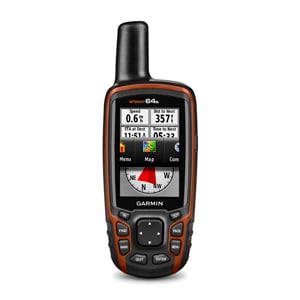
Garmin GPSMAP 64st is a handheld GPS device designed to help users navigate through challenging terrains. Whether you are hiking, navigating through the wilderness, or exploring new territories, this device has everything you need to reach your destination safely. This review will cover the features of the GPSMAP 64st and how it compares to other devices on the market.

Design and Display

The GPSMAP 64st features a compact and durable design that makes it easy to carry around. It measures 2.4 x 6.3 x 1.4 inches and weighs 8.1 ounces. Its rugged coating and waterproof casing make it ideal for outdoor adventures.

The device features a 2.6-inch color display that is easy to read even in bright sunlight. The screen resolution of 160 x 240 pixels provide crisp and clear images that enhance visibility.

Navigation Features

The GPSMAP 64st utilizes a high-sensitivity GPS and GLONASS receiver that determines your location quickly and accurately. It also features a quad helix antenna that ensures you receive the best possible signal even in challenging environments.

The device has a preloaded topographic map that displays the terrain you are navigating. The map includes roads, trails, rivers, lakes, and other points of interest. The GPSMAP 64st also allows you to create custom maps by using free Garmin BaseCamp software.

The device also features advanced navigation features such as track recording and trip planning. With track recording, you can save your route and share it with other Garmin users. The trip planning feature allows you to prepare for your trip in advance by creating waypoints and routes.

Connectivity

The GPSMAP 64st has several connectivity options that allow you to share and receive data. It supports wireless connectivity via Bluetooth and ANT+ technology. It also has a micro-USB port that allows you to transfer files from your computer.

Battery Life

The GPSMAP 64st uses a rechargeable battery that lasts up to 16 hours. You can extend the battery life by turning off features that you do not need.

Pros

– Durable and waterproof casing
– High-sensitivity GPS and GLONASS receiver
– Preloaded topographic map
– Advanced navigation features
– Wireless connectivity
– Rechargeable battery

Cons

– Expensive compared to other GPS devices
– Complex menu system
– The battery life is not great when compared to other devices

Conclusion

The Garmin GPSMAP 64st is an excellent GPS device that offers advanced navigation features, wireless connectivity, and a durable design. Its high-sensitivity GPS and GLONASS receiver ensure that you get accurate location data even in harsh environments. The preloaded topographic map and customizable map options make it easy to navigate your way through challenging terrains.

However, the device is more expensive compared to other GPS devices in the market, and its complex menu system may be overwhelming for beginners. Additionally, the battery life is lower than other devices, which may be an issue for longer trips. Overall, the Garmin GPSMAP 64st is a reliable GPS device that is perfect for outdoor enthusiasts looking for a reliable and effective navigation tool.


Previous Article

13 Best Sites With Free Educational Movies

Next Article

What Is Jack Dorsey’s Web5 and How ...

Matthew Lynch

Related articles More from author

  • Digital & Mobile Technology

    How to Fix BackgroundTaskHost.exe Error in Windows 11

    July 31, 2023
    By Matthew Lynch
  • Digital & Mobile Technology

    How Is a Router Different From a Switch?

    September 7, 2023
    By Matthew Lynch
  • Digital & Mobile Technology

    How to Allow Access to Google Docs

    July 31, 2023
    By Matthew Lynch
  • Digital & Mobile Technology

    How Much RAM Do You Need For Gaming?

    June 23, 2023
    By Matthew Lynch
  • Digital & Mobile Technology

    6 Easy Ways to Remove or Delete a Calendar From iPhone

    February 19, 2024
    By Matthew Lynch
  • Digital & Mobile Technology

    How Much Does an Xbox Network Subscription Cost?

    June 6, 2023
    By Matthew Lynch

Search

Login & Registration

  • Register
  • Log in
  • Entries feed
  • Comments feed
  • WordPress.org

Newsletter

Signup for The Tech Edvocate Newsletter and have the latest in EdTech news and opinion delivered to your email address!

About Us

Since technology is not going anywhere and does more good than harm, adapting is the best course of action. That is where The Tech Edvocate comes in. We plan to cover the PreK-12 and Higher Education EdTech sectors and provide our readers with the latest news and opinion on the subject. From time to time, I will invite other voices to weigh in on important issues in EdTech. We hope to provide a well-rounded, multi-faceted look at the past, present, the future of EdTech in the US and internationally.

We started this journey back in June 2016, and we plan to continue it for many more years to come. I hope that you will join us in this discussion of the past, present and future of EdTech and lend your own insight to the issues that are discussed.

Newsletter

Signup for The Tech Edvocate Newsletter and have the latest in EdTech news and opinion delivered to your email address!

Contact Us

The Tech Edvocate
910 Goddin Street
Richmond, VA 23231
(601) 630-5238
[email protected]

Copyright © 2025 Matthew Lynch. All rights reserved.