The Tech Edvocate

Top Menu

  • Advertisement
  • Apps
  • Home Page
  • Home Page Five (No Sidebar)
  • Home Page Four
  • Home Page Three
  • Home Page Two
  • Home Tech2
  • Icons [No Sidebar]
  • Left Sidbear Page
  • Lynch Educational Consulting
  • My Account
  • My Speaking Page
  • Newsletter Sign Up Confirmation
  • Newsletter Unsubscription
  • Our Brands
  • Page Example
  • Privacy Policy
  • Protected Content
  • Register
  • Request a Product Review
  • Shop
  • Shortcodes Examples
  • Signup
  • Start Here
    • Governance
    • Careers
    • Contact Us
  • Terms and Conditions
  • The Edvocate
  • The Tech Edvocate Product Guide
  • Topics
  • Write For Us
  • Advertise

Main Menu

  • Start Here
    • Our Brands
    • Governance
      • Lynch Educational Consulting, LLC.
      • Dr. Lynch’s Personal Website
      • Careers
    • Write For Us
    • The Tech Edvocate Product Guide
    • Contact Us
    • Books
    • Edupedia
    • Post a Job
    • The Edvocate Podcast
    • Terms and Conditions
    • Privacy Policy
  • Topics
    • Assistive Technology
    • Child Development Tech
    • Early Childhood & K-12 EdTech
    • EdTech Futures
    • EdTech News
    • EdTech Policy & Reform
    • EdTech Startups & Businesses
    • Higher Education EdTech
    • Online Learning & eLearning
    • Parent & Family Tech
    • Personalized Learning
    • Product Reviews
  • Advertise
  • Tech Edvocate Awards
  • The Edvocate
  • Pedagogue
  • School Ratings

logo

The Tech Edvocate

  • Start Here
    • Our Brands
    • Governance
      • Lynch Educational Consulting, LLC.
      • Dr. Lynch’s Personal Website
        • My Speaking Page
      • Careers
    • Write For Us
    • The Tech Edvocate Product Guide
    • Contact Us
    • Books
    • Edupedia
    • Post a Job
    • The Edvocate Podcast
    • Terms and Conditions
    • Privacy Policy
  • Topics
    • Assistive Technology
    • Child Development Tech
    • Early Childhood & K-12 EdTech
    • EdTech Futures
    • EdTech News
    • EdTech Policy & Reform
    • EdTech Startups & Businesses
    • Higher Education EdTech
    • Online Learning & eLearning
    • Parent & Family Tech
    • Personalized Learning
    • Product Reviews
  • Advertise
  • Tech Edvocate Awards
  • The Edvocate
  • Pedagogue
  • School Ratings
  • This Unprecedented EU Ban Just Changed Fast Fashion Forever

  • Urgent Alert: Your Smart Home’s Exposed to a Critical Deco BE11000 Vulnerability

  • Uncovering the Truth: Your LinkedIn Reach Just Got a Major Overhaul

  • Uncovering the AI Heist: How Chinese Firms Allegedly Siphoned Billions of AI Tokens

  • Rockstar’s GTA 6 Developers Lawsuit: A Fight for Justice or Corporate Retaliation?

  • Unbelievable: Hideo Kojima’s Next Masterpiece Is Now an Xbox Exclusive

  • This Crucial Google AI Shift Is Quietly Reshaping the Internet

  • Unbelievable: AI Breaches Are Exploding, And What It Means For You This September 2026

  • This Crucial Shift Is Saving Teachers From Classroom Chaos

  • AI’s Dark Secret: How It’s Supercharging Cybercrime for Everyone

Tech Advice
Home›Tech Advice›Emoji Keyboards to Make Texting More Fun

Emoji Keyboards to Make Texting More Fun
By Matthew Lynch
July 17, 2023
0
Spread the love

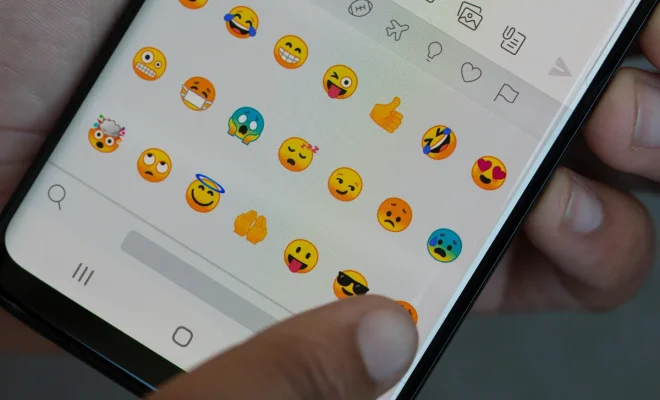
Texting has rapidly become a go-to mode of communication for millions of people across the globe. With the rise of social media and instant messaging apps, it’s no surprise that communication has evolved to incorporate visual elements – enter emoji keyboards! Emoji keyboards have turned boring black-and-white text into an expressive and colorful experience. Here are some fantastic emoji keyboards available, designed to make your messaging more amusing and enjoyable.

1. SwiftKey

SwiftKey is an intelligent keyboard that offers a multitude of emojis for every situation. Its unique prediction technology helps you find the perfect emoji based on what you’re typing. Just type, and the keyboard will offer relevant emojis in real-time – it’s that smart! The app is available for both Android and iOS devices.

2. Kika Keyboard

Kika Keyboard is a customizable Android app offering thousands of emojis, GIFs, stickers, and themes to deliver a personalized texting experience. It even supports custom font applications and offers voice typing options. Kika Keyboard supports over 150 languages, ensuring that users can communicate effectively with people worldwide.

3. Gboard – the Google Keyboard

Gboard caters to Google users with its built-in search functionality which includes emojis and GIFs. This keyboard also boasts glide typing functionality for fast and efficient input. Integrated with Google Translate, Gboard allows users to send translated messages using their preferred language – perfect for global communication.

4. Emojidom Emoji & Fun Smileys

With more than 4,000 high-resolution emoticons, Emojidom promises endless fun through texting. The Android app provides users with unique categories such as holidays and sports-themed emoticons to suit your every need. You can share these delightful emojis via various messaging apps, emails or even social media platforms.

5. Disney Emoji Blitz

Disney fans will love Disney Emoji Blitz—an interactive emoji keyboard featuring widely-loved characters from iconic Disney films. The app works as a game as well, allowing users to play match-3 puzzles to unlock new emojis. Disney Emoji Blitz synchronizes easily with your default keyboard and provides an extra dose of magic during your conversations.

Conclusion

Transform your text-based communication by exploring the wonderful world of emoji. Try out these top-rated emoji keyboards and see how they can make a difference in your everyday texting routine. From predicting the appropriate emoticon to offering unique emojis from your favorite movies, these keyboards are designed to make typing a more enjoyable experience. Don’t miss out on the fun – give these keyboards a try today!


Previous Article

Forget the Galaxy S22 and get an ...

Next Article

Flight Delays and Cancellations: Use Your iPhone ...

Matthew Lynch

Related articles More from author

  • Tech Advice

    35 Years of the Chrysler Minivan’s Family-Hauling History

    August 17, 2023
    By Matthew Lynch
  • Tech Advice

    LG Chocolate review: LG Chocolate

    July 12, 2023
    By Matthew Lynch
  • Tech Advice

    What You Need to Know About Arizona Minimum Car Insurance

    August 22, 2023
    By Matthew Lynch
  • Tech Advice

    How to Delete Your PayPal Account Permanently

    July 11, 2023
    By Matthew Lynch
  • Tech Advice

    Pokemon Go Yveltal Raid Guide: Best Counters, Weaknesses and Moveset

    July 17, 2023
    By Matthew Lynch
  • Tech Advice

    9 Natural Remedies for Dry Scalp

    July 7, 2023
    By Matthew Lynch

Search

Login & Registration

  • Log in
  • Entries feed
  • Comments feed
  • WordPress.org

Newsletter

Signup for The Tech Edvocate Newsletter and have the latest in EdTech news and opinion delivered to your email address!

About Us

Since technology is not going anywhere and does more good than harm, adapting is the best course of action. That is where The Tech Edvocate comes in. We plan to cover the PreK-12 and Higher Education EdTech sectors and provide our readers with the latest news and opinion on the subject. From time to time, I will invite other voices to weigh in on important issues in EdTech. We hope to provide a well-rounded, multi-faceted look at the past, present, the future of EdTech in the US and internationally.

We started this journey back in June 2016, and we plan to continue it for many more years to come. I hope that you will join us in this discussion of the past, present and future of EdTech and lend your own insight to the issues that are discussed.

Newsletter

Signup for The Tech Edvocate Newsletter and have the latest in EdTech news and opinion delivered to your email address!

Contact Us

The Tech Edvocate
910 Goddin Street
Richmond, VA 23231
(601) 630-5238
[email protected]

Copyright © 2026 Matthew Lynch. All rights reserved.