The Tech Edvocate

Top Menu

  • Advertisement
  • Apps
  • Home Page
  • Home Page Five (No Sidebar)
  • Home Page Four
  • Home Page Three
  • Home Page Two
  • Home Tech2
  • Icons [No Sidebar]
  • Left Sidbear Page
  • Lynch Educational Consulting
  • My Account
  • My Speaking Page
  • Newsletter Sign Up Confirmation
  • Newsletter Unsubscription
  • Our Brands
  • Page Example
  • Privacy Policy
  • Protected Content
  • Register
  • Request a Product Review
  • Shop
  • Shortcodes Examples
  • Signup
  • Start Here
    • Governance
    • Careers
    • Contact Us
  • Terms and Conditions
  • The Edvocate
  • The Tech Edvocate Product Guide
  • Topics
  • Write For Us
  • Advertise

Main Menu

  • Start Here
    • Our Brands
    • Governance
      • Lynch Educational Consulting, LLC.
      • Dr. Lynch’s Personal Website
      • Careers
    • Write For Us
    • The Tech Edvocate Product Guide
    • Contact Us
    • Books
    • Edupedia
    • Post a Job
    • The Edvocate Podcast
    • Terms and Conditions
    • Privacy Policy
  • Topics
    • Assistive Technology
    • Child Development Tech
    • Early Childhood & K-12 EdTech
    • EdTech Futures
    • EdTech News
    • EdTech Policy & Reform
    • EdTech Startups & Businesses
    • Higher Education EdTech
    • Online Learning & eLearning
    • Parent & Family Tech
    • Personalized Learning
    • Product Reviews
  • Advertise
  • Tech Edvocate Awards
  • The Edvocate
  • Pedagogue
  • School Ratings

logo

The Tech Edvocate

  • Start Here
    • Our Brands
    • Governance
      • Lynch Educational Consulting, LLC.
      • Dr. Lynch’s Personal Website
        • My Speaking Page
      • Careers
    • Write For Us
    • The Tech Edvocate Product Guide
    • Contact Us
    • Books
    • Edupedia
    • Post a Job
    • The Edvocate Podcast
    • Terms and Conditions
    • Privacy Policy
  • Topics
    • Assistive Technology
    • Child Development Tech
    • Early Childhood & K-12 EdTech
    • EdTech Futures
    • EdTech News
    • EdTech Policy & Reform
    • EdTech Startups & Businesses
    • Higher Education EdTech
    • Online Learning & eLearning
    • Parent & Family Tech
    • Personalized Learning
    • Product Reviews
  • Advertise
  • Tech Edvocate Awards
  • The Edvocate
  • Pedagogue
  • School Ratings
  • Viaim Opennote Review: The AI Note-Taker That Disappears Into Your Daily Routine

  • A Visitors Guide to Long Beach (CA), United States

  • A Visitor’s Guide to Fresno (CA), United States

  • A Visitors Guide to New Orleans (LA), United States

  • A Visitors Guide to Sacramento (CA), United States

  • A Visitors Guide to Lyon, France

  • JisuLife Ultra2 Portable Fan: A Powerful Multi-Function Cooling Solution

  • A Visitors Guide to Viña del Mar, Chile

  • A Visitors Guide to Århus, Denmark

  • A Visitors Guide to Bakersfield (CA), United States

Digital & Mobile Technology
Home›Digital & Mobile Technology›Do Not Download DLL Files to Fix Missing DLL Problems

Do Not Download DLL Files to Fix Missing DLL Problems
By Matthew Lynch
June 9, 2023
0
Spread the love

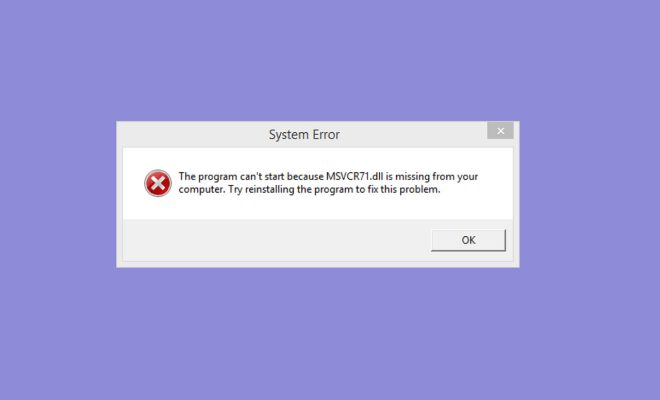
DLL (Dynamic Link Library) files are essential components of Windows operating system that allow multiple programs to use their functions and resources without the need to duplicate them. However, missing or corrupted DLL files can cause runtime errors and other issues that affect the performance and stability of your computer. Many users tend to download DLL files from unverified sources to fix these problems. But, it is not recommended to download DLL files from the internet as it can lead to serious security risks and system instability.

Here are some reasons why you should not download DLL files to fix missing DLL problems:

1. Security Risks: Downloading DLL files from untrusted sources can expose your computer to serious security vulnerabilities. The DLL files you download may contain malware, viruses or spyware that can infect your computer, steal your personal information or damage your files. Cybercriminals often disguise malware as DLL files and distribute them through fake download websites, social engineering techniques, or phishing emails.

2. Compatibility Issues: DLL files are specific to the version of Windows operating system and software applications they are designed for. Downloading the wrong version of a DLL file may cause compatibility issues and produce more errors than before. Moreover, installing multiple versions of DLL files can lead to conflicts and may cause system crashes or freezes.

3. Legal Consequences: Downloading DLL files from unauthorized sources may violate copyright laws and licensing agreements. Using pirated or unlicensed DLL files can result in legal consequences, such as fines or prosecution.

4. Unreliable Results: Even if you manage to download a DLL file from a trustworthy source, there is no guarantee that it will solve your missing DLL problems. DLL files are interconnected with other system files, and replacing them manually might cause more problems than it solves.

If you experience problems with missing DLL files, the best solution is to use the built-in System File Checker tool (SFC) that scans and repairs corrupted or missing system files automatically. Here are the steps to perform SFC scan:

1. Press the Windows key + R and enter “cmd” in the Run box and press enter to launch the Command Prompt.

2. Type “sfc /scannow” command in the prompt and press enter to start the scanning process.

3. Wait until the scan finishes and restart your computer.

System File Checker will locate missing or corrupted DLL files and replace them with the correct versions from the Windows operating system. If the problem persists, you can also try restoring your system to a previous restore point, reinstalling the software or resetting your Windows operating system.

In conclusion, downloading DLL files from the internet can cause more harm than good. By using the built-in SFC tool or seeking professional help, you can fix missing DLL problems without compromising your system’s security and stability.


Previous Article

Edit Cells with the F2 Function Key ...

Next Article

How to Set up and Use iPhone ...

Matthew Lynch

Related articles More from author

  • Digital & Mobile Technology

    How to Change the Clock on Your iPhone Lock Screen

    June 8, 2023
    By Matthew Lynch
  • Digital & Mobile Technology

    What is a Web Browser?

    April 24, 2023
    By Matthew Lynch
  • Digital & Mobile Technology

    5 Ways to Make a Laptop Run Faster

    June 4, 2023
    By Matthew Lynch
  • Digital & Mobile Technology

    How to Twitch Stream From Your PlayStation 4

    June 30, 2023
    By Matthew Lynch
  • Digital & Mobile Technology

    How to Add a Power Button to Your Raspberry Pi

    June 26, 2023
    By Matthew Lynch
  • Digital & Mobile Technology

    How to Fix It When Apple CarPlay is Not Working

    June 1, 2023
    By Matthew Lynch

Search

Login & Registration

  • Register
  • Log in
  • Entries feed
  • Comments feed
  • WordPress.org

Newsletter

Signup for The Tech Edvocate Newsletter and have the latest in EdTech news and opinion delivered to your email address!

About Us

Since technology is not going anywhere and does more good than harm, adapting is the best course of action. That is where The Tech Edvocate comes in. We plan to cover the PreK-12 and Higher Education EdTech sectors and provide our readers with the latest news and opinion on the subject. From time to time, I will invite other voices to weigh in on important issues in EdTech. We hope to provide a well-rounded, multi-faceted look at the past, present, the future of EdTech in the US and internationally.

We started this journey back in June 2016, and we plan to continue it for many more years to come. I hope that you will join us in this discussion of the past, present and future of EdTech and lend your own insight to the issues that are discussed.

Newsletter

Signup for The Tech Edvocate Newsletter and have the latest in EdTech news and opinion delivered to your email address!

Contact Us

The Tech Edvocate
910 Goddin Street
Richmond, VA 23231
(601) 630-5238
[email protected]

Copyright © 2025 Matthew Lynch. All rights reserved.