The Tech Edvocate

Top Menu

  • Advertisement
  • Apps
  • Home Page
  • Home Page Five (No Sidebar)
  • Home Page Four
  • Home Page Three
  • Home Page Two
  • Home Tech2
  • Icons [No Sidebar]
  • Left Sidbear Page
  • Lynch Educational Consulting
  • My Account
  • My Speaking Page
  • Newsletter Sign Up Confirmation
  • Newsletter Unsubscription
  • Our Brands
  • Page Example
  • Privacy Policy
  • Protected Content
  • Register
  • Request a Product Review
  • Shop
  • Shortcodes Examples
  • Signup
  • Start Here
    • Governance
    • Careers
    • Contact Us
  • Terms and Conditions
  • The Edvocate
  • The Tech Edvocate Product Guide
  • Topics
  • Write For Us
  • Advertise

Main Menu

  • Start Here
    • Our Brands
    • Governance
      • Lynch Educational Consulting, LLC.
      • Dr. Lynch’s Personal Website
      • Careers
    • Write For Us
    • The Tech Edvocate Product Guide
    • Contact Us
    • Books
    • Edupedia
    • Post a Job
    • The Edvocate Podcast
    • Terms and Conditions
    • Privacy Policy
  • Topics
    • Assistive Technology
    • Child Development Tech
    • Early Childhood & K-12 EdTech
    • EdTech Futures
    • EdTech News
    • EdTech Policy & Reform
    • EdTech Startups & Businesses
    • Higher Education EdTech
    • Online Learning & eLearning
    • Parent & Family Tech
    • Personalized Learning
    • Product Reviews
  • Advertise
  • Tech Edvocate Awards
  • The Edvocate
  • Pedagogue
  • School Ratings

logo

The Tech Edvocate

  • Start Here
    • Our Brands
    • Governance
      • Lynch Educational Consulting, LLC.
      • Dr. Lynch’s Personal Website
        • My Speaking Page
      • Careers
    • Write For Us
    • The Tech Edvocate Product Guide
    • Contact Us
    • Books
    • Edupedia
    • Post a Job
    • The Edvocate Podcast
    • Terms and Conditions
    • Privacy Policy
  • Topics
    • Assistive Technology
    • Child Development Tech
    • Early Childhood & K-12 EdTech
    • EdTech Futures
    • EdTech News
    • EdTech Policy & Reform
    • EdTech Startups & Businesses
    • Higher Education EdTech
    • Online Learning & eLearning
    • Parent & Family Tech
    • Personalized Learning
    • Product Reviews
  • Advertise
  • Tech Edvocate Awards
  • The Edvocate
  • Pedagogue
  • School Ratings
  • A Visitor’s Guide to Nashville-Davidson (TN), United States

  • A Visitors Guide to Portland (OR), United States

  • 7 Men’s Bruno Marc Shoes That Are the Perfect Christmas Gift

  • A Visitors Guide to Oklahoma City (OK), United States

  • A Visitor’s Guide to Tucson, Arizona, United States

  • A Visitor’s Guide to Hamilton, Canada

  • Beware of Fiverr: You Might Get Scammed

  • The Future of Artificial Intelligence: Navigating the Next Frontier

  • Best Home Backup Generators for 2026

  • Online Learning Platforms: Transforming Education in the Digital Age

Digital & Mobile Technology
Home›Digital & Mobile Technology›Costco Computers: Pros & Cons of Buying PCs From Costco

Costco Computers: Pros & Cons of Buying PCs From Costco
By Matthew Lynch
June 9, 2023
0
Spread the love

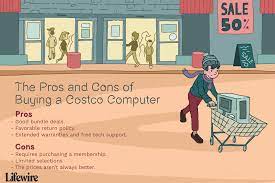
When it comes to buying a new computer, there are many options available in the market. One of the most popular options is to purchase a computer from Costco. Costco, the retail giant known for its warehouse stores, also offers a range of computers and laptops from various brands. While purchasing a computer from Costco does have its advantages, it’s important to consider the pros and cons before making a decision.

Pros:

1. Wide variety of options:

Costco offers a wide variety of computers and laptops from various brands like HP, Dell, and Lenovo. This means you can find a computer or laptop that suits your needs and budget, without needing to visit multiple stores.

2. Competitive pricing:

Costco is known for its competitive pricing, and the same applies to computers and laptops. They offer discounts, rebates, and other offers, making it a cost-effective option.

3. Extended warranties:

Costco offers an extended warranty on most of its electronics, including computers and laptops. If you encounter any issues with your computer, you can get it fixed or replaced under warranty.

4. Free tech support:

Costco also offers free tech support for its members who purchase a computer or laptop from them. This is beneficial, especially if you’re not tech-savvy and need help setting up your new computer.

Cons:

1. Limited customization options:

When purchasing a computer from Costco, you have limited options for customization. You can select from a few pre-configured models, but you cannot customize it to your exact specifications.

2. Bloatware:

Some Costco computers may come with pre-installed software that you may not need. This can slow down your computer and take up valuable space on your hard drive.

3. Limited in-store availability:

Not all Costco stores carry computers and laptops. This means you may need to order your computer online, which can take longer to arrive.

4. No customization:

Costco only sells pre-built computers, so if you want to build your computer or add on custom features, you would have to purchase the parts elsewhere.

In conclusion, purchasing a computer from Costco has its pros and cons. It offers a range of options at competitive prices, with an extended warranty and free tech support for members. However, you have limited customization options, may face bloatware, and have limited in-store availability. Before making a decision on whether to buy a computer from Costco or not, make sure to consider your individual needs and preferences.

Previous Article

How to Fix It When Time Machine ...

Next Article

How to Find the IP Address of ...

Matthew Lynch

Related articles More from author

  • Digital & Mobile TechnologyOnline Learning & eLearning

    How to Reset Your Apple ID Password in a Few Easy Steps

    June 12, 2023
    By Matthew Lynch
  • Digital & Mobile Technology

    How to Set the Default Account in Outlook

    July 24, 2023
    By Matthew Lynch
  • Digital & Mobile Technology

    How to Report Spam in Gmail

    June 12, 2023
    By Matthew Lynch
  • Digital & Mobile Technology

    How to Install a Wireless Keyboard and Mouse

    June 2, 2023
    By Matthew Lynch
  • Digital & Mobile Technology

    The Best Samsung Galaxy Z Fold 3 Cases

    June 14, 2023
    By Matthew Lynch
  • Digital & Mobile Technology

    What Is Google Meet and How Does It Work?

    August 5, 2023
    By Matthew Lynch

Search

Login & Registration

  • Register
  • Log in
  • Entries feed
  • Comments feed
  • WordPress.org

Newsletter

Signup for The Tech Edvocate Newsletter and have the latest in EdTech news and opinion delivered to your email address!

About Us

Since technology is not going anywhere and does more good than harm, adapting is the best course of action. That is where The Tech Edvocate comes in. We plan to cover the PreK-12 and Higher Education EdTech sectors and provide our readers with the latest news and opinion on the subject. From time to time, I will invite other voices to weigh in on important issues in EdTech. We hope to provide a well-rounded, multi-faceted look at the past, present, the future of EdTech in the US and internationally.

We started this journey back in June 2016, and we plan to continue it for many more years to come. I hope that you will join us in this discussion of the past, present and future of EdTech and lend your own insight to the issues that are discussed.

Newsletter

Signup for The Tech Edvocate Newsletter and have the latest in EdTech news and opinion delivered to your email address!

Contact Us

The Tech Edvocate
910 Goddin Street
Richmond, VA 23231
(601) 630-5238
[email protected]

Copyright © 2025 Matthew Lynch. All rights reserved.