The Tech Edvocate

Top Menu

  • Advertisement
  • Apps
  • Home Page
  • Home Page Five (No Sidebar)
  • Home Page Four
  • Home Page Three
  • Home Page Two
  • Home Tech2
  • Icons [No Sidebar]
  • Left Sidbear Page
  • Lynch Educational Consulting
  • My Account
  • My Speaking Page
  • Newsletter Sign Up Confirmation
  • Newsletter Unsubscription
  • Our Brands
  • Page Example
  • Privacy Policy
  • Protected Content
  • Register
  • Request a Product Review
  • Shop
  • Shortcodes Examples
  • Signup
  • Start Here
    • Governance
    • Careers
    • Contact Us
  • Terms and Conditions
  • The Edvocate
  • The Tech Edvocate Product Guide
  • Topics
  • Write For Us
  • Advertise

Main Menu

  • Start Here
    • Our Brands
    • Governance
      • Lynch Educational Consulting, LLC.
      • Dr. Lynch’s Personal Website
      • Careers
    • Write For Us
    • The Tech Edvocate Product Guide
    • Contact Us
    • Books
    • Edupedia
    • Post a Job
    • The Edvocate Podcast
    • Terms and Conditions
    • Privacy Policy
  • Topics
    • Assistive Technology
    • Child Development Tech
    • Early Childhood & K-12 EdTech
    • EdTech Futures
    • EdTech News
    • EdTech Policy & Reform
    • EdTech Startups & Businesses
    • Higher Education EdTech
    • Online Learning & eLearning
    • Parent & Family Tech
    • Personalized Learning
    • Product Reviews
  • Advertise
  • Tech Edvocate Awards
  • The Edvocate
  • Pedagogue
  • School Ratings

logo

The Tech Edvocate

  • Start Here
    • Our Brands
    • Governance
      • Lynch Educational Consulting, LLC.
      • Dr. Lynch’s Personal Website
        • My Speaking Page
      • Careers
    • Write For Us
    • The Tech Edvocate Product Guide
    • Contact Us
    • Books
    • Edupedia
    • Post a Job
    • The Edvocate Podcast
    • Terms and Conditions
    • Privacy Policy
  • Topics
    • Assistive Technology
    • Child Development Tech
    • Early Childhood & K-12 EdTech
    • EdTech Futures
    • EdTech News
    • EdTech Policy & Reform
    • EdTech Startups & Businesses
    • Higher Education EdTech
    • Online Learning & eLearning
    • Parent & Family Tech
    • Personalized Learning
    • Product Reviews
  • Advertise
  • Tech Edvocate Awards
  • The Edvocate
  • Pedagogue
  • School Ratings
  • A Visitors Guide to Long Beach (CA), United States

  • A Visitor’s Guide to Fresno (CA), United States

  • A Visitors Guide to New Orleans (LA), United States

  • A Visitors Guide to Sacramento (CA), United States

  • A Visitors Guide to Lyon, France

  • JisuLife Ultra2 Portable Fan: A Powerful Multi-Function Cooling Solution

  • A Visitors Guide to Viña del Mar, Chile

  • A Visitors Guide to Århus, Denmark

  • A Visitors Guide to Bakersfield (CA), United States

  • A Visitors Guide to Aurora (CO), United States

Digital & Mobile Technology
Home›Digital & Mobile Technology›Buying an SSD: What to Look For

Buying an SSD: What to Look For
By Matthew Lynch
April 3, 2023
0
Spread the love

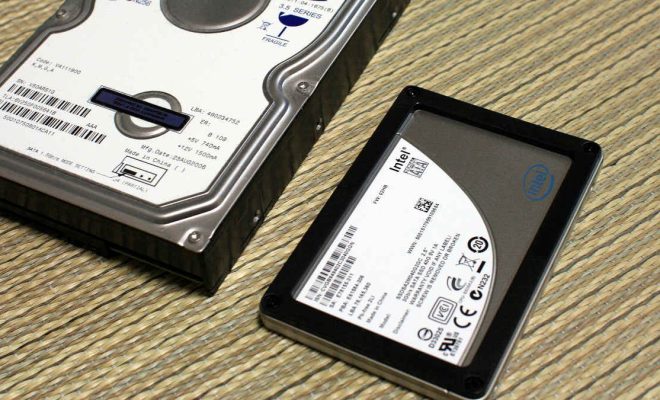
If you are planning to upgrade or replace your computer’s hard drive, switching to a solid-state drive or SSD can give a significant boost to your system’s performance. SSDs are faster, more durable, and consume less power compared to traditional hard drives. However, not all SSDs are created equal, and finding the right one that suits your needs, budget, and computer’s compatibility requires careful consideration. In this article, we will guide you through the essential factors to consider when buying an SSD.

Capacity:

First and foremost, you need to determine the storage capacity that you need. SSDs come in various sizes ranging from 120GB to 2TB or even more. The capacity you choose depends on your usage and budget. If you use your computer for basic tasks such as web browsing, emailing, and document editing, a 256GB SSD should suffice. However, for gaming, video editing, and other multimedia tasks, you may need more space. It’s worth noting that larger SSDs are more expensive, so factor in the cost when making your decision.

Performance:

SSDs enable faster data transfer speeds and quicker system boot times than traditional hard drives. The read and write speeds of an SSD are measured in MB/s or GB/s. Look for an SSD with high sequential read and write speeds to ensure that large files load quickly. The random read and write speeds are also important, as they affect the speed at which smaller files are accessed. Aim for SSDs with random speeds of at least 30,000 IOPS (input/output operations per second) for optimal performance.

Compatibility:

Before purchasing an SSD, make sure that it’s compatible with your computer’s motherboard and interface. Most modern computers use the SATA III interface, but some newer models may support faster NVMe (Non-Volatile Memory Express) drives. Check your computer’s manual or contact the manufacturer to determine which type of interface your system supports. Also, ensure that the SSD fits in the available drive bay of your computer’s case.

Brand and Warranty:

SSDs from reputable brands such as Samsung, Crucial, and Kingston are generally reliable and perform well. However, it’s crucial to check the warranty period and terms before making a purchase. A longer warranty period can give you peace of mind and protection against defects or failure. Most SSDs come with a three or five-year warranty, but some higher-end models offer up to 10 years of coverage.

Price:

SSDs are more expensive than traditional hard drives, but the prices have been steadily decreasing over the years. Prices vary depending on the capacity, performance, and brand of the SSD. If you’re on a budget, you may opt for lower-capacity SSDs or ones with slightly lower performance. However, avoid going for the cheapest options as their performance and durability may not be up to par.

In conclusion, when buying an SSD, consider the capacity, performance, compatibility, brand and warranty, and price. We hope this guide helps you make an informed decision and find the best SSD for your needs.

Previous Article

Preparing Your Kid for Their First Sleepover

Next Article

Browser Slow? How to Make Google Chrome ...

Matthew Lynch

Related articles More from author

  • Digital & Mobile Technology

    What Is AVX-512 and Why Is Intel Killing It Off?

    August 5, 2023
    By Matthew Lynch
  • Digital & Mobile Technology

    What Is a Crossover Cable?

    June 8, 2023
    By Matthew Lynch
  • Digital & Mobile Technology

    TikTok Is Testing Auto Scroll, and We Can’t Wait

    June 23, 2023
    By Matthew Lynch
  • Digital & Mobile Technology

    Browser Slow? How to Make Google Chrome Fast Again

    April 3, 2023
    By Matthew Lynch
  • Digital & Mobile Technology

    How to Enable Subtitles and Audio Description on Amazon Prime Video

    June 5, 2023
    By Matthew Lynch
  • Digital & Mobile Technology

    How to Recover Your Facebook Password Without Email or Phone Number

    June 2, 2023
    By Matthew Lynch

Search

Login & Registration

  • Register
  • Log in
  • Entries feed
  • Comments feed
  • WordPress.org

Newsletter

Signup for The Tech Edvocate Newsletter and have the latest in EdTech news and opinion delivered to your email address!

About Us

Since technology is not going anywhere and does more good than harm, adapting is the best course of action. That is where The Tech Edvocate comes in. We plan to cover the PreK-12 and Higher Education EdTech sectors and provide our readers with the latest news and opinion on the subject. From time to time, I will invite other voices to weigh in on important issues in EdTech. We hope to provide a well-rounded, multi-faceted look at the past, present, the future of EdTech in the US and internationally.

We started this journey back in June 2016, and we plan to continue it for many more years to come. I hope that you will join us in this discussion of the past, present and future of EdTech and lend your own insight to the issues that are discussed.

Newsletter

Signup for The Tech Edvocate Newsletter and have the latest in EdTech news and opinion delivered to your email address!

Contact Us

The Tech Edvocate
910 Goddin Street
Richmond, VA 23231
(601) 630-5238
[email protected]

Copyright © 2025 Matthew Lynch. All rights reserved.