The Tech Edvocate

Top Menu

  • Advertisement
  • Apps
  • Home Page
  • Home Page Five (No Sidebar)
  • Home Page Four
  • Home Page Three
  • Home Page Two
  • Home Tech2
  • Icons [No Sidebar]
  • Left Sidbear Page
  • Lynch Educational Consulting
  • My Account
  • My Speaking Page
  • Newsletter Sign Up Confirmation
  • Newsletter Unsubscription
  • Our Brands
  • Page Example
  • Privacy Policy
  • Protected Content
  • Register
  • Request a Product Review
  • Shop
  • Shortcodes Examples
  • Signup
  • Start Here
    • Governance
    • Careers
    • Contact Us
  • Terms and Conditions
  • The Edvocate
  • The Tech Edvocate Product Guide
  • Topics
  • Write For Us
  • Advertise

Main Menu

  • Start Here
    • Our Brands
    • Governance
      • Lynch Educational Consulting, LLC.
      • Dr. Lynch’s Personal Website
      • Careers
    • Write For Us
    • The Tech Edvocate Product Guide
    • Contact Us
    • Books
    • Edupedia
    • Post a Job
    • The Edvocate Podcast
    • Terms and Conditions
    • Privacy Policy
  • Topics
    • Assistive Technology
    • Child Development Tech
    • Early Childhood & K-12 EdTech
    • EdTech Futures
    • EdTech News
    • EdTech Policy & Reform
    • EdTech Startups & Businesses
    • Higher Education EdTech
    • Online Learning & eLearning
    • Parent & Family Tech
    • Personalized Learning
    • Product Reviews
  • Advertise
  • Tech Edvocate Awards
  • The Edvocate
  • Pedagogue
  • School Ratings

logo

The Tech Edvocate

  • Start Here
    • Our Brands
    • Governance
      • Lynch Educational Consulting, LLC.
      • Dr. Lynch’s Personal Website
        • My Speaking Page
      • Careers
    • Write For Us
    • The Tech Edvocate Product Guide
    • Contact Us
    • Books
    • Edupedia
    • Post a Job
    • The Edvocate Podcast
    • Terms and Conditions
    • Privacy Policy
  • Topics
    • Assistive Technology
    • Child Development Tech
    • Early Childhood & K-12 EdTech
    • EdTech Futures
    • EdTech News
    • EdTech Policy & Reform
    • EdTech Startups & Businesses
    • Higher Education EdTech
    • Online Learning & eLearning
    • Parent & Family Tech
    • Personalized Learning
    • Product Reviews
  • Advertise
  • Tech Edvocate Awards
  • The Edvocate
  • Pedagogue
  • School Ratings
  • Ramp’s Staggering $60 Billion Valuation: 8 Reasons Why Investors Are Piling In

  • Uncovering the Cost: Why This AI Startup’s Collapse Is a Troubling Sign for Tech

  • The Silent Crisis: Why Your Next Console Will Cost a Fortune

  • Advisers urged to steer clear of ‘hyperscale’ AI models

  • The Quiet Crisis: Is AI in Education Creating an ‘Illusion of Learning’?

  • 84% of Ransomware Attacks Use AI: This Is How Your Own Systems Are Turning Against You

  • The Staggering Truth About Healthcare Cyberattacks: 76.6 Million Records Exposed in 2026

  • This Crucial Deadline For Rogue AI Is Much Closer Than You Think

  • This RNA Breakthrough Could Rewrite Alzheimer’s Treatment

  • This One Thing Is Silently Crushing US Consumer Inflation — And Your Wallet

Digital & Mobile Technology
Home›Digital & Mobile Technology›Build Your Own VPN With Raspberry Pi and WireGuard

Build Your Own VPN With Raspberry Pi and WireGuard
By Matthew Lynch
June 12, 2023
0
Spread the love

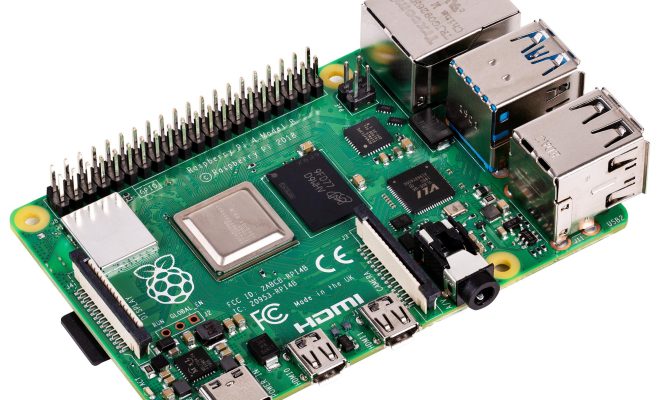
Virtual Private Network (VPN) is an essential tool for anyone concerned about their online privacy and security. Whether it’s to bypass geo-restrictions or safeguard your personal information from prying eyes, a VPN can provide you with the protection you need. However, many VPN services can be expensive, and some can be slow and unresponsive. Fortunately, you can now build your own VPN using a Raspberry Pi and WireGuard.

WireGuard is a new-generation VPN technology that provides faster speeds and improved security compared to traditional VPN protocols. It features a simpler codebase, making it more secure and easier to audit. This lightweight VPN software can be installed on Raspberry Pi, a highly versatile and affordable single-board computer.

Here’s how to build your own VPN with Raspberry Pi and WireGuard:

1. Prepare your Raspberry Pi. Firstly, download and install the latest version of Raspberry Pi operating system (OS) on your device. You can use Raspbian, a free OS for Raspberry Pi, available for download from the official Raspberry Pi website. Once you have installed your OS, you need to update your operating system using the following command in the terminal:

sudo apt-get update

2. Install WireGuard. Installing WireGuard on your Raspberry Pi is easy. Type the following command in the terminal:

sudo apt-get install wireguard

3. Generate server and client keys. You’ll need to create two sets of encryption keys: one for the VPN server and the other for the client. The server key will be used to encrypt and decrypt all incoming and outgoing traffic, while the client key is used to connect to the server. WireGuard uses a simple command-line tool called wg to create and manage keys.

4. Configure WireGuard. Once you have generated your server and client keys, you need to configure WireGuard to set up your VPN. Create a new configuration file called /etc/wireguard/wg0.conf, and add the following configuration:

[Interface]
PrivateKey = [Server Private Key]
Address = 10.0.0.1/24
ListenPort = 51820

[Peer]
PublicKey = [Client Public Key]
AllowedIPs = 10.0.0.2/32

5. Start the server. Once you have configured your VPN server, you can start the WireGuard service by typing the following command in the terminal:

sudo wg-quick up wg0

6. Connect the client. To connect to your Raspberry Pi-based VPN server, you need to set up your client device with the client’s private key, and the server’s address and public key. Once you have set up the client key, you can connect to the server using the following command:

sudo wg-quick up wg0

That’s it! Your VPN is now up and running. You can now protect your online activities and bypass geo-restrictions using your very own VPN. By running your VPN on a Raspberry Pi, you have complete control over your online privacy and security, and at a fraction of the cost of commercially available VPNs.

In summary, building your own VPN with Raspberry Pi and WireGuard is a straightforward process. You’ll need a Raspberry Pi, an internet connection, and some basic command-line knowledge. With WireGuard’s improved security and faster speeds, you can enjoy online content without worrying about anyone trying to snoop on your data. So, if you’re looking for a cost-effective solution for your online privacy and security needs, consider building your VPN with Raspberry Pi and WireGuard.


Previous Article

How to Report Someone on Snapchat

Next Article

Hypnobirthing: Great Apps to Help With Childbirth

Matthew Lynch

Related articles More from author

  • Digital & Mobile Technology

    The Top 10 Most Popular Sites on the Web

    June 11, 2023
    By Matthew Lynch
  • Digital & Mobile Technology

    How to Connect a Keyboard to Your iPad

    July 6, 2023
    By Matthew Lynch
  • Digital & Mobile Technology

    What Is Rack Focus? How to Achieve the Shot

    June 5, 2023
    By Matthew Lynch
  • Digital & Mobile Technology

    How to Charge Your Android Phone Faster: 9 Tips and Tricks

    August 5, 2023
    By Matthew Lynch
  • Digital & Mobile Technology

    How to Fix the Google App Crashing on Android

    August 5, 2023
    By Matthew Lynch
  • Digital & Mobile Technology

    How to Delete Pre-Installed Apps on Android

    June 1, 2023
    By Matthew Lynch

Search

Login & Registration

  • Log in
  • Entries feed
  • Comments feed
  • WordPress.org

Newsletter

Signup for The Tech Edvocate Newsletter and have the latest in EdTech news and opinion delivered to your email address!

About Us

Since technology is not going anywhere and does more good than harm, adapting is the best course of action. That is where The Tech Edvocate comes in. We plan to cover the PreK-12 and Higher Education EdTech sectors and provide our readers with the latest news and opinion on the subject. From time to time, I will invite other voices to weigh in on important issues in EdTech. We hope to provide a well-rounded, multi-faceted look at the past, present, the future of EdTech in the US and internationally.

We started this journey back in June 2016, and we plan to continue it for many more years to come. I hope that you will join us in this discussion of the past, present and future of EdTech and lend your own insight to the issues that are discussed.

Newsletter

Signup for The Tech Edvocate Newsletter and have the latest in EdTech news and opinion delivered to your email address!

Contact Us

The Tech Edvocate
910 Goddin Street
Richmond, VA 23231
(601) 630-5238
[email protected]

Copyright © 2026 Matthew Lynch. All rights reserved.