The Tech Edvocate

Top Menu

  • Advertisement
  • Apps
  • Home Page
  • Home Page Five (No Sidebar)
  • Home Page Four
  • Home Page Three
  • Home Page Two
  • Home Tech2
  • Icons [No Sidebar]
  • Left Sidbear Page
  • Lynch Educational Consulting
  • My Account
  • My Speaking Page
  • Newsletter Sign Up Confirmation
  • Newsletter Unsubscription
  • Our Brands
  • Page Example
  • Privacy Policy
  • Protected Content
  • Register
  • Request a Product Review
  • Shop
  • Shortcodes Examples
  • Signup
  • Start Here
    • Governance
    • Careers
    • Contact Us
  • Terms and Conditions
  • The Edvocate
  • The Tech Edvocate Product Guide
  • Topics
  • Write For Us
  • Advertise

Main Menu

  • Start Here
    • Our Brands
    • Governance
      • Lynch Educational Consulting, LLC.
      • Dr. Lynch’s Personal Website
      • Careers
    • Write For Us
    • The Tech Edvocate Product Guide
    • Contact Us
    • Books
    • Edupedia
    • Post a Job
    • The Edvocate Podcast
    • Terms and Conditions
    • Privacy Policy
  • Topics
    • Assistive Technology
    • Child Development Tech
    • Early Childhood & K-12 EdTech
    • EdTech Futures
    • EdTech News
    • EdTech Policy & Reform
    • EdTech Startups & Businesses
    • Higher Education EdTech
    • Online Learning & eLearning
    • Parent & Family Tech
    • Personalized Learning
    • Product Reviews
  • Advertise
  • Tech Edvocate Awards
  • The Edvocate
  • Pedagogue
  • School Ratings

logo

The Tech Edvocate

  • Start Here
    • Our Brands
    • Governance
      • Lynch Educational Consulting, LLC.
      • Dr. Lynch’s Personal Website
        • My Speaking Page
      • Careers
    • Write For Us
    • The Tech Edvocate Product Guide
    • Contact Us
    • Books
    • Edupedia
    • Post a Job
    • The Edvocate Podcast
    • Terms and Conditions
    • Privacy Policy
  • Topics
    • Assistive Technology
    • Child Development Tech
    • Early Childhood & K-12 EdTech
    • EdTech Futures
    • EdTech News
    • EdTech Policy & Reform
    • EdTech Startups & Businesses
    • Higher Education EdTech
    • Online Learning & eLearning
    • Parent & Family Tech
    • Personalized Learning
    • Product Reviews
  • Advertise
  • Tech Edvocate Awards
  • The Edvocate
  • Pedagogue
  • School Ratings
  • This One Skill Is Quietly Reshaping Every Career — And How to Master It Now

  • The Silent Threat: How AI Is Reshaping Recent College Graduates’ Job Prospects

  • This Crucial Shift in AI Will Devastate Millions of College Grads

  • The Brutal Truth: Zero-Day Exploit Analysis vs. Traditional Cybersecurity Careers — Which Path Pays $300,000?

  • The Urgent Truth: Why These Certifications Are Your Only Defense Against Zero-Day Attacks

  • The FBI Investigates a Zero-Day Attack on Your Job Applications

  • The Startling Truth About AI’s Impact on Your Coding Job by 2026

  • The Shocking Truth About Your Code: AI Is Already Rewriting Your Future

  • Is This Why Code Review Is Dead? AI’s Staggering Impact on Tech Jobs

  • The Shocking Truth About CogniBoost vs Focus Drugs: What No One Is Telling You

Digital & Mobile Technology
Home›Digital & Mobile Technology›Best Ways to Scan and Digitize Old Photos

Best Ways to Scan and Digitize Old Photos
By Matthew Lynch
June 8, 2023
0
Spread the love

Old photos are priceless treasures filled with memories of family, friends, special events, and milestones. However, they are also vulnerable to damage and deterioration over time. Thankfully, modern technology has made it easier than ever to preserve and digitize old photos. Here are some of the best ways to scan and digitize old photos.

Flatbed Scanners:

Flatbed scanners are the most common type of scanner used to digitize old photos. They are easy to use and produce high-quality scans with exceptional detail and color accuracy. Flatbed scanners come in different sizes, and the larger ones are ideal for scanning bigger photos, while smaller ones are suitable for smaller prints.

To scan an old photo with a flatbed scanner, start by cleaning the photo to remove any dust or debris. Place the photo face down on the glass, making sure it aligns with the edges of the scanner bed. Next, launch your scanner software, select the photo settings, and press scan. After the scanner has finished processing the photo, save it to your computer.

Portable Scanners:

Portable scanners are great for scanning old photos on-the-go, and they are also suitable for scanning photos from albums or scrapbooks without removing them. Portable scanners are lightweight and easy to use, and they can save scanned images directly to an SD card or USB drive for easy transfer.

To use a portable scanner, place the photo on a flat surface, turn on the scanner, and align the scanner with the photo. Press the scan button, and wait for the scanner to capture the image. Once the scan is complete, save the image to an SD card or USB drive for transfer to your computer.

Smartphone Camera:

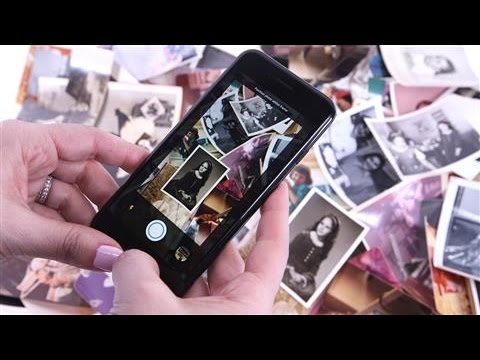
If you don’t have a scanner, or if you need to digitize old photos quickly, you can use your smartphone camera to take a picture of the original photo. Make sure you take the photo in good lighting, use the highest resolution setting possible, and hold the camera steady to avoid blur.

After taking the photo, transfer it to your computer, and use image-editing software to enhance the image, improve the color balance, and remove any blemishes or dust. You can also use apps like Google Photos to automatically scan multiple photos at once, and then edit them on your phone or computer.

Professional Services:

If you have delicate or precious old photos that require special care or expertise, consider using a professional photo scanning service. These services use advanced equipment and techniques to scan and digitize old photos without damaging them.

Professional services also offer additional restoration and digitization services, such as color correction, dust removal, and image enhancement. However, these services can be costly, so make sure to select a reputable service that offers excellent customer service and high-quality results.


Previous Article

What Is the Alt Key on Mac? ...

Next Article

Where Does Shein Ship From and How ...

Matthew Lynch

Related articles More from author

  • Digital & Mobile Technology

    What Can Someone Do With Your IP Address?

    August 5, 2023
    By Matthew Lynch
  • Digital & Mobile Technology

    What Is the wmiprvse.exe Process and What Does It Do?

    June 8, 2023
    By Matthew Lynch
  • Digital & Mobile Technology

    YouTube Go Is Shutting Down: Here’s Everything You Need to Know

    June 22, 2023
    By Matthew Lynch
  • Digital & Mobile Technology

    Dolby Atmos vs DTS:X – Which Is Better?

    April 13, 2023
    By Matthew Lynch
  • Digital & Mobile Technology

    How to Find Who Lives on My Street

    May 28, 2023
    By Matthew Lynch
  • Digital & Mobile Technology

    How Does a Camera Work?

    June 10, 2023
    By Matthew Lynch

Search

Login & Registration

  • Log in
  • Entries feed
  • Comments feed
  • WordPress.org

Newsletter

Signup for The Tech Edvocate Newsletter and have the latest in EdTech news and opinion delivered to your email address!

About Us

Since technology is not going anywhere and does more good than harm, adapting is the best course of action. That is where The Tech Edvocate comes in. We plan to cover the PreK-12 and Higher Education EdTech sectors and provide our readers with the latest news and opinion on the subject. From time to time, I will invite other voices to weigh in on important issues in EdTech. We hope to provide a well-rounded, multi-faceted look at the past, present, the future of EdTech in the US and internationally.

We started this journey back in June 2016, and we plan to continue it for many more years to come. I hope that you will join us in this discussion of the past, present and future of EdTech and lend your own insight to the issues that are discussed.

Newsletter

Signup for The Tech Edvocate Newsletter and have the latest in EdTech news and opinion delivered to your email address!

Contact Us

The Tech Edvocate
910 Goddin Street
Richmond, VA 23231
(601) 630-5238
[email protected]

Copyright © 2026 Matthew Lynch. All rights reserved.