The Tech Edvocate

Top Menu

  • Advertisement
  • Apps
  • Home Page
  • Home Page Five (No Sidebar)
  • Home Page Four
  • Home Page Three
  • Home Page Two
  • Home Tech2
  • Icons [No Sidebar]
  • Left Sidbear Page
  • Lynch Educational Consulting
  • My Account
  • My Speaking Page
  • Newsletter Sign Up Confirmation
  • Newsletter Unsubscription
  • Our Brands
  • Page Example
  • Privacy Policy
  • Protected Content
  • Register
  • Request a Product Review
  • Shop
  • Shortcodes Examples
  • Signup
  • Start Here
    • Governance
    • Careers
    • Contact Us
  • Terms and Conditions
  • The Edvocate
  • The Tech Edvocate Product Guide
  • Topics
  • Write For Us
  • Advertise

Main Menu

  • Start Here
    • Our Brands
    • Governance
      • Lynch Educational Consulting, LLC.
      • Dr. Lynch’s Personal Website
      • Careers
    • Write For Us
    • The Tech Edvocate Product Guide
    • Contact Us
    • Books
    • Edupedia
    • Post a Job
    • The Edvocate Podcast
    • Terms and Conditions
    • Privacy Policy
  • Topics
    • Assistive Technology
    • Child Development Tech
    • Early Childhood & K-12 EdTech
    • EdTech Futures
    • EdTech News
    • EdTech Policy & Reform
    • EdTech Startups & Businesses
    • Higher Education EdTech
    • Online Learning & eLearning
    • Parent & Family Tech
    • Personalized Learning
    • Product Reviews
  • Advertise
  • Tech Edvocate Awards
  • The Edvocate
  • Pedagogue
  • School Ratings

logo

The Tech Edvocate

  • Start Here
    • Our Brands
    • Governance
      • Lynch Educational Consulting, LLC.
      • Dr. Lynch’s Personal Website
        • My Speaking Page
      • Careers
    • Write For Us
    • The Tech Edvocate Product Guide
    • Contact Us
    • Books
    • Edupedia
    • Post a Job
    • The Edvocate Podcast
    • Terms and Conditions
    • Privacy Policy
  • Topics
    • Assistive Technology
    • Child Development Tech
    • Early Childhood & K-12 EdTech
    • EdTech Futures
    • EdTech News
    • EdTech Policy & Reform
    • EdTech Startups & Businesses
    • Higher Education EdTech
    • Online Learning & eLearning
    • Parent & Family Tech
    • Personalized Learning
    • Product Reviews
  • Advertise
  • Tech Edvocate Awards
  • The Edvocate
  • Pedagogue
  • School Ratings
  • Kā tiešsaistes kazino piedāvā pazīstamas spēles līdzās jaunākajiem izlaidumiem

  • Kā mobilo ekrānu portreta izkārtojums mainīja spēļu automātu kompozīciju

  • Kazino spēļu vadības elementu un informācijas izkārtojuma pielāgošana dažādiem ekrāniem

  • Kā māksla un mehānika veido spēļu automātu portfeļa atšķirības

  • How Sequel Slots Retain Familiar Features While Updating Play

  • Filtre poskytovateľov a rozpoznateľnosť herných kolekcií v kasínach

  • Razvoj iskanja in filtrov v vse obsežnejših katalogih kazino iger

  • Cinematic Intros Meet Familiar Reel Based Slot Play

  • Eventyrmotiver giver bonussekvenser retning og sammenhæng

  • Sådan former lydoplevelsen forskellige casinospil

Digital & Mobile Technology
Home›Digital & Mobile Technology›Best Game Launchers to Launch and Organize PC Games

Best Game Launchers to Launch and Organize PC Games
By Matthew Lynch
June 23, 2023
0
Spread the love

As a PC gamer, having a launcher to easily organize and launch games is essential. It can be overwhelming to keep track of multiple games from different platforms and launchers. Luckily, there are several game launchers available to solve this problem. Here are some of the best game launchers to launch and organize PC games.

1. Steam

Steam is possibly the most popular game launcher for PC gamers. It is a one-stop-shop for purchasing and downloading games, as well as organizing and launching them. Steam’s library feature makes it easy to organize games, and it also allows users to create categories and custom tags for better organization. Steam also features a robust friends list and chat system, making it easy to join multiplayer games with friends.

2. GOG Galaxy 2.0

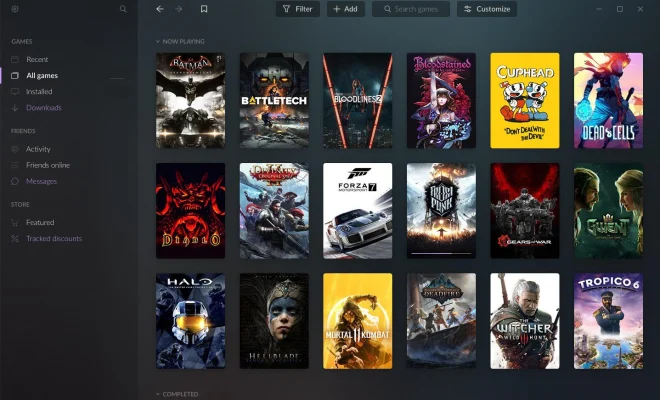
GOG Galaxy 2.0 is a game launcher that connects to all your gaming platforms, including Steam, Origin, and Epic Games Store. It acts as a unified library for all your games on different platforms, letting you launch and organize them in one place. GOG Galaxy 2.0 also has a search function that lets you find any installed game from any platform quickly. The platform also features cross-platform chat, friends list, and achievement tracking.

3. Epic Games Store

The Epic Games Store is a launcher developed by video game developer and publisher Epic Games. The Epic Games Store is known for its free games program, where the platform frequently releases games for free to attract more users to the store. The platform also allows users to organize and launch their games, with a powerful search bar to find games quickly.

4. Origin

Origin is a digital distribution platform developed by game developer and publisher Electronic Arts. It is one of the launchers used to launch and organize EA games, such as the Battlefield and FIFA franchises. Origin’s library feature lets users categorize and organize games, while the friends system allows players to connect with friends and join multiplayer games.

5. Uplay

Uplay is a launcher developed by Ubisoft, one of the biggest video game publishers in the world. It is the platform used to launch and organize Ubisoft games. Uplay features a friends list and messaging system, as well as a robust reward system where players can earn points for completing in-game challenges and redeem them for rewards.

Previous Article

The Best Z790 Motherboards for Intel 13th ...

Next Article

Best Wordle Alternatives to Get Your Puzzle ...

Matthew Lynch

Related articles More from author

  • Digital & Mobile Technology

    How Many Users Does Spotify Have?

    June 12, 2023
    By Matthew Lynch
  • Digital & Mobile Technology

    How to Fix the Bootrec /Fixboot Access Is Denied Error on Windows

    June 23, 2023
    By Matthew Lynch
  • Digital & Mobile Technology

    What Is an EPRT File?

    June 15, 2023
    By Matthew Lynch
  • Digital & Mobile Technology

    How to Combine Multiple Partitions Into a Single Partition

    May 27, 2023
    By Matthew Lynch
  • Digital & Mobile Technology

    How to Play Audible Books on Google Home

    August 3, 2023
    By Matthew Lynch
  • Digital & Mobile Technology

    How to Download YouTube Videos on Linux Using yt-dlp

    June 4, 2023
    By Matthew Lynch

Search

Login & Registration

  • Log in
  • Entries feed
  • Comments feed
  • WordPress.org

Newsletter

Signup for The Tech Edvocate Newsletter and have the latest in EdTech news and opinion delivered to your email address!

About Us

Since technology is not going anywhere and does more good than harm, adapting is the best course of action. That is where The Tech Edvocate comes in. We plan to cover the PreK-12 and Higher Education EdTech sectors and provide our readers with the latest news and opinion on the subject. From time to time, I will invite other voices to weigh in on important issues in EdTech. We hope to provide a well-rounded, multi-faceted look at the past, present, the future of EdTech in the US and internationally.

We started this journey back in June 2016, and we plan to continue it for many more years to come. I hope that you will join us in this discussion of the past, present and future of EdTech and lend your own insight to the issues that are discussed.

Newsletter

Signup for The Tech Edvocate Newsletter and have the latest in EdTech news and opinion delivered to your email address!

Contact Us

The Tech Edvocate
910 Goddin Street
Richmond, VA 23231
(601) 630-5238
[email protected]

Copyright © 2026 Matthew Lynch. All rights reserved.