The Tech Edvocate

Top Menu

  • Advertisement
  • Apps
  • Home Page
  • Home Page Five (No Sidebar)
  • Home Page Four
  • Home Page Three
  • Home Page Two
  • Home Tech2
  • Icons [No Sidebar]
  • Left Sidbear Page
  • Lynch Educational Consulting
  • My Account
  • My Speaking Page
  • Newsletter Sign Up Confirmation
  • Newsletter Unsubscription
  • Our Brands
  • Page Example
  • Privacy Policy
  • Protected Content
  • Register
  • Request a Product Review
  • Shop
  • Shortcodes Examples
  • Signup
  • Start Here
    • Governance
    • Careers
    • Contact Us
  • Terms and Conditions
  • The Edvocate
  • The Tech Edvocate Product Guide
  • Topics
  • Write For Us
  • Advertise

Main Menu

  • Start Here
    • Our Brands
    • Governance
      • Lynch Educational Consulting, LLC.
      • Dr. Lynch’s Personal Website
      • Careers
    • Write For Us
    • The Tech Edvocate Product Guide
    • Contact Us
    • Books
    • Edupedia
    • Post a Job
    • The Edvocate Podcast
    • Terms and Conditions
    • Privacy Policy
  • Topics
    • Assistive Technology
    • Child Development Tech
    • Early Childhood & K-12 EdTech
    • EdTech Futures
    • EdTech News
    • EdTech Policy & Reform
    • EdTech Startups & Businesses
    • Higher Education EdTech
    • Online Learning & eLearning
    • Parent & Family Tech
    • Personalized Learning
    • Product Reviews
  • Advertise
  • Tech Edvocate Awards
  • The Edvocate
  • Pedagogue
  • School Ratings

logo

The Tech Edvocate

  • Start Here
    • Our Brands
    • Governance
      • Lynch Educational Consulting, LLC.
      • Dr. Lynch’s Personal Website
        • My Speaking Page
      • Careers
    • Write For Us
    • The Tech Edvocate Product Guide
    • Contact Us
    • Books
    • Edupedia
    • Post a Job
    • The Edvocate Podcast
    • Terms and Conditions
    • Privacy Policy
  • Topics
    • Assistive Technology
    • Child Development Tech
    • Early Childhood & K-12 EdTech
    • EdTech Futures
    • EdTech News
    • EdTech Policy & Reform
    • EdTech Startups & Businesses
    • Higher Education EdTech
    • Online Learning & eLearning
    • Parent & Family Tech
    • Personalized Learning
    • Product Reviews
  • Advertise
  • Tech Edvocate Awards
  • The Edvocate
  • Pedagogue
  • School Ratings
  • One Crucial Factor Could Decimate Your US Auto Insurance Rates in 2026

  • Unbelievable: Meta Hit With $25 Billion Fine — Is Your Health Data Next?

  • 10 Crucial AI Literacy Courses Every Parent Needs Now

  • The Unseen Force Quietly Reshaping Rural Life: 7 Satellite Internet Providers Battling for Supremacy

  • Best Buy’s Gamers Hub: The Unbelievable Truth About Its “Rewards” And Discounts

  • 8 Crucial Reasons Why MAI-DxO Just Obliterated Doctors in a Head-to-Head Diagnosis Battle

  • The Brutal Truth About Student Loan Refinancing for New Grads in 2024

  • The Brutal Truth: AI Just Blew Up PHP Security – Here’s How to Survive ‘Black October’

  • Sodium-ion storage maker Peak Energy raises $108 million in GM-led round – PV Magazine

  • Stunning: 93,000 Nursing School Applicants Rejected — Here’s Why It’s a Crisis

Digital & Mobile Technology
Home›Digital & Mobile Technology›Best Apps for Remote Work

Best Apps for Remote Work
By Matthew Lynch
June 14, 2023
0
Spread the love

Remote work has become increasingly popular over the past few years, especially with the onset of the COVID-19 pandemic. As more people shift to working from home, the demand for apps that can help manage remote work has also increased. In this article, we’ll be highlighting some of the best apps for remote work.

1. Zoom

Zoom has become the go-to video conferencing tool for remote teams. Its easy-to-use interface and powerful features make it perfect for virtual meetings, webinars, and remote training sessions. It allows participants to join from anywhere in the world as long as they have access to the internet.

2. Slack

Slack is a team collaboration tool that allows remote teams to communicate in real-time. It offers chat rooms, voice and video calls, file sharing, and more. With Slack, teams can collaborate easily, share knowledge and updates, and stay connected no matter where they are in the world.

3. Trello

Trello is a project management tool that enables remote teams to organize and manage their work. With Trello, teams can create boards, add cards, assign tasks, and track progress. It’s simple, easy-to-use, and perfect for remote teams that are looking for a centralized platform for managing their projects.

4. Google Drive

Google Drive is a cloud-based file storage and sharing platform. It allows remote teams to collaborate on documents, spreadsheets, and presentations in real-time. With Google Drive, teams can also share files with each other without worrying about compatibility issues.

5. Asana

Asana is another project management tool that’s perfect for remote teams. It offers a wide range of features, including task management, project planning, and team collaboration. With Asana, teams can track their progress, set deadlines, and communicate with each other in real-time.

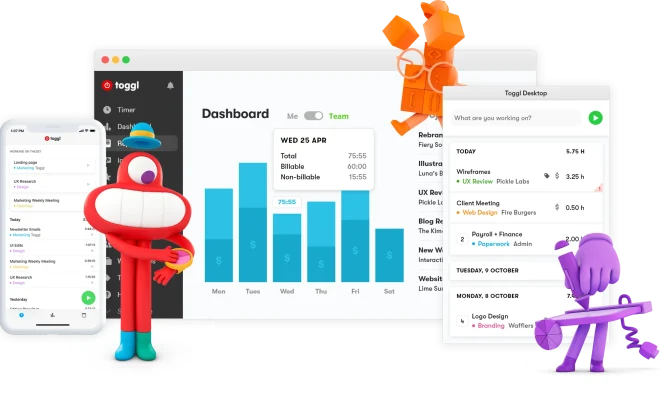
6. Time Doctor

Time Doctor is a time-tracking software that provides accurate insights into how remote teams spend their time. It helps remote teams to monitor their productivity by measuring the time spent on various tasks. Time Doctor also provides detailed reports, so teams can analyze their work habits and make the necessary changes to improve their productivity.

7. Evernote

Evernote is a productivity app that allows remote workers to capture and organize their ideas and notes. It allows teams to create notes, capture images, save documents, and more. With Evernote, remote teams can stay organized, have access to their notes from anywhere, and collaborate on ideas.

In conclusion, remote work is here to stay, and with these apps, remote teams can stay connected, collaborate seamlessly, and be productive no matter where they’re working from. These apps are designed to make remote work more manageable and efficient, and they’ll help teams succeed in this new era of work.


Previous Article

List of Control Panel Applets in Windows

Next Article

How Do Dash Cams Work?

Matthew Lynch

Related articles More from author

  • Digital & Mobile Technology

    YouTube Channels to Watch Free Shows and Movies (Legally)

    June 12, 2023
    By Matthew Lynch
  • Digital & Mobile Technology

    How to Fix a Pixel Watch That Won’t Turn On

    June 10, 2023
    By Matthew Lynch
  • Digital & Mobile Technology

    Can You Recover Data After a Factory Reset on Android Phones?

    June 14, 2023
    By Matthew Lynch
  • Digital & Mobile Technology

    How to Fix a World of Warcraft Update Stuck on Initializing on Windows

    June 22, 2023
    By Matthew Lynch
  • Digital & Mobile Technology

    What is Data Quality Management (DQM)?

    May 6, 2023
    By Matthew Lynch
  • Digital & Mobile Technology

    Lesser-Known Apple Health Features Worth Using

    July 15, 2023
    By Matthew Lynch

Search

Login & Registration

  • Log in
  • Entries feed
  • Comments feed
  • WordPress.org

Newsletter

Signup for The Tech Edvocate Newsletter and have the latest in EdTech news and opinion delivered to your email address!

About Us

Since technology is not going anywhere and does more good than harm, adapting is the best course of action. That is where The Tech Edvocate comes in. We plan to cover the PreK-12 and Higher Education EdTech sectors and provide our readers with the latest news and opinion on the subject. From time to time, I will invite other voices to weigh in on important issues in EdTech. We hope to provide a well-rounded, multi-faceted look at the past, present, the future of EdTech in the US and internationally.

We started this journey back in June 2016, and we plan to continue it for many more years to come. I hope that you will join us in this discussion of the past, present and future of EdTech and lend your own insight to the issues that are discussed.

Newsletter

Signup for The Tech Edvocate Newsletter and have the latest in EdTech news and opinion delivered to your email address!

Contact Us

The Tech Edvocate
910 Goddin Street
Richmond, VA 23231
(601) 630-5238
[email protected]

Copyright © 2026 Matthew Lynch. All rights reserved.