The Tech Edvocate

Top Menu

  • Advertisement
  • Apps
  • Home Page
  • Home Page Five (No Sidebar)
  • Home Page Four
  • Home Page Three
  • Home Page Two
  • Home Tech2
  • Icons [No Sidebar]
  • Left Sidbear Page
  • Lynch Educational Consulting
  • My Account
  • My Speaking Page
  • Newsletter Sign Up Confirmation
  • Newsletter Unsubscription
  • Our Brands
  • Page Example
  • Privacy Policy
  • Protected Content
  • Register
  • Request a Product Review
  • Shop
  • Shortcodes Examples
  • Signup
  • Start Here
    • Governance
    • Careers
    • Contact Us
  • Terms and Conditions
  • The Edvocate
  • The Tech Edvocate Product Guide
  • Topics
  • Write For Us
  • Advertise

Main Menu

  • Start Here
    • Our Brands
    • Governance
      • Lynch Educational Consulting, LLC.
      • Dr. Lynch’s Personal Website
      • Careers
    • Write For Us
    • The Tech Edvocate Product Guide
    • Contact Us
    • Books
    • Edupedia
    • Post a Job
    • The Edvocate Podcast
    • Terms and Conditions
    • Privacy Policy
  • Topics
    • Assistive Technology
    • Child Development Tech
    • Early Childhood & K-12 EdTech
    • EdTech Futures
    • EdTech News
    • EdTech Policy & Reform
    • EdTech Startups & Businesses
    • Higher Education EdTech
    • Online Learning & eLearning
    • Parent & Family Tech
    • Personalized Learning
    • Product Reviews
  • Advertise
  • Tech Edvocate Awards
  • The Edvocate
  • Pedagogue
  • School Ratings

logo

The Tech Edvocate

  • Start Here
    • Our Brands
    • Governance
      • Lynch Educational Consulting, LLC.
      • Dr. Lynch’s Personal Website
        • My Speaking Page
      • Careers
    • Write For Us
    • The Tech Edvocate Product Guide
    • Contact Us
    • Books
    • Edupedia
    • Post a Job
    • The Edvocate Podcast
    • Terms and Conditions
    • Privacy Policy
  • Topics
    • Assistive Technology
    • Child Development Tech
    • Early Childhood & K-12 EdTech
    • EdTech Futures
    • EdTech News
    • EdTech Policy & Reform
    • EdTech Startups & Businesses
    • Higher Education EdTech
    • Online Learning & eLearning
    • Parent & Family Tech
    • Personalized Learning
    • Product Reviews
  • Advertise
  • Tech Edvocate Awards
  • The Edvocate
  • Pedagogue
  • School Ratings
  • Ramp’s Staggering $60 Billion Valuation: 8 Reasons Why Investors Are Piling In

  • Uncovering the Cost: Why This AI Startup’s Collapse Is a Troubling Sign for Tech

  • The Silent Crisis: Why Your Next Console Will Cost a Fortune

  • Advisers urged to steer clear of ‘hyperscale’ AI models

  • The Quiet Crisis: Is AI in Education Creating an ‘Illusion of Learning’?

  • 84% of Ransomware Attacks Use AI: This Is How Your Own Systems Are Turning Against You

  • The Staggering Truth About Healthcare Cyberattacks: 76.6 Million Records Exposed in 2026

  • This Crucial Deadline For Rogue AI Is Much Closer Than You Think

  • This RNA Breakthrough Could Rewrite Alzheimer’s Treatment

  • This One Thing Is Silently Crushing US Consumer Inflation — And Your Wallet

Tech Advice
Home›Tech Advice›Apple’s Magic Keyboard for iPad: Still Excellent, but Time for a Revision

Apple’s Magic Keyboard for iPad: Still Excellent, but Time for a Revision
By Matthew Lynch
July 13, 2023
0
Spread the love

Introduction:

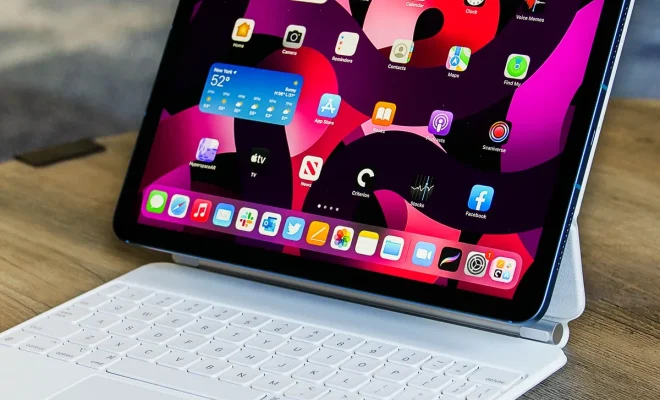
Apple’s Magic Keyboard for iPad has been a game-changing accessory for iPad users since its introduction. It has transformed the way people use their iPads, making it a true productivity tool rather than just a media consumption device. Although it remains a top performer in the market, even with numerous competitors entering the space, there are areas where it could use improvements.

Build & Design:

The Magic Keyboard’s sleek design and high-quality materials have earned it many loyal fans. Its compact, minimalist look allows the user to maintain a clutter-free workspace. The hinges provide a brilliant floating aesthetic for the iPad when open – creating an essential separation from the screen and keyboard, ideal for various tasks and enhancing ergonomics. However, certain limitations are evident, such as the absence of function keys and limited viewing angles.

Key Features & Usability:

The Magic Keyboard undoubtedly shines with its backlit keys, which make typing in dimly-lit environments highly convenient. Its trackpad also excels in enabling smooth navigation of the iPadOS. The added support for cursor and multi-touch gestures has elevated the user experience significantly.

Nonetheless, there is room for improvement. Integrating customizable shortcut keys or additional function keys would enhance its capabilities even more.

Battery Life & Connectivity:

Apple’s Magic Keyboard connects to your iPad via Smart Connector, eliminating the need to charge separately or rely on Bluetooth. Therefore, its battery life depends on that of your iPad – conserving battery life when not in use by automatically turning off after a period of inactivity. However, customer feedback suggests that the keyboard drains power from their iPads quickly – an area Apple must address moving forward.

Compatibility & Versatility:

While Apple’s Magic Keyboard is compatible with multiple iPad models – including iPad Air (4th generation), iPad Pro 11-inch (1st to 3rd generation), and iPad Pro 12.9-inch (3rd to 5th generation) – users have noted limited compatibility with certain cases. Though it clicks into place quickly, the absence of a protective solution for the back of the iPad could deter potential buyers.

Conclusion:

Apple’s Magic Keyboard for iPad has impressive features, making it an excellent option for those seeking to enhance their overall productivity when using an iPad. However, it’s clear that some areas can and should be improved in its next iteration – including function keys, customizability, and battery efficiency – to keep Apple ahead of its competition and maintain its reputation for impeccable design and user experience.

Previous Article

Apple’s MacBook Pro Touch Bar is gone. ...

Next Article

Apple’s Mixed Reality Headset: What to Expect ...

Matthew Lynch

Related articles More from author

  • Tech Advice

    How to change your DNS and (maybe) take the internet back

    July 13, 2023
    By Matthew Lynch
  • Tech Advice

    Track Your Mail at Your New Home and Old Home After You Move

    July 10, 2023
    By Matthew Lynch
  • Tech Advice

    Google Meet Update: You Can Now Do More From Picture-in-Picture Window

    July 15, 2023
    By Matthew Lynch
  • Tech Advice

    7 Must-Have Ergonomic Upgrades for Your Home Office

    July 5, 2023
    By Matthew Lynch
  • Tech Advice

    It’s Easy to Upgrade Your Steam Deck’s SSD. Here’s How to Add More Storage

    July 17, 2023
    By Matthew Lynch
  • Tech Advice

    10 Best Prepaid Credit Cards in Canada

    October 20, 2023
    By Matthew Lynch

Search

Login & Registration

  • Log in
  • Entries feed
  • Comments feed
  • WordPress.org

Newsletter

Signup for The Tech Edvocate Newsletter and have the latest in EdTech news and opinion delivered to your email address!

About Us

Since technology is not going anywhere and does more good than harm, adapting is the best course of action. That is where The Tech Edvocate comes in. We plan to cover the PreK-12 and Higher Education EdTech sectors and provide our readers with the latest news and opinion on the subject. From time to time, I will invite other voices to weigh in on important issues in EdTech. We hope to provide a well-rounded, multi-faceted look at the past, present, the future of EdTech in the US and internationally.

We started this journey back in June 2016, and we plan to continue it for many more years to come. I hope that you will join us in this discussion of the past, present and future of EdTech and lend your own insight to the issues that are discussed.

Newsletter

Signup for The Tech Edvocate Newsletter and have the latest in EdTech news and opinion delivered to your email address!

Contact Us

The Tech Edvocate
910 Goddin Street
Richmond, VA 23231
(601) 630-5238
[email protected]

Copyright © 2026 Matthew Lynch. All rights reserved.