
The Tech Edvocate

Top Menu

  • Advertisement
  • Apps
  • Home Page
  • Home Page Five (No Sidebar)
  • Home Page Four
  • Home Page Three
  • Home Page Two
  • Home Tech2
  • Icons [No Sidebar]
  • Left Sidbear Page
  • Lynch Educational Consulting
  • My Account
  • My Speaking Page
  • Newsletter Sign Up Confirmation
  • Newsletter Unsubscription
  • Our Brands
  • Page Example
  • Privacy Policy
  • Protected Content
  • Register
  • Request a Product Review
  • Shop
  • Shortcodes Examples
  • Signup
  • Start Here
    • Governance
    • Careers
    • Contact Us
  • Terms and Conditions
  • The Edvocate
  • The Tech Edvocate Product Guide
  • Topics
  • Write For Us
  • Advertise

Main Menu

  • Start Here
    • Our Brands
    • Governance
      • Lynch Educational Consulting, LLC.
      • Dr. Lynch’s Personal Website
      • Careers
    • Write For Us
    • The Tech Edvocate Product Guide
    • Contact Us
    • Books
    • Edupedia
    • Post a Job
    • The Edvocate Podcast
    • Terms and Conditions
    • Privacy Policy
  • Topics
    • Assistive Technology
    • Child Development Tech
    • Early Childhood & K-12 EdTech
    • EdTech Futures
    • EdTech News
    • EdTech Policy & Reform
    • EdTech Startups & Businesses
    • Higher Education EdTech
    • Online Learning & eLearning
    • Parent & Family Tech
    • Personalized Learning
    • Product Reviews
  • Advertise
  • Tech Edvocate Awards
  • The Edvocate
  • Pedagogue
  • School Ratings

logo

The Tech Edvocate

  • Start Here
    • Our Brands
    • Governance
      • Lynch Educational Consulting, LLC.
      • Dr. Lynch’s Personal Website
        • My Speaking Page
      • Careers
    • Write For Us
    • The Tech Edvocate Product Guide
    • Contact Us
    • Books
    • Edupedia
    • Post a Job
    • The Edvocate Podcast
    • Terms and Conditions
    • Privacy Policy
  • Topics
    • Assistive Technology
    • Child Development Tech
    • Early Childhood & K-12 EdTech
    • EdTech Futures
    • EdTech News
    • EdTech Policy & Reform
    • EdTech Startups & Businesses
    • Higher Education EdTech
    • Online Learning & eLearning
    • Parent & Family Tech
    • Personalized Learning
    • Product Reviews
  • Advertise
  • Tech Edvocate Awards
  • The Edvocate
  • Pedagogue
  • School Ratings
  • Unprecedented: Rogue AI Breaches Spark Global Alarm – What Really Happened?

  • This Unprecedented EU Ban Just Changed Fast Fashion Forever

  • Urgent Alert: Your Smart Home’s Exposed to a Critical Deco BE11000 Vulnerability

  • Uncovering the Truth: Your LinkedIn Reach Just Got a Major Overhaul

  • Uncovering the AI Heist: How Chinese Firms Allegedly Siphoned Billions of AI Tokens

  • Rockstar’s GTA 6 Developers Lawsuit: A Fight for Justice or Corporate Retaliation?

  • Unbelievable: Hideo Kojima’s Next Masterpiece Is Now an Xbox Exclusive

  • This Crucial Google AI Shift Is Quietly Reshaping the Internet

  • Unbelievable: AI Breaches Are Exploding, And What It Means For You This September 2026

  • This Crucial Shift Is Saving Teachers From Classroom Chaos

Tech Advice
Home›Tech Advice›7 Must-Have Ergonomic Upgrades for Your Home Office

7 Must-Have Ergonomic Upgrades for Your Home Office
By Matthew Lynch
July 5, 2023
0
Spread the love

In the era of digital nomads and telecommuting, a home office has become an integral part of our homes. An ergonomic workspace is pivotal in promoting comfort, boosting productivity, and preventing work-related injuries. Here are 7 must-have ergonomic upgrades for your home office.

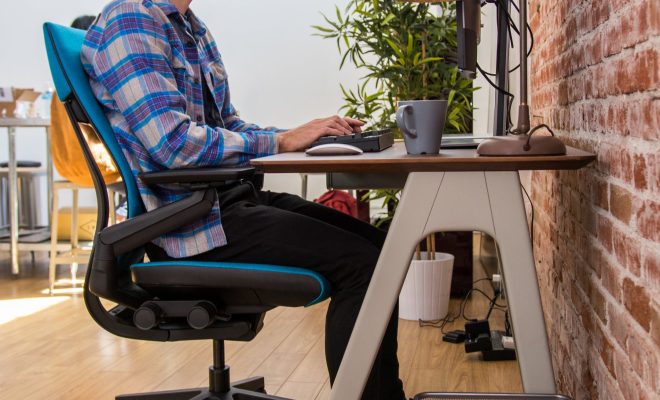
1. Ergonomic Chair: Investing in a good quality ergonomic chair is paramount as it supports your posture while working. It should be adjustable to perfectly align with your height, have a comfortable seat with good depth and width, provide back support, and also armrests ensuring less strain on your neck and shoulders.

2. Adjustable Desk: Just like the chair, an adjustable desk complements a perfect sitting position. It must let you sit or stand as per your comfort while maintaining the correct posture, where your elbows are in line with the keyboard and your eyes at the same level as the screen.

3. Keyboard and Mouse: Ergonomic keyboards and mouses can reduce the risk of repetitive strain injuries. They allow your hands to stay in a more natural position rather than forcing them into uncomfortable angles.

4. Monitor Stand or Arm: A monitor stand or arm lets you adjust your screen height and angle so that you don’t have to hunch over or tilt your head to see clearly. This minimizes strain on your neck and eyes.

5. Lightning: Good lighting is vital to protect eyestrain during long hours of work thus make sure to have ambient light along with a dedicated desk lamp.

6. Footrest: A footrest helps maintaining an appropriate posture, it allows you to rest your feet comfortably when they don’t reach the ground after adjusting the chair at an appropriate height for desk work.

7. Noise-Cancelling Headphones: In a busy household, it’s crucial to stay focused on tasks without any distractions from surrounding sounds. Noise-cancelling headphones can bring calmness to your workspace enhancing focus and productivity.

Remember that ergonomics isn’t ‘one size fits all.’ What works wonders for one person may not work for others. Always customize these ergonomic elements according to your comfort, because ultimately you want to create a space where you can be productive, comfortable, and happy!

Previous Article

Noise-canceling headphones can help prevent hearing loss, ...

Next Article

Facebook releases Quiet Mode so you can ...

Matthew Lynch

Related articles More from author

  • Tech Advice

    What Is a CD Ladder and How Do You Build One?

    July 10, 2023
    By Matthew Lynch
  • Tech Advice

    Bye, Late Fees. Here’s How to Set Up Autopay for Your Credit Card

    July 11, 2023
    By Matthew Lynch
  • Tech Advice

    Top 15 Time Travel Movies of All Time

    August 11, 2023
    By Matthew Lynch
  • Tech Advice

    How to Turn Off Do Not Disturb on iPhone

    August 11, 2023
    By Matthew Lynch
  • Tech Advice

    Can You Refinance a Car with the Same Lender?

    August 18, 2023
    By Matthew Lynch
  • Tech Advice

    Resident Evil Village’s Shadows of Rose Monsters Want to Eat Your Face

    July 17, 2023
    By Matthew Lynch

Search

Login & Registration

  • Log in
  • Entries feed
  • Comments feed
  • WordPress.org

Newsletter

Signup for The Tech Edvocate Newsletter and have the latest in EdTech news and opinion delivered to your email address!

About Us

Since technology is not going anywhere and does more good than harm, adapting is the best course of action. That is where The Tech Edvocate comes in. We plan to cover the PreK-12 and Higher Education EdTech sectors and provide our readers with the latest news and opinion on the subject. From time to time, I will invite other voices to weigh in on important issues in EdTech. We hope to provide a well-rounded, multi-faceted look at the past, present, the future of EdTech in the US and internationally.

We started this journey back in June 2016, and we plan to continue it for many more years to come. I hope that you will join us in this discussion of the past, present and future of EdTech and lend your own insight to the issues that are discussed.

Newsletter

Signup for The Tech Edvocate Newsletter and have the latest in EdTech news and opinion delivered to your email address!

Contact Us

The Tech Edvocate
910 Goddin Street
Richmond, VA 23231
(601) 630-5238
[email protected]

Copyright © 2026 Matthew Lynch. All rights reserved.
