The Tech Edvocate

Top Menu

  • Advertisement
  • Apps
  • Home Page
  • Home Page Five (No Sidebar)
  • Home Page Four
  • Home Page Three
  • Home Page Two
  • Home Tech2
  • Icons [No Sidebar]
  • Left Sidbear Page
  • Lynch Educational Consulting
  • My Account
  • My Speaking Page
  • Newsletter Sign Up Confirmation
  • Newsletter Unsubscription
  • Our Brands
  • Page Example
  • Privacy Policy
  • Protected Content
  • Register
  • Request a Product Review
  • Shop
  • Shortcodes Examples
  • Signup
  • Start Here
    • Governance
    • Careers
    • Contact Us
  • Terms and Conditions
  • The Edvocate
  • The Tech Edvocate Product Guide
  • Topics
  • Write For Us
  • Advertise

Main Menu

  • Start Here
    • Our Brands
    • Governance
      • Lynch Educational Consulting, LLC.
      • Dr. Lynch’s Personal Website
      • Careers
    • Write For Us
    • The Tech Edvocate Product Guide
    • Contact Us
    • Books
    • Edupedia
    • Post a Job
    • The Edvocate Podcast
    • Terms and Conditions
    • Privacy Policy
  • Topics
    • Assistive Technology
    • Child Development Tech
    • Early Childhood & K-12 EdTech
    • EdTech Futures
    • EdTech News
    • EdTech Policy & Reform
    • EdTech Startups & Businesses
    • Higher Education EdTech
    • Online Learning & eLearning
    • Parent & Family Tech
    • Personalized Learning
    • Product Reviews
  • Advertise
  • Tech Edvocate Awards
  • The Edvocate
  • Pedagogue
  • School Ratings

logo

The Tech Edvocate

  • Start Here
    • Our Brands
    • Governance
      • Lynch Educational Consulting, LLC.
      • Dr. Lynch’s Personal Website
        • My Speaking Page
      • Careers
    • Write For Us
    • The Tech Edvocate Product Guide
    • Contact Us
    • Books
    • Edupedia
    • Post a Job
    • The Edvocate Podcast
    • Terms and Conditions
    • Privacy Policy
  • Topics
    • Assistive Technology
    • Child Development Tech
    • Early Childhood & K-12 EdTech
    • EdTech Futures
    • EdTech News
    • EdTech Policy & Reform
    • EdTech Startups & Businesses
    • Higher Education EdTech
    • Online Learning & eLearning
    • Parent & Family Tech
    • Personalized Learning
    • Product Reviews
  • Advertise
  • Tech Edvocate Awards
  • The Edvocate
  • Pedagogue
  • School Ratings
  • Cybersecurity vs. Green Energy: Which Path Will Make You Richer in 2026?

  • Why These 10 Renewable Energy Certifications Are Quietly Reshaping Careers by 2026

  • Why Millions Are Rushing to Online Renewable Energy Certifications Right Now

  • August AI vs. USMLE: The Unsettling Future of Medical Licensing

  • One AI’s Perfect USMLE Score Just Blew Up Medical Education As We Know It

  • This AI Just Aced the USMLE: Why Your Medical Career Might Never Be the Same

  • The Quiet Exodus: Why Senior FinTech Developers Are Abandoning Corporate Life

  • The Quiet Revolution: Where Elite FinTech Developers Are Fleeing in 2026

  • The Quiet Exodus: Why Senior FinTech Developers Are Ditching Corporate Life

  • AI Governance Software: Pricing and Features Comparison

Digital & Mobile Technology
Home›Digital & Mobile Technology›Amazing Truecaller Features You Need to Use Regularly

Amazing Truecaller Features You Need to Use Regularly
By Matthew Lynch
June 10, 2023
0
Spread the love

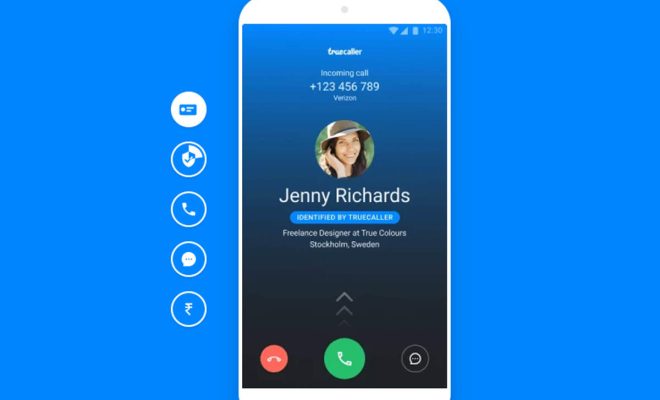
Truecaller is a popular app used by millions of people worldwide. It is a must-have app for smartphones, especially if you receive a lot of spam calls and texts. People use Truecaller for various reasons, including blocking spam calls, identifying unknown callers, and filtering spam messages. While these are some of the most common uses of Truecaller, there are several other features that you need to use regularly to make the most of this amazing app.

Here are some of the best Truecaller features that you need to use regularly:

1. Call Recording

Truecaller allows you to record all your incoming and outgoing calls. This feature is particularly useful if you need to remember important conversations or if you want to keep a record of a business call. Call recording is available only for Android users.

2. Call History

Truecaller keeps track of all your call history, even those that are not saved in your phonebook. You can see the date and time of every call, how long the call lasted, and the name of the caller.

3. Know Who Viewed Your Profile

One of the most exciting features of Truecaller is the ability to see who viewed your profile. You can see the names and locations of the people who have viewed your profile on Truecaller in the last week.

4. Message Filtering

Truecaller allows you to filter your messages to show only the ones relevant to you. You can filter messages from known contacts or unknown numbers, and you can also block spam messages.

5. Call and SMS Blocking

One of the core features of Truecaller is call and SMS blocking. You can block spam calls and messages from unknown numbers, and you can also block specific numbers that you don’t want to hear from.

6. Flash Messages

Truecaller offers a feature called Flash Messages, which enables you to send pre-defined messages to your contacts quickly. This feature is particularly useful in situations where you need to send a quick message without typing it out.

7. Backup and Restore

Truecaller offers a backup and restore feature that allows you to back up your contacts, call history, and other settings. You can then restore all your data to a new phone if you switch to a new device.

Conclusion

Truecaller is a versatile app that offers several amazing features that you need to use regularly. Whether you want to block spam calls and messages, record your calls, or filter your messages, Truecaller has got you covered. With its user-friendly interface and intuitive features, Truecaller is a must-have app for anyone who wants to have control over their calls and messages. So, start using these amazing Truecaller features today to make the most of this app.


Previous Article

Can You Use Google Sky Map on ...

Next Article

How to Watch Hulu on Chromecast

Matthew Lynch

Related articles More from author

  • Digital & Mobile Technology

    What Is Electromagnetic Interference (EMI)? How Can You Protect Your Devices Against It?

    June 12, 2023
    By Matthew Lynch
  • Digital & Mobile Technology

    What Is Virtualization Based Security in Windows?

    July 31, 2023
    By Matthew Lynch
  • Digital & Mobile Technology

    How to Fix a TV That Turns On by Itself

    June 2, 2023
    By Matthew Lynch
  • Digital & Mobile Technology

    How to Fix It When Your Phone Screen Turns Black and White

    June 1, 2023
    By Matthew Lynch
  • Digital & Mobile Technology

    20 Roku Hacks to Make Your Life Easier

    June 10, 2023
    By Matthew Lynch
  • Digital & Mobile Technology

    Why Is Printer Ink So Expensive?

    May 29, 2023
    By Matthew Lynch

Search

Login & Registration

  • Log in
  • Entries feed
  • Comments feed
  • WordPress.org

Newsletter

Signup for The Tech Edvocate Newsletter and have the latest in EdTech news and opinion delivered to your email address!

About Us

Since technology is not going anywhere and does more good than harm, adapting is the best course of action. That is where The Tech Edvocate comes in. We plan to cover the PreK-12 and Higher Education EdTech sectors and provide our readers with the latest news and opinion on the subject. From time to time, I will invite other voices to weigh in on important issues in EdTech. We hope to provide a well-rounded, multi-faceted look at the past, present, the future of EdTech in the US and internationally.

We started this journey back in June 2016, and we plan to continue it for many more years to come. I hope that you will join us in this discussion of the past, present and future of EdTech and lend your own insight to the issues that are discussed.

Newsletter

Signup for The Tech Edvocate Newsletter and have the latest in EdTech news and opinion delivered to your email address!

Contact Us

The Tech Edvocate
910 Goddin Street
Richmond, VA 23231
(601) 630-5238
[email protected]

Copyright © 2026 Matthew Lynch. All rights reserved.