The Tech Edvocate

Top Menu

  • Advertisement
  • Apps
  • Home Page
  • Home Page Five (No Sidebar)
  • Home Page Four
  • Home Page Three
  • Home Page Two
  • Home Tech2
  • Icons [No Sidebar]
  • Left Sidbear Page
  • Lynch Educational Consulting
  • My Account
  • My Speaking Page
  • Newsletter Sign Up Confirmation
  • Newsletter Unsubscription
  • Our Brands
  • Page Example
  • Privacy Policy
  • Protected Content
  • Register
  • Request a Product Review
  • Shop
  • Shortcodes Examples
  • Signup
  • Start Here
    • Governance
    • Careers
    • Contact Us
  • Terms and Conditions
  • The Edvocate
  • The Tech Edvocate Product Guide
  • Topics
  • Write For Us
  • Advertise

Main Menu

  • Start Here
    • Our Brands
    • Governance
      • Lynch Educational Consulting, LLC.
      • Dr. Lynch’s Personal Website
      • Careers
    • Write For Us
    • The Tech Edvocate Product Guide
    • Contact Us
    • Books
    • Edupedia
    • Post a Job
    • The Edvocate Podcast
    • Terms and Conditions
    • Privacy Policy
  • Topics
    • Assistive Technology
    • Child Development Tech
    • Early Childhood & K-12 EdTech
    • EdTech Futures
    • EdTech News
    • EdTech Policy & Reform
    • EdTech Startups & Businesses
    • Higher Education EdTech
    • Online Learning & eLearning
    • Parent & Family Tech
    • Personalized Learning
    • Product Reviews
  • Advertise
  • Tech Edvocate Awards
  • The Edvocate
  • Pedagogue
  • School Ratings

logo

The Tech Edvocate

  • Start Here
    • Our Brands
    • Governance
      • Lynch Educational Consulting, LLC.
      • Dr. Lynch’s Personal Website
        • My Speaking Page
      • Careers
    • Write For Us
    • The Tech Edvocate Product Guide
    • Contact Us
    • Books
    • Edupedia
    • Post a Job
    • The Edvocate Podcast
    • Terms and Conditions
    • Privacy Policy
  • Topics
    • Assistive Technology
    • Child Development Tech
    • Early Childhood & K-12 EdTech
    • EdTech Futures
    • EdTech News
    • EdTech Policy & Reform
    • EdTech Startups & Businesses
    • Higher Education EdTech
    • Online Learning & eLearning
    • Parent & Family Tech
    • Personalized Learning
    • Product Reviews
  • Advertise
  • Tech Edvocate Awards
  • The Edvocate
  • Pedagogue
  • School Ratings
  • The New Wave of Soccer Players: Key Habits for Young Athletes

  • BrandPilot AI Expands into European Markets with Performance-Based Advertising

  • The Brutal Truth: Why K-12 Cybersecurity Needs More Than Just Awareness

  • The Unseen Threat: How K-12 Cybersecurity Training Is Quietly Reshaping Education

  • The Staggering Truth: K-12 Cybersecurity Education Is Failing – Here’s How to Fix It

  • Why Millions Are Ditching Degrees For This Career-Boosting Secret

  • 7 Crucial Micro-Credentials Boosting Recent Grads’ Salaries by 15%

  • The Brutal Truth: Why Your College Degree Isn’t Enough Anymore

  • The Ethical AI Auditor Boom: Why Salaries Are Skyrocketing Globally

  • This Crucial Skill Now Pays $150,000 Starting — Here’s How to Get Certified in 2024

Digital & Mobile Technology
Home›Digital & Mobile Technology›A Guide to Changing the Wi-Fi Name (SSID) on a Network Router

A Guide to Changing the Wi-Fi Name (SSID) on a Network Router
By Matthew Lynch
July 24, 2023
0
Spread the love

As more and more connected devices enter our lives, the Wi-Fi network in our homes has become an important part of our daily routine. However, most of us tend to stick with the default Wi-Fi name (SSID) that comes with our router. This can make it difficult to identify which network you are connecting to, especially in crowded urban areas. Changing your Wi-Fi name is a simple task that can improve the security and accessibility of your home network.

Before we dive into the process of changing your SSID, let’s understand what a Wi-Fi name is. An SSID is simply the name that identifies your Wi-Fi network. When you search for Wi-Fi networks on your device, the name(s) that show up are the SSIDs of the nearby networks. SSID stands for Service Set Identifier.

Now, let’s discuss the importance of changing your SSID. When you buy a new router, it comes with a default SSID that is often a combination of the brand name and some numbers. This generic name makes it easy for hackers to identify your router’s model and exploit any vulnerabilities associated with it. By choosing a unique name, you make it harder for attackers to know what kind of router you use.

Another benefit of changing your SSID is that it helps you identify your network from others nearby. If you live in a densely populated area, there could be multiple Wi-Fi networks in range. This can make it confusing to know which one is yours. By changing your SSID to something unique and memorable, you can easily differentiate your network from others.

Now that you know why you should change your SSID, let’s look at how to do it. Here’s a step-by-step guide to help you change your Wi-Fi name:

Step 1:

Log in to your router’s admin panel. To do this, enter your router’s IP address in your browser. This should open your router’s web interface. If you’re unsure of the IP address, check your router manual or look for it online.

Step 2:

Enter your login credentials. Most routers come with a default username and password that you need to enter to log in. If you’ve changed your login credentials before, use those. If not, check your router’s manual for the default login credentials.

Step 3:

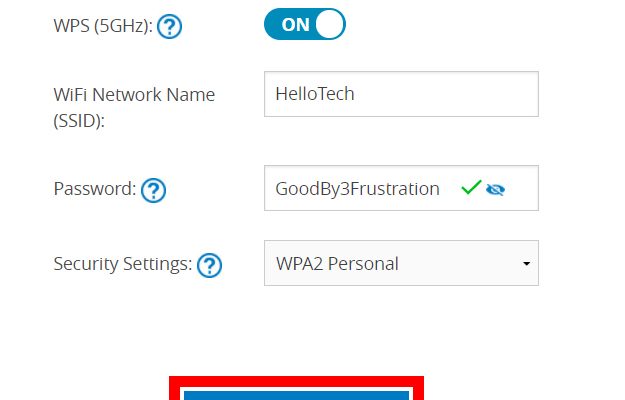
the wireless settings. Once you’re logged into your router’s admin panel, look for the wireless settings. This is where you can change your SSID and other wireless network settings.

Step 4:

Change the SSID. Look for the SSID field and enter your new Wi-Fi name. Keep in mind that the name should be unique and easy to remember. Avoid using personal information or anything that could identify you or your home.

Step 5:

Save the settings. Once you’ve entered your new SSID, save the settings. Your router will then reboot and apply the new settings.

Changing your Wi-Fi name is a simple but effective way to improve the security and accessibility of your home network. By choosing a unique and memorable name, you make it harder for attackers to target your router and easier for you to identify your network. So go ahead and give your network a personalized name today!


Previous Article

Blu-ray Disc Player Audio Settings: Bitstream vs. ...

Next Article

Turn a 2D Drawing Into 3D Art ...

Matthew Lynch

Related articles More from author

  • Digital & Mobile Technology

    Where to Download iPod nano Manuals for All Models

    June 10, 2023
    By Matthew Lynch
  • Digital & Mobile Technology

    Why You Should Upgrade to the Galaxy S22 From the S20 or Older, but Not the S21

    June 22, 2023
    By Matthew Lynch
  • Digital & Mobile Technology

    How to Silence a Noisy Laptop Fan: Things You Can Do

    August 5, 2023
    By Matthew Lynch
  • Digital & Mobile Technology

    How Does a Ring Doorbell Work? What You Need to Know

    June 23, 2023
    By Matthew Lynch
  • Digital & Mobile Technology

    Making Free Calls on Your iPad

    June 21, 2023
    By Matthew Lynch
  • Digital & Mobile Technology

    7 Hidden iMessage Features You Should Try on Your iPhone

    August 1, 2023
    By Matthew Lynch

Search

Login & Registration

  • Log in
  • Entries feed
  • Comments feed
  • WordPress.org

Newsletter

Signup for The Tech Edvocate Newsletter and have the latest in EdTech news and opinion delivered to your email address!

About Us

Since technology is not going anywhere and does more good than harm, adapting is the best course of action. That is where The Tech Edvocate comes in. We plan to cover the PreK-12 and Higher Education EdTech sectors and provide our readers with the latest news and opinion on the subject. From time to time, I will invite other voices to weigh in on important issues in EdTech. We hope to provide a well-rounded, multi-faceted look at the past, present, the future of EdTech in the US and internationally.

We started this journey back in June 2016, and we plan to continue it for many more years to come. I hope that you will join us in this discussion of the past, present and future of EdTech and lend your own insight to the issues that are discussed.

Newsletter

Signup for The Tech Edvocate Newsletter and have the latest in EdTech news and opinion delivered to your email address!

Contact Us

The Tech Edvocate
910 Goddin Street
Richmond, VA 23231
(601) 630-5238
[email protected]

Copyright © 2026 Matthew Lynch. All rights reserved.