The Tech Edvocate

Top Menu

  • Advertisement
  • Apps
  • Home Page
  • Home Page Five (No Sidebar)
  • Home Page Four
  • Home Page Three
  • Home Page Two
  • Home Tech2
  • Icons [No Sidebar]
  • Left Sidbear Page
  • Lynch Educational Consulting
  • My Account
  • My Speaking Page
  • Newsletter Sign Up Confirmation
  • Newsletter Unsubscription
  • Our Brands
  • Page Example
  • Privacy Policy
  • Protected Content
  • Register
  • Request a Product Review
  • Shop
  • Shortcodes Examples
  • Signup
  • Start Here
    • Governance
    • Careers
    • Contact Us
  • Terms and Conditions
  • The Edvocate
  • The Tech Edvocate Product Guide
  • Topics
  • Write For Us
  • Advertise

Main Menu

  • Start Here
    • Our Brands
    • Governance
      • Lynch Educational Consulting, LLC.
      • Dr. Lynch’s Personal Website
      • Careers
    • Write For Us
    • The Tech Edvocate Product Guide
    • Contact Us
    • Books
    • Edupedia
    • Post a Job
    • The Edvocate Podcast
    • Terms and Conditions
    • Privacy Policy
  • Topics
    • Assistive Technology
    • Child Development Tech
    • Early Childhood & K-12 EdTech
    • EdTech Futures
    • EdTech News
    • EdTech Policy & Reform
    • EdTech Startups & Businesses
    • Higher Education EdTech
    • Online Learning & eLearning
    • Parent & Family Tech
    • Personalized Learning
    • Product Reviews
  • Advertise
  • Tech Edvocate Awards
  • The Edvocate
  • Pedagogue
  • School Ratings

logo

The Tech Edvocate

  • Start Here
    • Our Brands
    • Governance
      • Lynch Educational Consulting, LLC.
      • Dr. Lynch’s Personal Website
        • My Speaking Page
      • Careers
    • Write For Us
    • The Tech Edvocate Product Guide
    • Contact Us
    • Books
    • Edupedia
    • Post a Job
    • The Edvocate Podcast
    • Terms and Conditions
    • Privacy Policy
  • Topics
    • Assistive Technology
    • Child Development Tech
    • Early Childhood & K-12 EdTech
    • EdTech Futures
    • EdTech News
    • EdTech Policy & Reform
    • EdTech Startups & Businesses
    • Higher Education EdTech
    • Online Learning & eLearning
    • Parent & Family Tech
    • Personalized Learning
    • Product Reviews
  • Advertise
  • Tech Edvocate Awards
  • The Edvocate
  • Pedagogue
  • School Ratings
  • How to create estimates in Buildertrend

  • How to use Bluebeam for punch lists

  • Procore vs Viewpoint features

  • How to submit invoices in Procore

  • How to set up Monday.com for contractors

  • Can PlanGrid track punch lists

  • How to create selections in CoConstruct

  • How to markup drawings in PlanGrid

  • How to use PlanGrid for blueprints

  • How to create custom tools in Bluebeam

Digital & Mobile Technology
Home›Digital & Mobile Technology›Best Free Mind Map Tools (And How to Best Use Them)

Best Free Mind Map Tools (And How to Best Use Them)
By Matthew Lynch
June 22, 2023
0
Spread the love

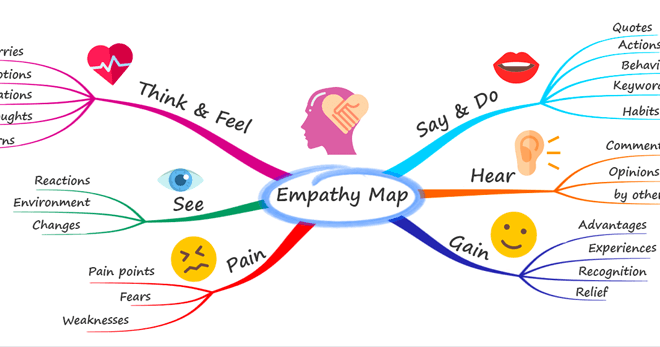
Mind mapping is an effective way to brainstorm, organize thoughts and ideas, and visually outline complex concepts. In today’s digital age, there are a variety of free mind map tools available online. Here, we’ll look at the best of these tools and how to best use them.

1. MindMeister

MindMeister is a user-friendly mind mapping tool that enables users to create and share mind maps online. It allows multiple users to collaborate in real-time, making it an ideal choice for team projects. MindMeister offers a variety of templates to get started and supports multimedia elements like images, videos, and links to external resources. With their mobile app, users can access and update their mind maps on-the-go.

2. Coggle

Coggle is a visually appealing mind mapping tool that is simple to use. It has a user-friendly interface and allows for easy customization of colors, font styles, and shapes. Coggle is ideal for brainstorming and organizing ideas in a visual manner. The tool also allows for real-time collaboration and sharing of the mind maps.

3. Lucidchart

Lucidchart is a versatile diagramming tool that allows users to create not just mind maps, but also flowcharts, org charts, and more. It integrates seamlessly with Google Drive, Slack, and other productivity tools. Lucidchart offers a wide variety of customization options, intuitive interface, and real-time collaboration to ensure teams can work efficiently.

4. Freemind

Freemind is a free, open-source mind mapping tool that is great for brainstorming, and outlining. It is available for Windows, Mac, and Linux. The tool has a range of features for creating and organizing maps including formatting options, notes, relationships, and more. Freemind allows for exporting to a variety of formats such as PDF, HTML or JPEG.

5. Draw.io

Draw.io is another free diagramming tool that offers a full range of customization options for mind maps, flowcharts, process diagrams, and more. It features an intuitive interface, offers various templates and styles, and can integrate with Google Drive, Dropbox, and OneDrive. Draw.io also supports real-time collaboration and offers the ability to export diagrams in a variety of formats.

How to best use these tools:

1. Define your purpose – Start by defining the purpose of your mind map (for example, brainstorming, project planning, problem-solving). This will help you choose the right tool for your needs.

2. Choose a template – Most tools offer templates that can make it easier to start creating your mind map. Choose the one that best fits your objective.

3. Organize your ideas – Use colors, shapes, font styles, and other visual elements to organize your ideas and create hierarchy in your map.

4. Share and collaborate – Most of the tools mentioned earlier offer real-time collaboration features, so take advantage of this if you’re working in a team. Share your maps and exchange ideas.

5. Stay focused – Mind maps can get complex quickly, so make sure to stay focused on your objective and update your map as needed.


Previous Article

How to Change Your Instagram Chat Themes ...

Next Article

Fallout Shelter Tips for Vault Dwellers

Matthew Lynch

Related articles More from author

  • Digital & Mobile Technology

    Is eBay Down … or Is It Just You?

    June 10, 2023
    By Matthew Lynch
  • Digital & Mobile Technology

    Can You Use an Apple Watch With an Android Phone?

    June 8, 2023
    By Matthew Lynch
  • Digital & Mobile Technology

    You’re Probably Not Getting That New iPhone 14 for Christmas, Experts Say

    June 12, 2023
    By Matthew Lynch
  • Digital & Mobile Technology

    How to Increase the Font Size While Reading Mail in Outlook

    June 3, 2023
    By Matthew Lynch
  • Digital & Mobile Technology

    What is Network Discovery?

    May 24, 2023
    By Matthew Lynch
  • Digital & Mobile Technology

    How to Fix FaceTime Live Photos Not Saving

    June 2, 2023
    By Matthew Lynch

Search

Login & Registration

  • Log in
  • Entries feed
  • Comments feed
  • WordPress.org

Newsletter

Signup for The Tech Edvocate Newsletter and have the latest in EdTech news and opinion delivered to your email address!

About Us

Since technology is not going anywhere and does more good than harm, adapting is the best course of action. That is where The Tech Edvocate comes in. We plan to cover the PreK-12 and Higher Education EdTech sectors and provide our readers with the latest news and opinion on the subject. From time to time, I will invite other voices to weigh in on important issues in EdTech. We hope to provide a well-rounded, multi-faceted look at the past, present, the future of EdTech in the US and internationally.

We started this journey back in June 2016, and we plan to continue it for many more years to come. I hope that you will join us in this discussion of the past, present and future of EdTech and lend your own insight to the issues that are discussed.

Newsletter

Signup for The Tech Edvocate Newsletter and have the latest in EdTech news and opinion delivered to your email address!

Contact Us

The Tech Edvocate
910 Goddin Street
Richmond, VA 23231
(601) 630-5238
[email protected]

Copyright © 2026 Matthew Lynch. All rights reserved.