The Tech Edvocate

Top Menu

  • Advertisement
  • Apps
  • Home Page
  • Home Page Five (No Sidebar)
  • Home Page Four
  • Home Page Three
  • Home Page Two
  • Home Tech2
  • Icons [No Sidebar]
  • Left Sidbear Page
  • Lynch Educational Consulting
  • My Account
  • My Speaking Page
  • Newsletter Sign Up Confirmation
  • Newsletter Unsubscription
  • Our Brands
  • Page Example
  • Privacy Policy
  • Protected Content
  • Register
  • Request a Product Review
  • Shop
  • Shortcodes Examples
  • Signup
  • Start Here
    • Governance
    • Careers
    • Contact Us
  • Terms and Conditions
  • The Edvocate
  • The Tech Edvocate Product Guide
  • Topics
  • Write For Us
  • Advertise

Main Menu

  • Start Here
    • Our Brands
    • Governance
      • Lynch Educational Consulting, LLC.
      • Dr. Lynch’s Personal Website
      • Careers
    • Write For Us
    • The Tech Edvocate Product Guide
    • Contact Us
    • Books
    • Edupedia
    • Post a Job
    • The Edvocate Podcast
    • Terms and Conditions
    • Privacy Policy
  • Topics
    • Assistive Technology
    • Child Development Tech
    • Early Childhood & K-12 EdTech
    • EdTech Futures
    • EdTech News
    • EdTech Policy & Reform
    • EdTech Startups & Businesses
    • Higher Education EdTech
    • Online Learning & eLearning
    • Parent & Family Tech
    • Personalized Learning
    • Product Reviews
  • Advertise
  • Tech Edvocate Awards
  • The Edvocate
  • Pedagogue
  • School Ratings

logo

The Tech Edvocate

  • Start Here
    • Our Brands
    • Governance
      • Lynch Educational Consulting, LLC.
      • Dr. Lynch’s Personal Website
        • My Speaking Page
      • Careers
    • Write For Us
    • The Tech Edvocate Product Guide
    • Contact Us
    • Books
    • Edupedia
    • Post a Job
    • The Edvocate Podcast
    • Terms and Conditions
    • Privacy Policy
  • Topics
    • Assistive Technology
    • Child Development Tech
    • Early Childhood & K-12 EdTech
    • EdTech Futures
    • EdTech News
    • EdTech Policy & Reform
    • EdTech Startups & Businesses
    • Higher Education EdTech
    • Online Learning & eLearning
    • Parent & Family Tech
    • Personalized Learning
    • Product Reviews
  • Advertise
  • Tech Edvocate Awards
  • The Edvocate
  • Pedagogue
  • School Ratings
  • Shocking Truth: The Real Cost of Building Data Centers No One Talks About

  • The Unseen War: How Unionization Is Quietly Reshaping Tech Jobs

  • The Unseen War: Why Data Center Jobs Are Sparking a Political Firestorm

  • The Next Big Shake-Up: 10 PropTech Startups Poised for Acquisition in 2026

  • How to Leverage AI-Powered Tools for Real Estate Transactions in 2026

  • This One Tech Trend Is Quietly Reshaping Real Estate by 2026

  • The Shocking Truth About Duck Creek vs Reserv: Is One Quietly Dominating AI Insurance?

  • The AI Revolution: 10 Platforms Fixing Insurance Claims Forever

  • This One Change Is Quietly Revolutionizing Insurance for Millions

  • The Mind-Blowing Battle: Space Solar Power vs. Traditional Renewables – Which Will Power Our Future?

Digital & Mobile Technology
Home›Digital & Mobile Technology›What Is Apple Wallet and How Do You Use It?

What Is Apple Wallet and How Do You Use It?
By Matthew Lynch
June 22, 2023
0
Spread the love

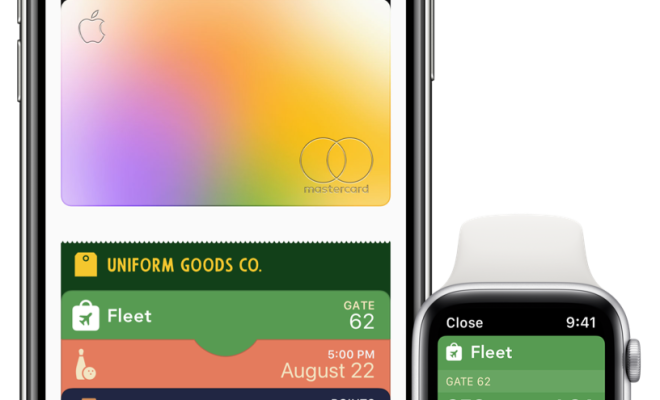
Apple Wallet, also known as Wallet, is an app on your iPhone that stores your credit and debit cards, boarding passes, event tickets, and other various forms of digital information. It can be used in conjunction with Apple Pay as a digital wallet to make secure and contactless payments.

To use Apple Wallet, first, you need to open the app on your iPhone. If you don’t have it already, download it from the App Store. Once you have the app open, you’ll see a plus sign in the upper right corner. Tap that, and you’ll be presented with options to add your credit or debit card, boarding pass, event ticket, or membership card.

If you choose to add your credit or debit card, you will need to follow the prompts to verify your card with your bank or financial institution. Once that’s done, you can use Apple Pay to make purchases at participating merchants. Simply hold your iPhone near the payment terminal, and it will automatically pull up your card in Apple Wallet. You will then use Touch ID or Face ID to complete the transaction.

If you add a boarding pass, event ticket, or membership card to your Apple Wallet, your iPhone will automatically display a notification on the lock screen when it’s time to use that information. For example, if you add a boarding pass for a flight, you’ll receive a notification with the pass when it’s time to board. Simply tap the notification, and it will open in Apple Wallet.

You can also organize your Apple Wallet by grouping your cards into categories or folders. This makes it easier to find the card or pass that you need when you need it.

In addition to storing digital cards and tickets, Apple Wallet can also keep track of your transactions and balances for some credit and debit cards. This makes it easy to monitor your spending and ensure that your account information is up to date.

Overall, Apple Wallet is a convenient and secure way to store important information on your iPhone. Whether you’re making a purchase or checking into a flight, it offers a simple and streamlined experience that can save you time and hassle.


Previous Article

Easy and Low Budget DIY Electronics Projects ...

Next Article

Best Driving Simulation Games for iPhone

Matthew Lynch

Related articles More from author

  • Digital & Mobile Technology

    The BlackBerry Phone Is Dead: Here’s Why

    June 23, 2023
    By Matthew Lynch
  • Digital & Mobile Technology

    The Top Highest-Rated Reddit Posts of All Time

    June 12, 2023
    By Matthew Lynch
  • Digital & Mobile Technology

    How to Fix It When the Cursor Disappears in Windows 10

    May 30, 2023
    By Matthew Lynch
  • Digital & Mobile Technology

    Apps That Let You Send Multiple Photos for Free

    June 23, 2023
    By Matthew Lynch
  • Digital & Mobile Technology

    Free Mobile Games With NO Ads or In-App Purchases

    June 8, 2023
    By Matthew Lynch
  • Digital & Mobile Technology

    Can I Move My Modem to Another Room?

    September 7, 2023
    By Matthew Lynch

Search

Login & Registration

  • Log in
  • Entries feed
  • Comments feed
  • WordPress.org

Newsletter

Signup for The Tech Edvocate Newsletter and have the latest in EdTech news and opinion delivered to your email address!

About Us

Since technology is not going anywhere and does more good than harm, adapting is the best course of action. That is where The Tech Edvocate comes in. We plan to cover the PreK-12 and Higher Education EdTech sectors and provide our readers with the latest news and opinion on the subject. From time to time, I will invite other voices to weigh in on important issues in EdTech. We hope to provide a well-rounded, multi-faceted look at the past, present, the future of EdTech in the US and internationally.

We started this journey back in June 2016, and we plan to continue it for many more years to come. I hope that you will join us in this discussion of the past, present and future of EdTech and lend your own insight to the issues that are discussed.

Newsletter

Signup for The Tech Edvocate Newsletter and have the latest in EdTech news and opinion delivered to your email address!

Contact Us

The Tech Edvocate
910 Goddin Street
Richmond, VA 23231
(601) 630-5238
[email protected]

Copyright © 2026 Matthew Lynch. All rights reserved.