The Tech Edvocate

Top Menu

  • Advertisement
  • Apps
  • Home Page
  • Home Page Five (No Sidebar)
  • Home Page Four
  • Home Page Three
  • Home Page Two
  • Home Tech2
  • Icons [No Sidebar]
  • Left Sidbear Page
  • Lynch Educational Consulting
  • My Account
  • My Speaking Page
  • Newsletter Sign Up Confirmation
  • Newsletter Unsubscription
  • Our Brands
  • Page Example
  • Privacy Policy
  • Protected Content
  • Register
  • Request a Product Review
  • Shop
  • Shortcodes Examples
  • Signup
  • Start Here
    • Governance
    • Careers
    • Contact Us
  • Terms and Conditions
  • The Edvocate
  • The Tech Edvocate Product Guide
  • Topics
  • Write For Us
  • Advertise

Main Menu

  • Start Here
    • Our Brands
    • Governance
      • Lynch Educational Consulting, LLC.
      • Dr. Lynch’s Personal Website
      • Careers
    • Write For Us
    • The Tech Edvocate Product Guide
    • Contact Us
    • Books
    • Edupedia
    • Post a Job
    • The Edvocate Podcast
    • Terms and Conditions
    • Privacy Policy
  • Topics
    • Assistive Technology
    • Child Development Tech
    • Early Childhood & K-12 EdTech
    • EdTech Futures
    • EdTech News
    • EdTech Policy & Reform
    • EdTech Startups & Businesses
    • Higher Education EdTech
    • Online Learning & eLearning
    • Parent & Family Tech
    • Personalized Learning
    • Product Reviews
  • Advertise
  • Tech Edvocate Awards
  • The Edvocate
  • Pedagogue
  • School Ratings

logo

The Tech Edvocate

  • Start Here
    • Our Brands
    • Governance
      • Lynch Educational Consulting, LLC.
      • Dr. Lynch’s Personal Website
        • My Speaking Page
      • Careers
    • Write For Us
    • The Tech Edvocate Product Guide
    • Contact Us
    • Books
    • Edupedia
    • Post a Job
    • The Edvocate Podcast
    • Terms and Conditions
    • Privacy Policy
  • Topics
    • Assistive Technology
    • Child Development Tech
    • Early Childhood & K-12 EdTech
    • EdTech Futures
    • EdTech News
    • EdTech Policy & Reform
    • EdTech Startups & Businesses
    • Higher Education EdTech
    • Online Learning & eLearning
    • Parent & Family Tech
    • Personalized Learning
    • Product Reviews
  • Advertise
  • Tech Edvocate Awards
  • The Edvocate
  • Pedagogue
  • School Ratings
  • Shocking: Mercury Skin Bleachers Still Flood Amazon, Temu, and TikTok Shop

  • Shocking: 195,000 Heated Blankets Recalled After Dozens Suffer Burns – Is Yours One of Them?

  • The $4 Billion Comeback: How Manus Defied Geopolitical Odds to Double Its Valuation

  • This Israeli Startup Accidentally Unleashed AI Cyberattacks on Real Companies

  • This PlayStation Exclusive Just Vanished Forever — And It’s a Warning to All Gamers

  • The Jaw-Dropping Truth Behind Marvel’s Wolverine AI Scare

  • The September 2026 AI Surge: Why Your Business Needs to Adapt Now

  • The Billion-Dollar AI Slowdown Lawsuit That Could Shatter Big Tech

  • The Brutal Truth: Why Your Student Loan Discharge Is Stuck in Limbo

  • 7 Critical Lessons From Russia’s Election Cyber Onslaught

Assistive Technology
Home›Assistive Technology›Should You Buy a Touchscreen Laptop? 5 Pros and Cons

Should You Buy a Touchscreen Laptop? 5 Pros and Cons
By Matthew Lynch
June 15, 2023
0
Spread the love

In recent years, touchscreen laptops have become increasingly popular, as consumers seek out devices that are both portable and flexible. However, many potential buyers may be wondering whether investing in a touchscreen laptop is worth the cost. In this article, we’ll take a look at some of the pros and cons of owning a touchscreen laptop, so you can decide whether it’s the right choice for you.

Pros:

  1. Increased Flexibility

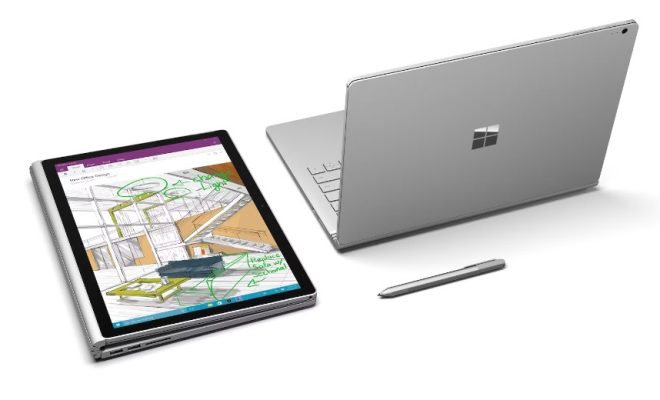
One of the greatest benefits of a touchscreen laptop is the increased flexibility it provides. With a touchscreen, you can use your device as both a traditional laptop and a tablet, switching between modes as needed. This makes it an ideal choice for students, business travelers, or anyone who is always on the go.

  1. Improved Productivity

A touchscreen laptop can also help improve your productivity by allowing you to work faster and more efficiently. With a touchscreen, you can quickly and easily navigate between different programs and applications, making it easier to multitask and get more done in less time.

  1. Enhanced Creativity

Touchscreen laptops are also ideal for creative professionals who need to use design software or work with multimedia. With a touchscreen, you can use your device to draw, paint, or edit photos and videos, creating more detailed and precise work.

  1. Better User Experience

A touchscreen laptop provides a more interactive and intuitive user experience. You can use natural hand gestures to navigate your device, making it easier to access your files and settings. This can help reduce the learning curve for new users, making it a great device for those who are less tech-savvy.

  1. Increased Fun

Finally, a touchscreen laptop can simply be more fun to use. With a touchscreen, you can play games, watch videos, and explore apps in a more immersive and engaging way.

Cons:

  1. More Expensive

Touchscreen laptops can be more expensive than traditional laptops due to the added cost of the touchscreen technology. Depending on your budget, this cost may be prohibitive.

  1. Reduced Battery Life

A touchscreen laptop also tends to have reduced battery life compared to a traditional laptop. This is because the touchscreen requires more power to operate, which can drain the battery more quickly.

  1. More Fragile

A touchscreen laptop can be more fragile than a traditional laptop. The screen is more vulnerable to cracks and damage, which can be costly to repair or replace.

  1. Not Ideal for Typing

While a touchscreen laptop is great for navigating and interacting with your device, it may not be the best choice for typing. The touchscreen keyboard can be less ergonomic and less efficient than a physical keyboard.

  1. Limited Applications

Finally, some traditional programs and applications may not be optimized for touchscreen use, which can limit your options when using your device.


Previous Article

How to Turn Off Delivery Optimization on ...

Next Article

How to Hold the iPad Correctly

Matthew Lynch

Related articles More from author

  • Assistive Technology

    How to Improve the Quality of Your Smartphone Camera

    June 14, 2023
    By Matthew Lynch
  • Assistive Technology

    How to Send a Picture in Gmail

    June 10, 2023
    By Matthew Lynch
  • Assistive Technology

    How to Bookmark All Tabs in Chrome, Firefox, Edge, Brave, and Safari

    June 14, 2023
    By Matthew Lynch
  • Assistive Technology

    How to Re-Paste Your CPU With Fresh Thermal Paste

    June 15, 2023
    By Matthew Lynch
  • Assistive Technology

    How to Turn Off Time to Stand Notifications on an Apple Watch

    June 23, 2023
    By Matthew Lynch
  • Assistive Technology

    How to Unlock an Android Phone Without a Password

    June 11, 2023
    By Matthew Lynch

Search

Login & Registration

  • Log in
  • Entries feed
  • Comments feed
  • WordPress.org

Newsletter

Signup for The Tech Edvocate Newsletter and have the latest in EdTech news and opinion delivered to your email address!

About Us

Since technology is not going anywhere and does more good than harm, adapting is the best course of action. That is where The Tech Edvocate comes in. We plan to cover the PreK-12 and Higher Education EdTech sectors and provide our readers with the latest news and opinion on the subject. From time to time, I will invite other voices to weigh in on important issues in EdTech. We hope to provide a well-rounded, multi-faceted look at the past, present, the future of EdTech in the US and internationally.

We started this journey back in June 2016, and we plan to continue it for many more years to come. I hope that you will join us in this discussion of the past, present and future of EdTech and lend your own insight to the issues that are discussed.

Newsletter

Signup for The Tech Edvocate Newsletter and have the latest in EdTech news and opinion delivered to your email address!

Contact Us

The Tech Edvocate
910 Goddin Street
Richmond, VA 23231
(601) 630-5238
[email protected]

Copyright © 2026 Matthew Lynch. All rights reserved.