The Tech Edvocate

Top Menu

  • Advertisement
  • Apps
  • Home Page
  • Home Page Five (No Sidebar)
  • Home Page Four
  • Home Page Three
  • Home Page Two
  • Home Tech2
  • Icons [No Sidebar]
  • Left Sidbear Page
  • Lynch Educational Consulting
  • My Account
  • My Speaking Page
  • Newsletter Sign Up Confirmation
  • Newsletter Unsubscription
  • Our Brands
  • Page Example
  • Privacy Policy
  • Protected Content
  • Register
  • Request a Product Review
  • Shop
  • Shortcodes Examples
  • Signup
  • Start Here
    • Governance
    • Careers
    • Contact Us
  • Terms and Conditions
  • The Edvocate
  • The Tech Edvocate Product Guide
  • Topics
  • Write For Us
  • Advertise

Main Menu

  • Start Here
    • Our Brands
    • Governance
      • Lynch Educational Consulting, LLC.
      • Dr. Lynch’s Personal Website
      • Careers
    • Write For Us
    • The Tech Edvocate Product Guide
    • Contact Us
    • Books
    • Edupedia
    • Post a Job
    • The Edvocate Podcast
    • Terms and Conditions
    • Privacy Policy
  • Topics
    • Assistive Technology
    • Child Development Tech
    • Early Childhood & K-12 EdTech
    • EdTech Futures
    • EdTech News
    • EdTech Policy & Reform
    • EdTech Startups & Businesses
    • Higher Education EdTech
    • Online Learning & eLearning
    • Parent & Family Tech
    • Personalized Learning
    • Product Reviews
  • Advertise
  • Tech Edvocate Awards
  • The Edvocate
  • Pedagogue
  • School Ratings

logo

The Tech Edvocate

  • Start Here
    • Our Brands
    • Governance
      • Lynch Educational Consulting, LLC.
      • Dr. Lynch’s Personal Website
        • My Speaking Page
      • Careers
    • Write For Us
    • The Tech Edvocate Product Guide
    • Contact Us
    • Books
    • Edupedia
    • Post a Job
    • The Edvocate Podcast
    • Terms and Conditions
    • Privacy Policy
  • Topics
    • Assistive Technology
    • Child Development Tech
    • Early Childhood & K-12 EdTech
    • EdTech Futures
    • EdTech News
    • EdTech Policy & Reform
    • EdTech Startups & Businesses
    • Higher Education EdTech
    • Online Learning & eLearning
    • Parent & Family Tech
    • Personalized Learning
    • Product Reviews
  • Advertise
  • Tech Edvocate Awards
  • The Edvocate
  • Pedagogue
  • School Ratings
  • The Hidden Cost of EVs: Why Your Battery Could Cost More Than Your Car in 2026

  • Jensen Huang’s Shock Exit: This Unbelievable Scandal Just Rocked Nvidia and the AI World

  • Big Walk developer House House Confirms ‘Sparing’ Use of Gen AI – Press Start

  • Baffling: How a Cyber Breach at South Korea’s Top Security Watchdog Exposed Millions

  • Wenn Ordnung den Bildschirm beruhigt: Warum klare Abläufe Casino-Unterhaltung einladender machen

  • Reddit AI Reviews: The Quiet Reshaping of Online Opinion

  • The Chilling Truth: Iran Cyberattacks Europe’s Food and Blood Supplies

  • Anthropic’s $3.4 Billion Bet on Gas: The Unseen Cost of AI’s Future

  • Tribit FlyBuds C3 Earbuds: Premium Features at a Budget-Friendly Price

  • Is AuraCam Pro’s Emotional AI a Privacy Nightmare or Security Breakthrough?

Digital & Mobile Technology
Home›Digital & Mobile Technology›OnePlus 6T Review

OnePlus 6T Review

By Matthew Lynch
June 10, 2023
0
Spread the love

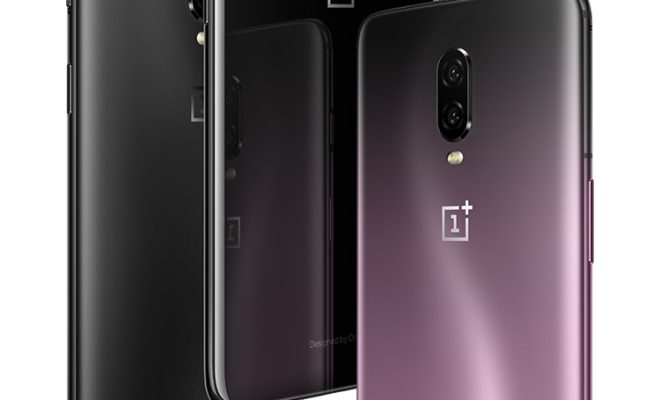
The OnePlus 6T is the latest addition from the OnePlus brand. The phone’s specifications include a 6.41-inch OLED display and a 19.5:9 aspect ratio. The phone’s design is sleek and polished, with a minimalist feel that is both stylish and functional.

One of the most striking features of the OnePlus 6T is its screen. The phone boasts a 1080p resolution display with excellent viewing angles and vibrant colors. The display has a small notch that houses the front-facing camera, which is smaller than that of the OnePlus 6. The chin at the bottom of the phone is also noticeably smaller.

The OnePlus 6T comes equipped with Qualcomm’s Snapdragon 845 processor, the same chip found in most flagship smartphones from 2018. The phone has 6GB or 8GB of RAM, with 128GB or 256GB of storage, respectively. It is important to note that there is no expandable storage option with the OnePlus 6T.

The phone’s battery life is another highlight. The OnePlus 6T’s 3,700mAh battery lasts for an extended period, keeping the phone going for over a day with moderate usage. The phone also features fast charging technology, allowing the battery to charge to 60% in just 30 minutes. Unfortunately, a downside is that there is no wireless charging option, which is a feature found on many other high-end devices.

The OnePlus 6T has an improved camera compared to its predecessor. The dual camera system now includes a 16-megapixel primary sensor with an f/1.7 aperture and optical image stabilization, and a 20-megapixel secondary sensor. The camera also features Nightscape mode, which captures brighter and clearer images in low-light environments.

Overall, the OnePlus 6T offers a satisfying experience for its price point. While it may not compare to other premium devices in terms of features and performance, its overall package is admirable. It offers a great display, long battery life, and a capable camera. The phone has an attractive design, and the absence of wireless charging and expandable storage can be overlooked for the price point.  9 Ways to Customize Your Android Device

As an Android user, you are no longer limited to just default settings and apps. With the latest Android versions and third-party apps, you can customize your device in countless ways. Here are some of the best ways to customize your Android device.

1. Change the Home Screen

Your Home screen is the first thing you see when you turn on your phone. You can customize it by choosing a unique wallpaper or theme for your Home screen. You can also add widgets, shortcuts, folders, and app icons to your Home screen, making it easy to access the apps and functions you use the most.

2. Install Launchers

Launching apps and navigating through different screens can be a tedious process. But you can make things much easier by installing a launcher app. A launcher app provides a new interface for your Home screen, giving you access to more customization options and unique features.

3. Customize App Icons and Fonts

Android devices have a wide range of fonts, but if you’re unsatisfied with those that come with your device, you can download custom fonts from the Google Play Store. To make your device even more unique, you can also customize your app icons using Icon Packs.

4. Set Live Wallpapers

Live wallpapers are a great way to customize your device even further. These wallpapers are animated, giving you an immersive experience that is far more engaging than static wallpapers. You can download a live wallpaper from the Google Play Store and set it as your Home screen or Lock screen.

5. Enable and Customize Notification LED

Most Android devices have a notification LED that blinks whenever you have a new notification. However, not all devices are equipped with a notification LED. If you have one, you can customize its color and blink rate for different types of notifications.

6. Use Different Lock Screen Methods

The lock screen is another area where you can customize your device. You can use different methods, such as the swipe, pattern, PIN, password, or face recognition to unlock your device. Moreover, you can customize your lock screen by adding widgets, shortcuts, and custom text.

7. Install Custom ROMs

If you’re looking to completely overhaul your device’s interface and functionality, you can install a custom ROM. A custom ROM is a third-party firmware that replaces your device’s stock firmware. Custom ROMs allow you to install the latest Android versions and enjoy new features that aren’t available on your device.

8. Use Tasker

Tasker is an automation app that lets you create custom scripts to perform a variety of tasks automatically. With Tasker, you can automate almost any function on your device, such as opening apps, changing settings, texting, and more.

9. Install Xposed Framework

Xposed Framework is an app that allows you to modify the core functions of your device’s operating system. You can use Xposed Framework to install modules that add new features to your device, such as a new lock screen, custom DPI settings, and more.

In conclusion, Android devices are known for their flexibility and customizability. By implementing some of these tips, you can personalize your device and make it truly yours. Be creative and enjoy the endless possibilities for customization that Android has to offer.  

Previous Article

Can You Change the Google Home Wake ...

Next Article

How to Search Your iPad for Apps, ...

Matthew Lynch

Related articles More from author

  • Digital & Mobile Technology

    Why Is Apple Called “Apple”?

    August 5, 2023
    By Matthew Lynch
  • Digital & Mobile Technology

    What Can You Do With Samsung’s Bixby Vision?

    June 21, 2023
    By Matthew Lynch
  • Digital & Mobile Technology

    How the Insight Timer App Can Improve Your Well-Being

    August 1, 2023
    By Matthew Lynch
  • Digital & Mobile Technology

    How to Create a Self-Signed Certificate in Linux

    August 3, 2023
    By Matthew Lynch
  • Digital & Mobile Technology

    How to Print From Android Phone

    June 4, 2023
    By Matthew Lynch
  • Digital & Mobile Technology

    How to Password Protect Your USB Drive: Easy Ways

    September 8, 2023
    By Matthew Lynch

Search

Login & Registration

  • Log in
  • Entries feed
  • Comments feed
  • WordPress.org

Newsletter

Signup for The Tech Edvocate Newsletter and have the latest in EdTech news and opinion delivered to your email address!

About Us

Since technology is not going anywhere and does more good than harm, adapting is the best course of action. That is where The Tech Edvocate comes in. We plan to cover the PreK-12 and Higher Education EdTech sectors and provide our readers with the latest news and opinion on the subject. From time to time, I will invite other voices to weigh in on important issues in EdTech. We hope to provide a well-rounded, multi-faceted look at the past, present, the future of EdTech in the US and internationally.

We started this journey back in June 2016, and we plan to continue it for many more years to come. I hope that you will join us in this discussion of the past, present and future of EdTech and lend your own insight to the issues that are discussed.

Newsletter

Signup for The Tech Edvocate Newsletter and have the latest in EdTech news and opinion delivered to your email address!

Contact Us

The Tech Edvocate
910 Goddin Street
Richmond, VA 23231
(601) 630-5238
[email protected]

Copyright © 2026 Matthew Lynch. All rights reserved.