The Tech Edvocate

Top Menu

  • Advertisement
  • Apps
  • Home Page
  • Home Page Five (No Sidebar)
  • Home Page Four
  • Home Page Three
  • Home Page Two
  • Home Tech2
  • Icons [No Sidebar]
  • Left Sidbear Page
  • Lynch Educational Consulting
  • My Account
  • My Speaking Page
  • Newsletter Sign Up Confirmation
  • Newsletter Unsubscription
  • Our Brands
  • Page Example
  • Privacy Policy
  • Protected Content
  • Register
  • Request a Product Review
  • Shop
  • Shortcodes Examples
  • Signup
  • Start Here
    • Governance
    • Careers
    • Contact Us
  • Terms and Conditions
  • The Edvocate
  • The Tech Edvocate Product Guide
  • Topics
  • Write For Us
  • Advertise

Main Menu

  • Start Here
    • Our Brands
    • Governance
      • Lynch Educational Consulting, LLC.
      • Dr. Lynch’s Personal Website
      • Careers
    • Write For Us
    • The Tech Edvocate Product Guide
    • Contact Us
    • Books
    • Edupedia
    • Post a Job
    • The Edvocate Podcast
    • Terms and Conditions
    • Privacy Policy
  • Topics
    • Assistive Technology
    • Child Development Tech
    • Early Childhood & K-12 EdTech
    • EdTech Futures
    • EdTech News
    • EdTech Policy & Reform
    • EdTech Startups & Businesses
    • Higher Education EdTech
    • Online Learning & eLearning
    • Parent & Family Tech
    • Personalized Learning
    • Product Reviews
  • Advertise
  • Tech Edvocate Awards
  • The Edvocate
  • Pedagogue
  • School Ratings

logo

The Tech Edvocate

  • Start Here
    • Our Brands
    • Governance
      • Lynch Educational Consulting, LLC.
      • Dr. Lynch’s Personal Website
        • My Speaking Page
      • Careers
    • Write For Us
    • The Tech Edvocate Product Guide
    • Contact Us
    • Books
    • Edupedia
    • Post a Job
    • The Edvocate Podcast
    • Terms and Conditions
    • Privacy Policy
  • Topics
    • Assistive Technology
    • Child Development Tech
    • Early Childhood & K-12 EdTech
    • EdTech Futures
    • EdTech News
    • EdTech Policy & Reform
    • EdTech Startups & Businesses
    • Higher Education EdTech
    • Online Learning & eLearning
    • Parent & Family Tech
    • Personalized Learning
    • Product Reviews
  • Advertise
  • Tech Edvocate Awards
  • The Edvocate
  • Pedagogue
  • School Ratings
  • Can Clio accept client payments

  • How to dispatch jobs in FieldAware

  • Can ServiceTitan do call booking

  • How to onboard construction workers BambooHR

  • Is FieldAware worth it for contractors

  • How many users in Jobber

  • Can JobNimbus track leads

  • How to create estimates in Housecall Pro

  • How many users in mHelpDesk

  • How to track certifications in BambooHR construction

Digital & Mobile Technology
Home›Digital & Mobile Technology›How to Print Multiple Slides on One Page in PowerPoint

How to Print Multiple Slides on One Page in PowerPoint
By Matthew Lynch
June 9, 2023
0
Spread the love

Printing slides in PowerPoint is an essential feature required by many professionals. However, sometimes, it might be necessary to print multiple slides on a single sheet of paper. This technique is useful if you want to save paper and time.

In this article, we will discuss “How to Print Multiple Slides on One Page in PowerPoint.”

Step 1:

Open PowerPoint and select the file you wish to print.

Step 2:

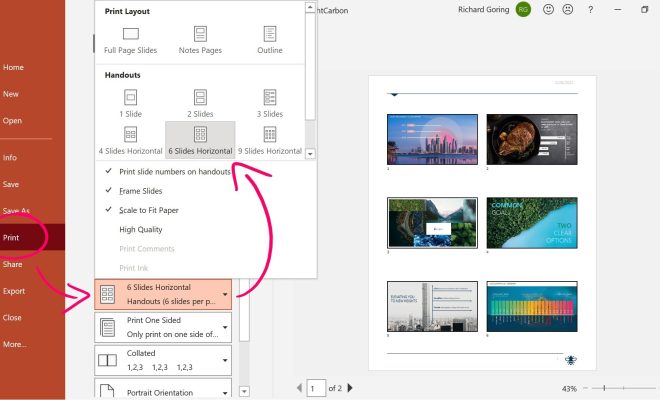
Click on the “File” tab in the top left corner of the screen and select “Print.”

Step 3:

In the print settings, you will see a “Settings” dropdown menu that will allow you to select the number of slides you wish to print on each page. Start by selecting “1 slide per page.”

Step 4:

Click on the dropdown menu beneath “Settings,” and choose the desired number of slides you want to print per page. For instance, if you choose “2 slides per page,” you will see a preview of what your printout will look like.

Step 5:

Check the preview to see that the slides are correctly positioned on the page and ensure that they are aligned correctly. You can adjust slide size and orientation under the “Settings” menu.

Step 6:

If you have already chosen the desired option, click on the “Print” button located at the bottom of the page. Once you click on “Print,” your slides will be printed on a single page.

You can also apply the same process if you want to print 4 slides or 6 slides on one page.

Finally, printing multiple slides on one page is an excellent way to save costs and time. You can opt for this option whenever you want, and the above steps will guide you on how to print multiple slides on one page in PowerPoint.


Previous Article

What Is a Service Pack?

Next Article

How to Mass Delete Images and Photos ...

Matthew Lynch

Related articles More from author

  • Digital & Mobile Technology

    How to Mirror Your iPhone to Roku

    April 30, 2023
    By Matthew Lynch
  • Digital & Mobile Technology

    Looking to Sell Your PS4? Where, Why You Should, and What You’ll Get for It

    June 26, 2023
    By Matthew Lynch
  • Digital & Mobile Technology

    How to Update Microsoft Outlook

    May 30, 2023
    By Matthew Lynch
  • Digital & Mobile Technology

    How to Bookmark on an iPad

    June 2, 2023
    By Matthew Lynch
  • Digital & Mobile Technology

    How to Find Someone With a First Name & City

    May 28, 2023
    By Matthew Lynch
  • Digital & Mobile Technology

    How to Watch Netflix on the Wii

    June 9, 2023
    By Matthew Lynch

Search

Login & Registration

  • Log in
  • Entries feed
  • Comments feed
  • WordPress.org

Newsletter

Signup for The Tech Edvocate Newsletter and have the latest in EdTech news and opinion delivered to your email address!

About Us

Since technology is not going anywhere and does more good than harm, adapting is the best course of action. That is where The Tech Edvocate comes in. We plan to cover the PreK-12 and Higher Education EdTech sectors and provide our readers with the latest news and opinion on the subject. From time to time, I will invite other voices to weigh in on important issues in EdTech. We hope to provide a well-rounded, multi-faceted look at the past, present, the future of EdTech in the US and internationally.

We started this journey back in June 2016, and we plan to continue it for many more years to come. I hope that you will join us in this discussion of the past, present and future of EdTech and lend your own insight to the issues that are discussed.

Newsletter

Signup for The Tech Edvocate Newsletter and have the latest in EdTech news and opinion delivered to your email address!

Contact Us

The Tech Edvocate
910 Goddin Street
Richmond, VA 23231
(601) 630-5238
[email protected]

Copyright © 2026 Matthew Lynch. All rights reserved.