The Tech Edvocate

Top Menu

  • Advertisement
  • Apps
  • Home Page
  • Home Page Five (No Sidebar)
  • Home Page Four
  • Home Page Three
  • Home Page Two
  • Home Tech2
  • Icons [No Sidebar]
  • Left Sidbear Page
  • Lynch Educational Consulting
  • My Account
  • My Speaking Page
  • Newsletter Sign Up Confirmation
  • Newsletter Unsubscription
  • Our Brands
  • Page Example
  • Privacy Policy
  • Protected Content
  • Register
  • Request a Product Review
  • Shop
  • Shortcodes Examples
  • Signup
  • Start Here
    • Governance
    • Careers
    • Contact Us
  • Terms and Conditions
  • The Edvocate
  • The Tech Edvocate Product Guide
  • Topics
  • Write For Us
  • Advertise

Main Menu

  • Start Here
    • Our Brands
    • Governance
      • Lynch Educational Consulting, LLC.
      • Dr. Lynch’s Personal Website
      • Careers
    • Write For Us
    • The Tech Edvocate Product Guide
    • Contact Us
    • Books
    • Edupedia
    • Post a Job
    • The Edvocate Podcast
    • Terms and Conditions
    • Privacy Policy
  • Topics
    • Assistive Technology
    • Child Development Tech
    • Early Childhood & K-12 EdTech
    • EdTech Futures
    • EdTech News
    • EdTech Policy & Reform
    • EdTech Startups & Businesses
    • Higher Education EdTech
    • Online Learning & eLearning
    • Parent & Family Tech
    • Personalized Learning
    • Product Reviews
  • Advertise
  • Tech Edvocate Awards
  • The Edvocate
  • Pedagogue
  • School Ratings

logo

The Tech Edvocate

  • Start Here
    • Our Brands
    • Governance
      • Lynch Educational Consulting, LLC.
      • Dr. Lynch’s Personal Website
        • My Speaking Page
      • Careers
    • Write For Us
    • The Tech Edvocate Product Guide
    • Contact Us
    • Books
    • Edupedia
    • Post a Job
    • The Edvocate Podcast
    • Terms and Conditions
    • Privacy Policy
  • Topics
    • Assistive Technology
    • Child Development Tech
    • Early Childhood & K-12 EdTech
    • EdTech Futures
    • EdTech News
    • EdTech Policy & Reform
    • EdTech Startups & Businesses
    • Higher Education EdTech
    • Online Learning & eLearning
    • Parent & Family Tech
    • Personalized Learning
    • Product Reviews
  • Advertise
  • Tech Edvocate Awards
  • The Edvocate
  • Pedagogue
  • School Ratings
  • Navigating the Challenges of Neurodiversity Support in Schools

  • The Best European Cities for Graduates to Live and Work

  • States With the Biggest School Enrollment Drops Revealed

  • Empowering Future Innovators: The Role of STEAM Education in Tribal Communities

  • The Personal Liability of Founders in AI Misrepresentation Cases

  • The Rise of Skilled Trades: A Viable Alternative to Traditional College Degrees

  • The Rise of U.S. Youth Soccer: A New Frontier for Investment

  • The Human Element in Language Learning: A Challenge with Preply

  • What Can Healthcare Engagement Learn From Sports Betting?

  • Addressing the Rise of Fatigue: Expert Insights from Patrice Bonfiglio

Digital & Mobile Technology
Home›Digital & Mobile Technology›The Best Router Settings for Home Networks

The Best Router Settings for Home Networks
By Matthew Lynch
June 4, 2023
0
Spread the love

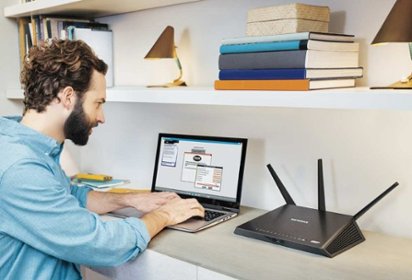
A home network is essential for most households, and choosing the right router settings can make a significant difference in the performance and security of your network. The settings can impact the speed of your internet connection, the security of your data, and the overall performance of your home network. In this article, we’ll discuss the best router settings for home networks that can help you enhance the performance and security of your network.

1. Change Default Network Name and Password

The first and most critical step in securing your home network is changing the default network name and password. Most routers have a default network name and password, and leaving it unchanged can make your network vulnerable to hacking or data theft. Changing your network name and password will make it harder for hackers to gain access to your network, and also helps to differentiate your network from others in your area.

2. Enable WPA2 Encryption

Wireless networks are inherently more vulnerable to hacking than wired networks; therefore, it’s essential to secure them using encryption. WPA2 is currently the most secure encryption standard, and it’s recommended that you enable it on your router’s settings. With WPA2, your routers and devices will communicate over a secure channel, and your data will be protected from prying eyes.

3. Quality of Service Settings

The Quality of Service (QoS) settings on your router help to prioritize bandwidth usage, and ensure that important applications get priority over others. For example, if you’re streaming a movie on Netflix while someone else is downloading large files, the QoS settings will give priority to your streaming activity. This ensures that your video stream is smooth and uninterrupted, and your download speed is not affected.

4. Enable Parental Controls Settings

Most modern routers come with built-in parental control settings that allow you to restrict access to specific websites or applications. This feature is particularly useful if you have children who may access inappropriate content online. With parental control settings, you can ensure that your children are safe online, and keep them from accessing sites that may have a negative impact on them.

5. Enable Guest Network

A guest network is a separate network that you can set up on your router, specifically for visitors to your home. With a guest network, your visitors can access the internet without accessing your primary network. This keeps your family’s devices and data secure, while still allowing your guests to use your internet connection.

Final Thoughts

Setting up your home network correctly is essential for optimal performance, speed, and security. In addition to the settings mentioned above, there are various other options you can configure on your router, depending on your needs. It’s vital that you keep your router firmware updated, as this ensures that your network is protected from the latest security vulnerabilities. By implementing these tips, you’ll improve your network’s performance and security, and ensure that your family’s data is always protected.

Previous Article

Why Your Carbon Monoxide Detector Is Beeping

Next Article

How to Fix It When Apple Maps ...

Matthew Lynch

Related articles More from author

  • Digital & Mobile Technology

    How to Change the Gmail Password on Your Android or iPhone

    June 12, 2023
    By Matthew Lynch
  • Digital & Mobile Technology

    How to Check If Your iPhone Was Refurbished

    May 29, 2023
    By Matthew Lynch
  • Digital & Mobile Technology

    Here Is Everything You Need to Know About Windows Product Keys

    June 21, 2023
    By Matthew Lynch
  • Digital & Mobile Technology

    Frequent Amazon Shopper? Here’s How to Get a $100 Amazon Gift Card

    February 3, 2024
    By Matthew Lynch
  • Digital & Mobile Technology

    How to Transfer Music From iPhone to iPhone

    June 10, 2023
    By Matthew Lynch
  • Digital & Mobile Technology

    Everything You Need to Know About Your Mac’s Dock

    June 21, 2023
    By Matthew Lynch

Search

Login & Registration

  • Log in
  • Entries feed
  • Comments feed
  • WordPress.org

Newsletter

Signup for The Tech Edvocate Newsletter and have the latest in EdTech news and opinion delivered to your email address!

About Us

Since technology is not going anywhere and does more good than harm, adapting is the best course of action. That is where The Tech Edvocate comes in. We plan to cover the PreK-12 and Higher Education EdTech sectors and provide our readers with the latest news and opinion on the subject. From time to time, I will invite other voices to weigh in on important issues in EdTech. We hope to provide a well-rounded, multi-faceted look at the past, present, the future of EdTech in the US and internationally.

We started this journey back in June 2016, and we plan to continue it for many more years to come. I hope that you will join us in this discussion of the past, present and future of EdTech and lend your own insight to the issues that are discussed.

Newsletter

Signup for The Tech Edvocate Newsletter and have the latest in EdTech news and opinion delivered to your email address!

Contact Us

The Tech Edvocate
910 Goddin Street
Richmond, VA 23231
(601) 630-5238
[email protected]

Copyright © 2026 Matthew Lynch. All rights reserved.