The Tech Edvocate

Top Menu

  • Advertisement
  • Apps
  • Home Page
  • Home Page Five (No Sidebar)
  • Home Page Four
  • Home Page Three
  • Home Page Two
  • Home Tech2
  • Icons [No Sidebar]
  • Left Sidbear Page
  • Lynch Educational Consulting
  • My Account
  • My Speaking Page
  • Newsletter Sign Up Confirmation
  • Newsletter Unsubscription
  • Our Brands
  • Page Example
  • Privacy Policy
  • Protected Content
  • Register
  • Request a Product Review
  • Shop
  • Shortcodes Examples
  • Signup
  • Start Here
    • Governance
    • Careers
    • Contact Us
  • Terms and Conditions
  • The Edvocate
  • The Tech Edvocate Product Guide
  • Topics
  • Write For Us
  • Advertise

Main Menu

  • Start Here
    • Our Brands
    • Governance
      • Lynch Educational Consulting, LLC.
      • Dr. Lynch’s Personal Website
      • Careers
    • Write For Us
    • The Tech Edvocate Product Guide
    • Contact Us
    • Books
    • Edupedia
    • Post a Job
    • The Edvocate Podcast
    • Terms and Conditions
    • Privacy Policy
  • Topics
    • Assistive Technology
    • Child Development Tech
    • Early Childhood & K-12 EdTech
    • EdTech Futures
    • EdTech News
    • EdTech Policy & Reform
    • EdTech Startups & Businesses
    • Higher Education EdTech
    • Online Learning & eLearning
    • Parent & Family Tech
    • Personalized Learning
    • Product Reviews
  • Advertise
  • Tech Edvocate Awards
  • The Edvocate
  • Pedagogue
  • School Ratings

logo

The Tech Edvocate

  • Start Here
    • Our Brands
    • Governance
      • Lynch Educational Consulting, LLC.
      • Dr. Lynch’s Personal Website
        • My Speaking Page
      • Careers
    • Write For Us
    • The Tech Edvocate Product Guide
    • Contact Us
    • Books
    • Edupedia
    • Post a Job
    • The Edvocate Podcast
    • Terms and Conditions
    • Privacy Policy
  • Topics
    • Assistive Technology
    • Child Development Tech
    • Early Childhood & K-12 EdTech
    • EdTech Futures
    • EdTech News
    • EdTech Policy & Reform
    • EdTech Startups & Businesses
    • Higher Education EdTech
    • Online Learning & eLearning
    • Parent & Family Tech
    • Personalized Learning
    • Product Reviews
  • Advertise
  • Tech Edvocate Awards
  • The Edvocate
  • Pedagogue
  • School Ratings
  • The Brutal Truth: Why K-12 Cybersecurity Needs More Than Just Awareness

  • The Unseen Threat: How K-12 Cybersecurity Training Is Quietly Reshaping Education

  • The Staggering Truth: K-12 Cybersecurity Education Is Failing – Here’s How to Fix It

  • Why Millions Are Ditching Degrees For This Career-Boosting Secret

  • 7 Crucial Micro-Credentials Boosting Recent Grads’ Salaries by 15%

  • The Brutal Truth: Why Your College Degree Isn’t Enough Anymore

  • The Ethical AI Auditor Boom: Why Salaries Are Skyrocketing Globally

  • This Crucial Skill Now Pays $150,000 Starting — Here’s How to Get Certified in 2024

  • This Unforeseen Tech Job Pays Six Figures — And You Can Start Today

  • One Stunning Reason Why Quantum Certifications Trump Traditional IT

Digital & Mobile Technology
Home›Digital & Mobile Technology›How to Fake a GPS Location on Your Phone

How to Fake a GPS Location on Your Phone
By Matthew Lynch
May 31, 2023
0
Spread the love

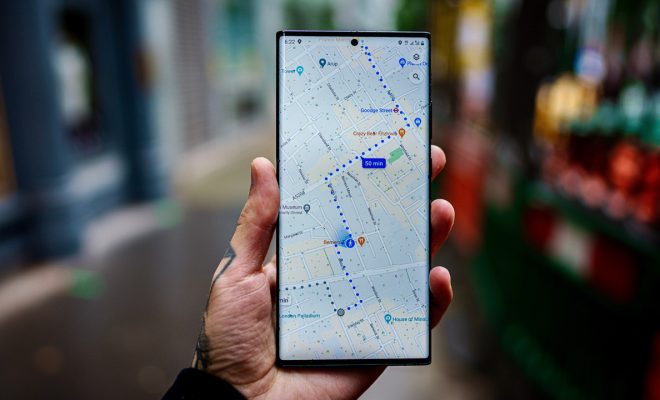
As technology advances, smartphones have become an essential part of our daily lives. With the increasing functionality of these devices, they have become smarter and more capable than ever before. One of the most exciting features of smartphones is GPS (Global Positioning System), which can track the movements of the user and their device. However, there are several reasons why you might need to fake a GPS location on your phone. It might be for privacy purposes or to access location-based services in various parts of the world. In this article, we are going to discuss how to fake a GPS location on your phone.

Option 1: Using the Android App “Fake GPS Location”

The “Fake GPS Location” app is a trusted and reliable application for Android devices, which enables you to fake your GPS location. Here are some simple steps to guide you on how to use the app:

– Download the app onto your Android device.

– Once loaded, open the application and scroll through the list of countries provided until you find the country or region you want to appear to be in.

– Then, press the “Start” button on the app and wait for it to establish a new GPS location for your Android device.

– You can then minimize or close the app and use your phone normally.

Option 2: Using a VPN

Another way to fake your GPS location is by using a Virtual Private Network (VPN). A VPN is an application that enables you to browse the internet securely and protect your privacy, while at the same time hiding your real IP address. Here is how you can use a VPN to fake your GPS location:

– Install a trusted VPN app on your smartphone from the app store.

– Open the VPN app and select a server from the location list to which you want to fake your GPS location.

– Once you’re connected to the server, your smartphone’s GPS location will appear in the new location you have selected.

– You can then close the app and use your phone as usual.

In conclusion, faking a GPS location on your phone is really quite easy with the right tools. By using any of the two methods discussed above, you’re able to fake your GPS location and access location-based services anywhere in the world without actually being there. However, it’s important to be aware of the risks involved in such behavior as it’s not encouraged or supported by some apps as it goes against their guidelines. It’s essential to use these tips responsibly and only to achieve legitimate purposes.

Previous Article

How to Make an Invisibility Potion in ...

Next Article

How to Make a Bullet Point on ...

Matthew Lynch

Related articles More from author

  • Digital & Mobile Technology

    What Is a PEF File?

    July 24, 2023
    By Matthew Lynch
  • Digital & Mobile Technology

    How to Connect AirPods to Kindle Fire

    July 5, 2023
    By Matthew Lynch
  • Digital & Mobile Technology

    Video Game Emulators You Can Use on Your Xbox Series X|S

    June 6, 2023
    By Matthew Lynch
  • Digital & Mobile Technology

    The Best Dark Web Websites You Won’t Find on Google

    August 5, 2023
    By Matthew Lynch
  • Digital & Mobile Technology

    How to Remote Access your Mac from an External Computer

    May 3, 2023
    By Matthew Lynch
  • Digital & Mobile Technology

    Chrome Canary: What It Is (and Who Needs It)

    June 12, 2023
    By Matthew Lynch

Search

Login & Registration

  • Log in
  • Entries feed
  • Comments feed
  • WordPress.org

Newsletter

Signup for The Tech Edvocate Newsletter and have the latest in EdTech news and opinion delivered to your email address!

About Us

Since technology is not going anywhere and does more good than harm, adapting is the best course of action. That is where The Tech Edvocate comes in. We plan to cover the PreK-12 and Higher Education EdTech sectors and provide our readers with the latest news and opinion on the subject. From time to time, I will invite other voices to weigh in on important issues in EdTech. We hope to provide a well-rounded, multi-faceted look at the past, present, the future of EdTech in the US and internationally.

We started this journey back in June 2016, and we plan to continue it for many more years to come. I hope that you will join us in this discussion of the past, present and future of EdTech and lend your own insight to the issues that are discussed.

Newsletter

Signup for The Tech Edvocate Newsletter and have the latest in EdTech news and opinion delivered to your email address!

Contact Us

The Tech Edvocate
910 Goddin Street
Richmond, VA 23231
(601) 630-5238
[email protected]

Copyright © 2026 Matthew Lynch. All rights reserved.