Create Your Ideal Home Office Setup: A Comprehensive Guide
“`html
With more people working from home than ever before, establishing an effective home office setup is crucial for productivity and well-being. Whether you’re a freelancer, a remote employee, or simply managing side projects, the right environment can make all the difference. In this guide, we’ll explore the top ten elements you need to consider when creating your ideal workspace.
1. Choose the Right Location
The first step in setting up your home office is selecting the best location. Your workspace should ideally be a quiet area that minimizes distractions. If space allows, consider a separate room specifically designed for work. However, if that’s not feasible, try to find a corner in your living area that can be dedicated to your office activities.
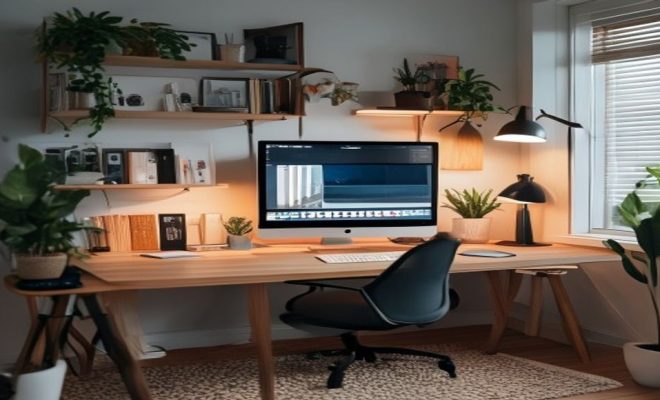
Additionally, think about natural light; a well-lit space can positively influence your mood and energy levels. If possible, position your desk near windows, but also consider glare on screens. It’s all about finding the right balance to create a comfortable environment.
2. Invest in Quality Furniture
Your home office setup should include comfortable and ergonomic furniture. A high-quality desk and chair can significantly impact your posture and overall health. Look for desks that accommodate your working style; options like standing desks can also be beneficial for those who prefer flexibility throughout their day.
Your chair should provide adequate support to your back and promote good posture. Brands like Herman Miller and Steelcase offer ergonomic options, but there are budget-friendly alternatives that still provide comfort. Don’t overlook the importance of a supportive chair; after all, you’ll be spending hours at your desk every day.
3. Optimize Your Technology
A functional home office setup must incorporate the right technology. Your computer should be reliable, and depending on your work requirements, you may need additional accessories such as a second monitor, keyboard, or mouse for improved efficiency. Having multiple screens can simplify multitasking by allowing you to view different applications simultaneously.
Moreover, ensure that your internet connection is fast and stable. Slow internet can be incredibly frustrating, especially during video calls or when trying to download large files. Consider upgrading your plan or investing in a good router to optimize your connectivity.
4. Implement Proper Lighting
Lighting is another critical aspect of any home office setup. A combination of natural and artificial light works best. While daylight is beneficial, you’ll need adequate lighting for evening work or cloudy days. Desk lamps that are adjustable can help illuminate your workspace without causing eye strain.
Consider using warm LED bulbs to create a cozy atmosphere. If your office space can accommodate it, a soft overhead light combined with task lighting from your desk can enhance the overall ambiance, making it inviting and functional.
5. Incorporate Plants and Personal Touches
Bringing in plants can vastly improve the mood of your home office setup. Research shows that greenery can reduce stress, increase productivity, and enhance creativity. Choose low-maintenance plants like succulents or spider plants if you’re worried about upkeep.
Additionally, personal touches such as photos, artwork, or motivational quotes can add character to your workspace. These small decorations can inspire and stimulate creativity, making your office feel more like your own.
6. Establish Clear Organization Systems
Organization is key in a home office. Invest in storage solutions such as filing cabinets, shelves, and desktop organizers. Keeping your workspace tidy not only helps with productivity but also minimizes stress. You’ll find it much easier to focus when everything has its place. (See: CDC on ergonomics in the workplace.)
Consider implementing a digital organization system as well. Tools like Trello, Asana, or even Google Drive can help you keep track of projects and deadlines. A clean workspace paired with an organized digital environment leads to a more efficient working experience.
7. Create a Schedule and Set Boundaries
One of the challenges of a home office setup is maintaining a work-life balance. Establishing a clear schedule can help separate work time from personal time. Aim for consistent start and end times to your workday, and don’t forget to schedule breaks to recharge.
Setting boundaries with family or housemates is equally important. Communicate your work hours to those in your household, so they know when you’re available and when you need uninterrupted focus. This clarity can help minimize distractions and interruptions.
8. Utilize Sound Management Techniques
Noise can be a significant distraction in a home office environment. If you find it challenging to concentrate, consider soundproofing your space or using noise-canceling headphones. Soft background music or ambient sounds can also create a conducive atmosphere.
Another effective strategy is to incorporate white noise machines or apps that can help mask disruptive sounds. This small investment can significantly enhance your productivity by creating a more peaceful working environment.
9. Prioritize Comfort and Ergonomics
Comfort is paramount in any home office setup. Ensure that your chair and desk height are adjusted to fit your body. Your monitor should be at eye level, and your wrists should be straight while typing. Taking these factors into account can prevent long-term health issues.
Additionally, consider using a footrest if your feet don’t comfortably reach the floor. Investing in ergonomic accessories, such as keyboard trays and wrist supports, can create a healthier workspace and improve your overall efficiency.
10. Stay Flexible and Adaptable
Finally, remember that your home office setup doesn’t have to be static. As you assess your productivity and comfort levels, be open to making adjustments. Whether it’s changing the layout, swapping furniture, or trying new organizational tools, continuously refining your workspace will help you create an environment that best supports your work.
11. Designing for Different Work Styles
Not everyone works the same way, and that’s perfectly okay. Your home office setup should reflect your personal work style. For instance, if you’re a visual learner, you might benefit from a large whiteboard or bulletin board for brainstorming and idea organization. Alternatively, tactile learners might prefer physical files and documents they can handle directly.
Consider how you like to operate. If you thrive on collaboration, think about setting up a space that facilitates virtual meetings and teamwork, perhaps including a large screen for video calls. A quiet nook might suit those who need solitude to concentrate on deep work. Understanding your unique work style can help you design a space that maximizes your effectiveness.
12. Color Psychology in Your Workspace
The colors you choose for your home office setup can significantly affect your mood and productivity. For example, blue hues are known to promote calm and focus, making them ideal for concentration-heavy tasks. On the other hand, yellows can stimulate creativity and energy, which might be beneficial for brainstorming sessions.
Consider painting an accent wall or incorporating these colors through decor, such as artwork or office supplies. The right color palette can transform your workspace into a motivating and cheerful environment that enhances your work experience.
13. Understanding the Importance of Breaks
One of the perks of a home office setup is the ability to take breaks at your leisure. However, it’s important to strategically time these breaks to maximize productivity. The Pomodoro Technique, which involves working for 25 minutes followed by a 5-minute break, is one approach that many find effective. After four cycles, take a longer break of 15 to 30 minutes. (See: New York Times on home office setups.)
Breaks not only refresh your mind but also help prevent burnout. Use this time to stretch, take a quick walk, or engage in a different activity that interests you. It’s amazing how a short change of scenery or task can rejuvenate your focus for the next work session.
14. Regularly Evaluate Your Setup
It’s easy to fall into a routine and overlook how your home office setup is performing for you. Schedule regular evaluations, perhaps monthly or quarterly, to assess what’s working and what isn’t. Are you comfortable? Is your setup helping or hindering your productivity? Make adjustments based on your evolving needs.
Don’t hesitate to reach out to experts or communities online for fresh ideas and inspiration. Sometimes a small tweak can lead to big improvements in your efficiency and satisfaction.
15. Addressing Common Challenges in Home Office Setups
While creating a perfect home office setup sounds ideal, you may face common challenges such as distractions from family members or pets, feelings of isolation, or even the struggle to motivate yourself without the structure of a traditional workplace.
To mitigate distractions, establish clear physical boundaries, such as a door or designated workspace, and communicate your needs to others. For feelings of isolation, consider scheduling regular virtual coffee breaks with colleagues or joining online communities that share your professional interests. Motivational strategies, like setting daily goals or rewarding yourself after completing tasks, can also help keep you engaged.
16. Green Office Initiatives
If you’re environmentally conscious, consider implementing green practices in your home office setup. This can include using sustainable materials for furniture, minimizing paper usage through digital documents, and investing in energy-efficient appliances. Not only do these practices help the planet, but they often lead to cost savings over time.
Additionally, using energy-efficient lighting like LED bulbs can significantly reduce your energy consumption. You may also want to incorporate a recycling system for any waste generated, further contributing to a healthier environment.
17. Frequently Asked Questions
What is the most important part of a home office setup?
The most important part of a home office setup can vary from person to person, but generally, ergonomic furniture and a comfortable workspace are critical. A good chair and desk that promote good posture can make a significant difference in your overall comfort and productivity.
How do I stay motivated while working from home?
To stay motivated while working from home, create a structured schedule, set specific goals for each day, and take regular breaks. Also, ensure your workspace is inspiring and free from distractions. Engaging in virtual social interactions can also help maintain motivation.
How can I minimize distractions in my home office?
Minimizing distractions can involve setting boundaries with housemates or family, using noise-canceling headphones, or creating a dedicated workspace that signals to others when you’re unavailable. You can also use apps that block distracting websites while you work.
How often should I re-evaluate my home office setup?
Regular evaluations every month or quarter can help you determine if your setup is still meeting your needs. It’s essential to adjust as your work habits, tasks, or even physical comfort levels change over time.
What are some budget-friendly home office setup ideas?
Budget-friendly ideas include repurposing furniture you already own, shopping at thrift stores for second-hand items, and using free digital tools for organization. Simple adjustments like adding plants or decorative items can also enhance your space without costing much. (See: WHO on health and environment.)
How do I create a home office setup in a small space?
In a small space, consider a compact desk or a wall-mounted desk to save room. Utilize vertical storage solutions to maximize storage without taking up much floor space. Multi-functional furniture, like an ottoman with storage, can also help utilize space intelligently.
18. Setting Up for Remote Collaboration
As remote work becomes increasingly common, it’s important to design your home office setup for collaboration. This may involve investing in high-quality webcams and microphones to ensure clear communication with colleagues during video calls. Look for tools that connect easily with your computer and have good audio and video quality.
Incorporating a large monitor or even a smart TV can enhance collaborative efforts, allowing you to share your screen for presentations or brainstorming sessions. Virtual collaboration platforms such as Zoom, Microsoft Teams, or Slack can facilitate effective communication and project management, helping you stay connected with your team regardless of where you are.
19. Creating a Dual-Function Space
For those who may not have the luxury of a dedicated office room, your home office setup can also serve other functions. If you’re combining work and leisure in the same space, make sure to clearly define your work area. You can achieve this by using rugs to delineate spaces or by incorporating adjustable furniture that can easily transition from work mode to relaxation mode.
This dual-functionality can be a great way to make use of limited space. For example, a foldable desk can be tucked away when not in use, allowing the area to be transformed into a cozy reading nook or creative space. It helps to keep your workspace organized while also ensuring that you have a relaxing area to unwind after work hours.
20. Long-Term Investment in Your Workspace
Think of your home office setup as a long-term investment. High-quality furniture and equipment may come with a higher upfront cost, but they often prove more durable and supportive in the long run. Investing in items like an ergonomic chair or a sturdy desk can lead to increased productivity and comfort over time, ultimately enhancing your work life.
Additionally, keep in mind that trends in home office design evolve. While it’s important to create a setup that works for you now, don’t shy away from incorporating elements that reflect your personality and can evolve with your tastes. A smart investment now can pay off in improved productivity and a more enjoyable workspace for years to come.
In summary, establishing a productive home office setup involves thoughtful consideration of location, furniture, technology, and personal preferences. By following these essential tips, you can create a workspace that enhances your productivity and well-being, making remote work a more enjoyable experience.
“`
Trending Now
Frequently Asked Questions
What are the essential elements of a home office setup?
The essential elements of a home office setup include choosing the right location, investing in quality furniture, optimizing your technology, ensuring good lighting, and minimizing distractions. Each of these components contributes to creating a productive and comfortable workspace tailored to your needs.
How can I make my home office more productive?
To enhance productivity in your home office, select a quiet location, invest in ergonomic furniture, and optimize your technology. Additionally, ensure good lighting and minimize distractions by setting boundaries with others in your home.
What kind of furniture do I need for a home office?
For a home office, invest in a comfortable, ergonomic chair and a suitable desk that fits your work style. Consider options like standing desks for flexibility, and prioritize furniture that supports good posture to promote health during long work hours.
How important is lighting in a home office?
Lighting is crucial in a home office as it affects your mood and energy levels. Natural light is ideal, so position your desk near windows if possible. However, be mindful of glare on screens and consider additional lighting options to ensure a well-lit workspace.
What technology do I need for a home office?
A functional home office requires a reliable computer, and depending on your work, you may need accessories like a second monitor, keyboard, and mouse. Ensuring your technology is up-to-date can greatly enhance your efficiency and comfort while working.
Have you experienced this yourself? We’d love to hear your story in the comments.