How to make Alexa stop listening
“`html
1. Understanding Alexa’s Listening Capabilities
Amazon’s Alexa, a voice-activated assistant, has revolutionized the way we interact with technology. However, with great convenience comes significant privacy concerns. Alexa is designed to listen for wake words, typically ‘Alexa’ but can also be customized. This means that as long as it’s plugged in, it’s passively listening for your commands, which can lead to unease about potential eavesdropping.
Many fear that Alexa records conversations inadvertently, raising questions about data security and personal privacy. Understanding how Alexa processes voice commands helps demystify its operations. When the device hears its wake word, it starts recording, sending those audio snippets to Amazon’s servers for processing. However, it’s crucial to know that recordings are stored and can be accessed later, which leads us to the vital question: How to stop Alexa from listening?
2. Adjusting Your Device Settings
The first step in taking control of your Alexa device is to adjust its settings through the Alexa app. Open the app and navigate to ‘Settings,’ then select ‘Device Settings’ to choose the specific Alexa device you want to modify. Here, you can turn off the microphone or adjust the sensitivity of the wake word detection.
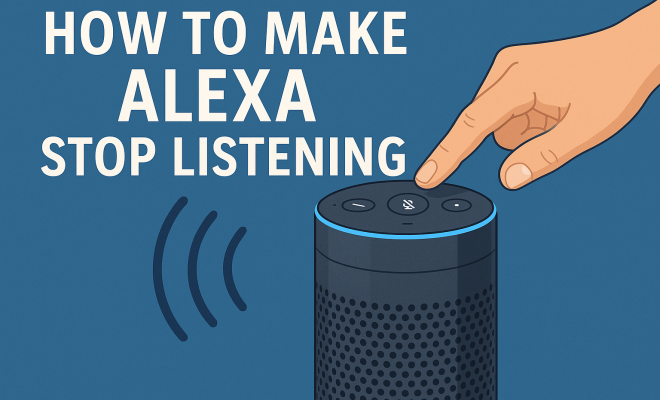
Disabling the microphone is a straightforward approach to ensure that Alexa doesn’t listen unless you specifically enable it. This can be done by either pressing the microphone button on the device or through the app. This manual control gives you a sense of security, knowing that Alexa isn’t actively listening unless you want it to.
3. Utilizing the ‘Alexa Privacy’ Features
Amazon has recognized the public’s growing concerns about privacy and has incorporated several features to help users manage their Alexa experience. In the ‘Settings’ section of the Alexa app, you can find ‘Alexa Privacy,’ which allows you to review and manage your voice recordings. Here you can delete voice history, a crucial step in ensuring your conversations remain private.
Additionally, you can toggle settings that control whether Alexa saves your voice recordings at all. By opting out of saving these recordings, you minimize the data that could potentially be accessed by third parties. This is a proactive measure to help ensure your private conversations stay private.
4. Disconnecting Alexa from Wi-Fi When Not in Use
One of the most effective methods for ensuring that your Alexa device isn’t listening is to disconnect it from the internet when it’s not in use. Simply turning off the Wi-Fi can effectively render the device non-operational for voice commands. This can be inconvenient but guarantees maximum privacy.
For users who prefer not to go through the hassle of disconnecting Wi-Fi, consider setting up a smart plug that can control power to your Alexa device. This way, you can power down the device when you want some quiet, effectively stopping it from listening altogether while still having the functionality available when needed.
5. Adjusting Voice Recordings and Data Sharing Settings
To further enhance your privacy, adjust the data sharing settings in the Alexa app. Amazon offers an option to limit the amount of data shared with third-party services. This is an excellent way to control who has access to your information. Go to ‘Settings’ > ‘Account Settings’ > ‘Amazon Privacy’ to manage these options.
Consider turning off personalized ads and limiting access to your data for third-party applications. While this may affect the level of personalization Alexa provides, it significantly reduces the number of eyes on your data, allowing you to maintain a sense of security.
6. Turning Off Voice Purchasing
Another layer of privacy control involves turning off voice purchasing. This feature allows you to buy products simply by voice command, but it can also lead to accidental purchases if Alexa misunderstands your commands. Go to ‘Settings’ > ‘Account Settings’ > ‘Voice Purchasing’ and toggle the setting off. (See: Amazon Alexa overview on Wikipedia.)
By disabling voice purchasing, you not only prevent unwanted purchases but also ensure that your device is not actively processing commands that could be misinterpreted. This step may seem simple, but it adds an extra layer of security to your Alexa experience.
7. Exploring Alternative Solutions
If you’re still uncomfortable with Alexa’s capabilities despite taking these measures, consider alternative smart home assistants that prioritize privacy. Devices like Apple’s HomePod or Google’s Nest Hub offer similar functionalities while placing a stronger emphasis on user control over privacy settings.
Moreover, you can explore options like using your smartphone’s virtual assistant instead of a dedicated device, allowing you to maintain control over when and how you engage with voice technology. Ultimately, evaluating your options can lead you to a solution that feels right for you and your privacy concerns.
8. Additional Privacy Controls You Can Implement
In addition to the steps mentioned, there are a few more privacy controls you can implement to better secure your Alexa device. One effective practice is regularly reviewing your Alexa app for updates. Amazon is continuously improving its privacy features, so keeping the app updated ensures you’re benefiting from the latest security enhancements.
You might also want to explore the ‘Voice ID’ feature that Amazon offers. This feature allows Alexa to distinguish between different users in your household by their voice, providing personalized responses. However, be mindful of how this feature interacts with privacy settings, as it may store additional voice data.
9. Understanding Data Collection and Usage
It’s essential to understand what data Alexa collects and how it’s used. Amazon states that the voice recordings contribute to improving the Alexa experience, including better speech recognition and more accurate responses. However, this does raise questions about how long this data is stored and how it could potentially be used in the future.
Amazon claims it uses anonymization techniques to protect user data, but there have been instances where data has been misused. For example, in 2020, a report indicated that Amazon employees had access to voice recordings for quality control purposes. Such news can create apprehension regarding data handling practices.
10. Statistics on Voice Assistant Usage and Privacy Concerns
To better illustrate the current landscape of voice assistant technology, let’s look at some statistics. According to a 2023 survey by Statista, around 60% of U.S. adults own a smart speaker, with Alexa being the most popular choice. However, research by Pew Research Center indicates that 70% of smart speaker users have concerns about their privacy and data security.
These statistics reflect a growing unease among consumers. As more people integrate smart technology into their lives, awareness and education around privacy settings are becoming increasingly vital. It’s important to remain informed about any changes in policies or new features that could affect your privacy.
11. Real User Experiences
Hearing from real users can provide valuable insights into the practical implications of using Alexa. For instance, many users report feeling uneasy about how often the device activates unintentionally, leading to concerns about unintentional recordings. One user shared a story about how their Alexa device mistakenly activated during a family gathering, capturing private conversations that were later reviewed by Amazon for quality assurance.
Such experiences underline the importance of understanding how to stop Alexa from listening and implementing the necessary privacy measures. Many users echo the sentiment that while the convenience of voice commands is appealing, the potential for privacy invasions is a significant trade-off.
12. Frequently Asked Questions
How do I know if Alexa is listening?
Alexa indicates that it is listening by lighting up with a blue ring. If the device is actively processing a command, you’ll see a light ring that turns orange. If you want to ensure Alexa isn’t listening, make sure the microphone is turned off, which disables voice recognition. (See: CDC on telecommuting and technology use.)
Can I delete all my voice recordings?
Yes, you can delete all your voice recordings by going into the Alexa app, navigating to ‘Settings,’ then ‘Alexa Privacy.’ From there, you can choose the option to ‘Delete All Voice Recordings.’ This feature allows you to delete your recordings in bulk and manage your privacy more effectively.
Can Alexa be hacked?
Like any internet-connected device, Alexa can potentially be vulnerable to hacking. However, Amazon employs various security measures to protect user data. It’s crucial to set strong passwords for your Amazon account and enable two-factor authentication to enhance security further.
What are some alternatives to Alexa?
Some popular alternatives to Alexa include Google Assistant, Apple’s Siri, and Microsoft’s Cortana. Each of these alternatives offers different privacy features and user experiences, so it’s worth researching which one aligns best with your privacy preferences.
Is it safe to use Alexa in my home?
Using Alexa can be safe if you implement the necessary privacy measures. Taking proactive steps such as disabling the microphone, reviewing privacy settings, and keeping the device updated can help mitigate risks associated with privacy concerns. Ultimately, it comes down to your comfort level with using voice technology.
13. The Impact of Smart Home Devices on Privacy
As smart home devices become more commonplace, the overall landscape of privacy is changing. While Alexa offers conveniences, it also represents a shift in how data is collected and used. Smart devices can collect vast amounts of data, from your daily routines to your preferences, leading to a wealth of information that can be analyzed for marketing and development purposes.
Consider the implications: your smart speaker can share insights on when you’re home, what you often listen to, and even your shopping habits based on voice commands. This data collection raises ethical questions about user consent and the extent of surveillance in your own home. Understanding these implications is crucial for making informed decisions about the smart devices in your life.
14. Expert Perspectives on Alexa and Privacy
Experts in technology and data privacy have raised various points regarding the use of smart assistants like Alexa. Privacy advocates highlight the need for transparency from companies regarding data collection. According to data privacy expert and author, Dr. Ann Cavoukian, “Users should have a clear understanding of what data is collected, how it is used, and the opportunity to opt-out.” This reflects the core principle of privacy by design, which advocates for user control over personal data.
Moreover, tech experts suggest that users should be proactive about their privacy settings, regularly reviewing them as part of their digital hygiene. Dr. Michael Farah, a cybersecurity researcher, advises that users should think critically about the devices they bring into their homes and consider how much trust they are willing to place in them.
15. Privacy Regulations and Smart Devices
As concerns about privacy grow, so do regulations aimed at protecting consumer data. In the European Union, the General Data Protection Regulation (GDPR) sets strict guidelines on how companies can collect and use personal data. Such regulations emphasize the right of individuals to access, modify, and delete their data, which could influence how companies like Amazon operate.
In the U.S., various states are proposing or implementing their own privacy laws, which could impact how devices like Alexa handle personal information. As this landscape evolves, users should stay informed about their rights and the obligations of companies in relation to data privacy. (See: New York Times article on Alexa privacy.)
16. Tips for Secure Smart Home Living
To enhance security and privacy in your smart home, consider the following tips:
- Change Default Passwords: Always change default passwords on smart devices to unique and complex ones.
- Segment Your Network: Use a separate Wi-Fi network for your smart devices to limit access to your primary devices and data.
- Keep Software Updated: Regularly updating your devices ensures you have the latest security patches and features.
- Utilize Two-Factor Authentication: Enable two-factor authentication on accounts associated with your devices for an extra layer of security.
- Regularly Audit Your Devices: Periodically review the devices connected to your network and their associated permissions.
Implementing these strategies can greatly reduce risks and enhance your overall smart home experience.
17. The Future of Voice Technology and Privacy
Looking ahead, the future of voice technology and its intersection with privacy is poised for significant change. As artificial intelligence continues to evolve, we can expect advancements that improve user control and privacy settings. Companies may introduce more robust options that allow users to manage their data transparently and securely.
For example, developments in localized processing may allow devices to process commands without sending data to the cloud, thereby reducing privacy concerns. Additionally, as consumers demand more accountability, companies will likely respond with clearer privacy policies and enhanced user control over data collection.
Staying informed about these developments can help you make empowered choices regarding the smart technologies you integrate into your life. Embracing the benefits of innovation while advocating for privacy will be essential in this rapidly evolving landscape.
Conclusion: Empowering Your Privacy Choices
In a world where voice assistants are becoming ubiquitous, ensuring privacy should be at the forefront of your mind. Knowing how to stop Alexa from listening provides you with the knowledge and tools to take control of your interactions with technology. Whether through device settings, data management, or exploring alternatives, you have the power to protect your personal space.
Ultimately, understanding the technology you invite into your home is crucial. By taking these proactive steps, you secure your privacy while still enjoying the conveniences modern technology offers.
“`
Trending Now
Frequently Asked Questions
How do I stop Alexa from listening to me?
To stop Alexa from listening, you can disable the microphone on your device. This can be done by pressing the microphone button or through the Alexa app by navigating to 'Settings' and adjusting 'Device Settings' for your specific Alexa device.
Can I turn off Alexa's voice recording feature?
Yes, you can manage Alexa's voice recordings through the 'Alexa Privacy' section in the Alexa app. Here, you can review, delete recordings, and adjust settings to enhance your privacy.
What happens when I disable the microphone on Alexa?
Disabling the microphone on Alexa prevents the device from listening for the wake word. This ensures that Alexa will only respond when you manually enable the microphone, providing you with more control over your privacy.
Is Alexa always listening?
Alexa is designed to listen for its wake word, meaning it remains in a passive listening mode until activated. However, you can turn off the microphone to ensure it doesn't listen at all unless you choose to enable it.
How can I change Alexa's wake word?
To change Alexa's wake word, open the Alexa app, go to 'Settings,' select 'Device Settings,' choose your device, and then find the option to change the wake word. This allows for customization according to your preferences.
Agree or disagree? Drop a comment and tell us what you think.