The Tech Edvocate

Top Menu

  • Advertisement
  • Apps
  • Home Page
  • Home Page Five (No Sidebar)
  • Home Page Four
  • Home Page Three
  • Home Page Two
  • Home Tech2
  • Icons [No Sidebar]
  • Left Sidbear Page
  • Lynch Educational Consulting
  • My Account
  • My Speaking Page
  • Newsletter Sign Up Confirmation
  • Newsletter Unsubscription
  • Our Brands
  • Page Example
  • Privacy Policy
  • Protected Content
  • Register
  • Request a Product Review
  • Shop
  • Shortcodes Examples
  • Signup
  • Start Here
    • Governance
    • Careers
    • Contact Us
  • Terms and Conditions
  • The Edvocate
  • The Tech Edvocate Product Guide
  • Topics
  • Write For Us
  • Advertise

Main Menu

  • Start Here
    • Our Brands
    • Governance
      • Lynch Educational Consulting, LLC.
      • Dr. Lynch’s Personal Website
      • Careers
    • Write For Us
    • The Tech Edvocate Product Guide
    • Contact Us
    • Books
    • Edupedia
    • Post a Job
    • The Edvocate Podcast
    • Terms and Conditions
    • Privacy Policy
  • Topics
    • Assistive Technology
    • Child Development Tech
    • Early Childhood & K-12 EdTech
    • EdTech Futures
    • EdTech News
    • EdTech Policy & Reform
    • EdTech Startups & Businesses
    • Higher Education EdTech
    • Online Learning & eLearning
    • Parent & Family Tech
    • Personalized Learning
    • Product Reviews
  • Advertise
  • Tech Edvocate Awards
  • The Edvocate
  • Pedagogue
  • School Ratings

logo

The Tech Edvocate

  • Start Here
    • Our Brands
    • Governance
      • Lynch Educational Consulting, LLC.
      • Dr. Lynch’s Personal Website
        • My Speaking Page
      • Careers
    • Write For Us
    • The Tech Edvocate Product Guide
    • Contact Us
    • Books
    • Edupedia
    • Post a Job
    • The Edvocate Podcast
    • Terms and Conditions
    • Privacy Policy
  • Topics
    • Assistive Technology
    • Child Development Tech
    • Early Childhood & K-12 EdTech
    • EdTech Futures
    • EdTech News
    • EdTech Policy & Reform
    • EdTech Startups & Businesses
    • Higher Education EdTech
    • Online Learning & eLearning
    • Parent & Family Tech
    • Personalized Learning
    • Product Reviews
  • Advertise
  • Tech Edvocate Awards
  • The Edvocate
  • Pedagogue
  • School Ratings
  • Shocking Truth: The Real Cost of Building Data Centers No One Talks About

  • The Unseen War: How Unionization Is Quietly Reshaping Tech Jobs

  • The Unseen War: Why Data Center Jobs Are Sparking a Political Firestorm

  • The Next Big Shake-Up: 10 PropTech Startups Poised for Acquisition in 2026

  • How to Leverage AI-Powered Tools for Real Estate Transactions in 2026

  • This One Tech Trend Is Quietly Reshaping Real Estate by 2026

  • The Shocking Truth About Duck Creek vs Reserv: Is One Quietly Dominating AI Insurance?

  • The AI Revolution: 10 Platforms Fixing Insurance Claims Forever

  • This One Change Is Quietly Revolutionizing Insurance for Millions

  • The Mind-Blowing Battle: Space Solar Power vs. Traditional Renewables – Which Will Power Our Future?

Google ClassroomGoogle Classroom Tips
Home›Google Classroom›What is Google Classroom?

What is Google Classroom?
By Matthew Lynch
August 3, 2020
0
Spread the love

Google Classroom is an interactive collaboration app for educators and learners that can be used through the web or on a mobile device. It provides an online platform to make digital learning more organized and streamlined. It consists of four sections that each have distinctive features and purposes:
⦁ Google Classroom offers a live “Class Stream,” where educators can make important announcements and students can see what assignments have been posted. This is the go-to place for educators to post messages or share information in the form of a link, video, or document.
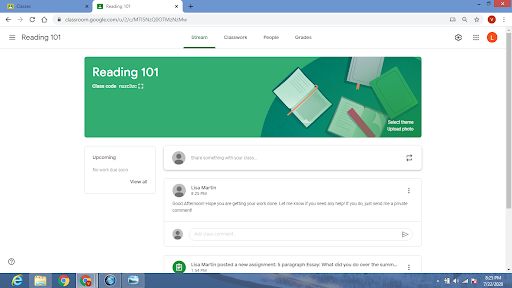
⦁ Under the section titled “Classwork“, educators can post assignments or quizzes, share educational material, or ask a question to the Class.

⦁ The “People” section will provide the name of the teachers and a list of all the students enrolled in the Class. This is where you would go to send an email to a student or guardian, as well as check to see what assignments a particular student has turned in by clicking on their name.

⦁ The “Grades” section, which is only for educator’s accounts, provides a quick and easy format to assign grades to students for each assignment you create.
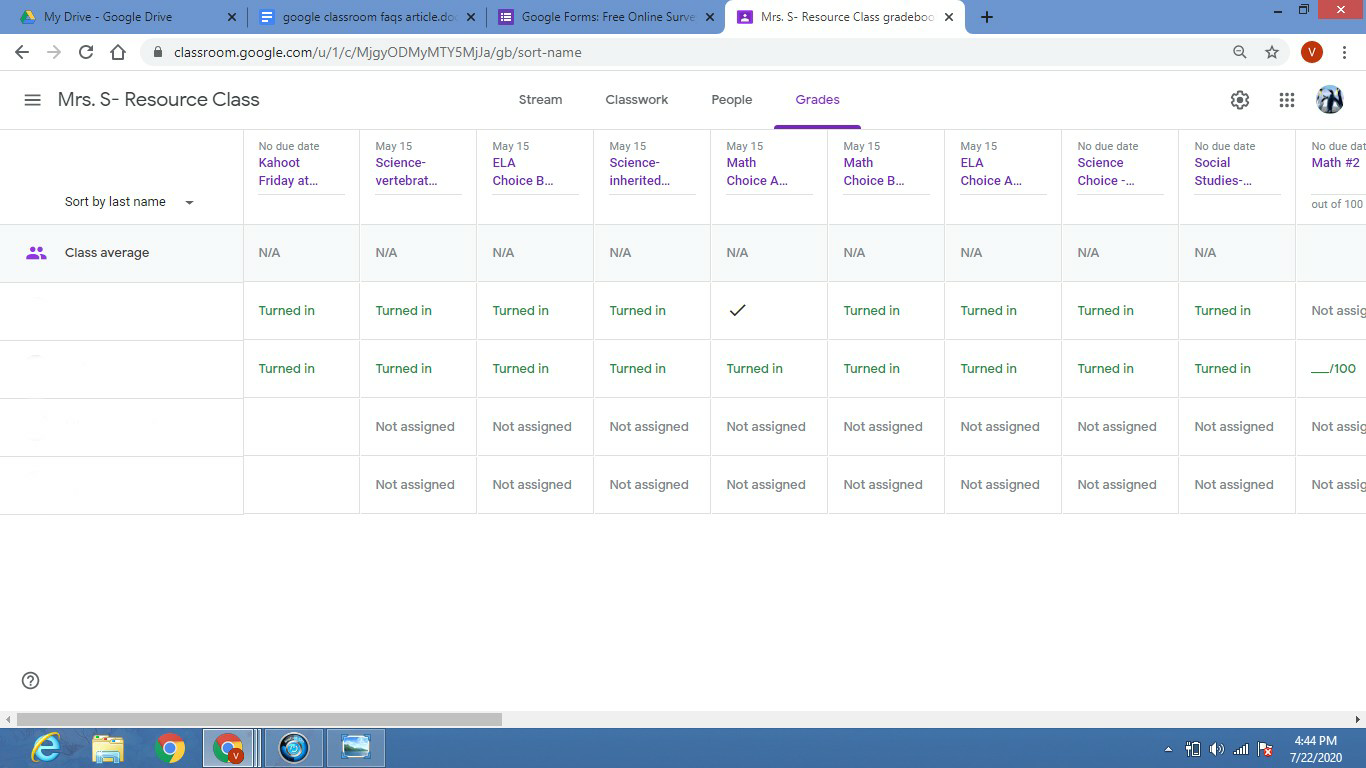
The app also automatically develops Drive folders for each assignment, Class, and learner. This handy feature provides a central location for all of your Classroom files, including any digital materials you shared, each assignment that has been created, and completed student work. This helps to keep you organized and frees up your time so that you can concentrate on more important things.

Google Classroom’s time-saving elements contain:
⦁ One-click copies: Instead of having to recreate new documents for each learner, you can make a copy of a Google Doc for every learner in your Class with just one click of a button.
⦁ Assignment and grade management: With this app, you can assign due dates for each assignment and return grades quickly and efficiently. You also have the option to select no due date so that students can take their time without pressure. Once you have graded an assignment, you can return it to the student, which allows them to immediately view their grade as well as any written feedback you have provided.
⦁ Progress monitoring: Check which learners have completed an assignment at a glance by clicking on the assignment link. This will show you how many students turned it in, and who is missing their work. You can also go to the “People” section and click on an individual student’s name to see which assignments are assigned to them, and what work they have completed.
⦁ Instant feedback: Comment directly on shared documents and learner posts to provide timely feedback. There also is an option to leave a comment on any assignment that has been turned in so that you can provide positive praise for a job well done, or provide tips for necessary corrections.

Have G Suite for Education but cannot access Classroom? Ask your admin to enable it!

Previous Article

A 2022 Definition of Edtech

Next Article

What is G Suite for Education?

Matthew Lynch

Related articles More from author

  • Early Childhood & K-12 EdTechGoogle ClassroomHigher Education EdTech

    Google Classroom Integrated Similarity Detector

    September 18, 2018
    By Matthew Lynch
  • Google Classroom Tips

    Google Classroom Tip #6: Have Your Students to Create Animations

    November 13, 2018
    By Matthew Lynch
  • Google ClassroomGoogle Classroom Tips

    How Do I Share Assignments With Multiple Classes in Google Docs?

    September 2, 2020
    By Matthew Lynch
  • Google Classroom Tips

    Google Classroom Tip #20: Community Outreach

    November 21, 2018
    By Matthew Lynch
  • Google ClassroomGoogle Classroom Tips

    Why is Google Classroom So Popular?

    September 24, 2020
    By Matthew Lynch
  • Google ClassroomGoogle Classroom Tips

    How Does My Child Access Google Classroom?

    September 29, 2020
    By Matthew Lynch

Search

Login & Registration

  • Log in
  • Entries feed
  • Comments feed
  • WordPress.org

Newsletter

Signup for The Tech Edvocate Newsletter and have the latest in EdTech news and opinion delivered to your email address!

About Us

Since technology is not going anywhere and does more good than harm, adapting is the best course of action. That is where The Tech Edvocate comes in. We plan to cover the PreK-12 and Higher Education EdTech sectors and provide our readers with the latest news and opinion on the subject. From time to time, I will invite other voices to weigh in on important issues in EdTech. We hope to provide a well-rounded, multi-faceted look at the past, present, the future of EdTech in the US and internationally.

We started this journey back in June 2016, and we plan to continue it for many more years to come. I hope that you will join us in this discussion of the past, present and future of EdTech and lend your own insight to the issues that are discussed.

Newsletter

Signup for The Tech Edvocate Newsletter and have the latest in EdTech news and opinion delivered to your email address!

Contact Us

The Tech Edvocate
910 Goddin Street
Richmond, VA 23231
(601) 630-5238
[email protected]

Copyright © 2026 Matthew Lynch. All rights reserved.