
The Tech Edvocate

Top Menu

  • Advertisement
  • Apps
  • Home Page
  • Home Page Five (No Sidebar)
  • Home Page Four
  • Home Page Three
  • Home Page Two
  • Home Tech2
  • Icons [No Sidebar]
  • Left Sidbear Page
  • Lynch Educational Consulting
  • My Account
  • My Speaking Page
  • Newsletter Sign Up Confirmation
  • Newsletter Unsubscription
  • Our Brands
  • Page Example
  • Privacy Policy
  • Protected Content
  • Register
  • Request a Product Review
  • Shop
  • Shortcodes Examples
  • Signup
  • Start Here
    • Governance
    • Careers
    • Contact Us
  • Terms and Conditions
  • The Edvocate
  • The Tech Edvocate Product Guide
  • Topics
  • Write For Us
  • Advertise

Main Menu

  • Start Here
    • Our Brands
    • Governance
      • Lynch Educational Consulting, LLC.
      • Dr. Lynch’s Personal Website
      • Careers
    • Write For Us
    • The Tech Edvocate Product Guide
    • Contact Us
    • Books
    • Edupedia
    • Post a Job
    • The Edvocate Podcast
    • Terms and Conditions
    • Privacy Policy
  • Topics
    • Assistive Technology
    • Child Development Tech
    • Early Childhood & K-12 EdTech
    • EdTech Futures
    • EdTech News
    • EdTech Policy & Reform
    • EdTech Startups & Businesses
    • Higher Education EdTech
    • Online Learning & eLearning
    • Parent & Family Tech
    • Personalized Learning
    • Product Reviews
  • Advertise
  • Tech Edvocate Awards
  • The Edvocate
  • Pedagogue
  • School Ratings

logo

The Tech Edvocate

  • Start Here
    • Our Brands
    • Governance
      • Lynch Educational Consulting, LLC.
      • Dr. Lynch’s Personal Website
        • My Speaking Page
      • Careers
    • Write For Us
    • The Tech Edvocate Product Guide
    • Contact Us
    • Books
    • Edupedia
    • Post a Job
    • The Edvocate Podcast
    • Terms and Conditions
    • Privacy Policy
  • Topics
    • Assistive Technology
    • Child Development Tech
    • Early Childhood & K-12 EdTech
    • EdTech Futures
    • EdTech News
    • EdTech Policy & Reform
    • EdTech Startups & Businesses
    • Higher Education EdTech
    • Online Learning & eLearning
    • Parent & Family Tech
    • Personalized Learning
    • Product Reviews
  • Advertise
  • Tech Edvocate Awards
  • The Edvocate
  • Pedagogue
  • School Ratings
  • Unmasking the Troubling Truth About EU’s Digital Omnibus and Your Data

  • Outrageous: Your US Car Insurance 2026 Bill Is About to Explode – Here’s Why

  • Uncovering the Truth: Are AI Spending Concerns About to Tank Your Portfolio?

  • The Silent Revolution: How AI Property Valuation Is Quietly Reshaping Real Estate

  • The Astonishing Truth: Why Your Dream Car Is Now a $52,000 Illusion

  • Toxic Algorithms: Why Your Bank’s AI Could Cost You Everything

  • OpenAI’s GPT-6 Cyber: A Dangerous New AI Threat or Our Ultimate Digital Guardian?

  • This Game-Changing Natural Ozempic Alternative Just Blew Up on Social Media

  • Bónuszösszeg, ingyen pörgetés és befizetési feltétel: üdvözlő és befizetés nélküli kaszinóajánlatok magyar játékosoknak

  • 9 Critical Reasons Why Athexio Might Be The Investment You Need (Or Should Avoid)

Tech Advice
Home›Tech Advice›‘This PC can’t run Windows 11’: How to fix this error

‘This PC can’t run Windows 11’: How to fix this error
By Matthew Lynch
July 13, 2023
0
Spread the love

Introduction:

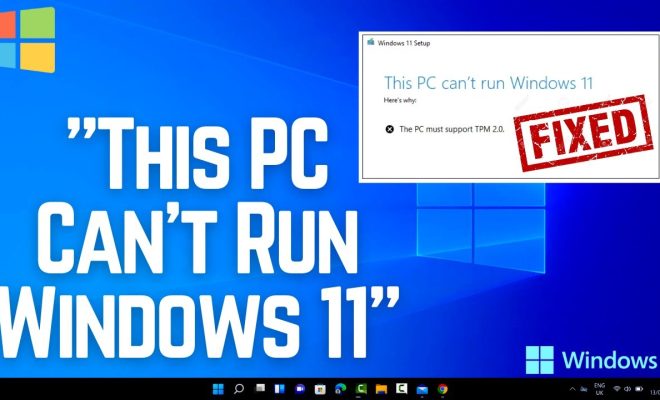
Upgrading to the latest operating system always comes with its challenges. The Windows 11 update is no exception. Users may be encountering a problem where their PC cannot run Windows 11. This article presents potential solutions to fix this error so you can enjoy the new features of Windows 11.

1. Check System Requirements:

First, make sure your PC meets the minimum system requirements for Windows 11. These include a compatible 64-bit processor, 4 GB of RAM, and 64 GB of storage. Additionally, your device should have UEFI firmware with Secure Boot capability and TPM version 2.0.

2. Update Device Drivers:

Outdated device drivers might prevent a successful upgrade to Windows 11. Visit your PC manufacturer’s website or use the Device Manager to identify and download the latest compatible drivers for your hardware components.

3. Enable TPM and Secure Boot:

Windows 11 requires TPM (Trusted Platform Module) version 2.0 and Secure Boot enabled in your system BIOS/UEFI settings. Access your motherboard’s settings during startup (by pressing F2, Del, or Esc key), locate these options, and enable them.

4. Use Microsoft PC Health Check Tool:

Microsoft has released a PC Health Check Tool that evaluates your computer’s compatibility with Windows 11. Download and run this tool; it will automatically identify any issues and suggest possible solutions.

5. Perform a Clean Installation:

If upgrading from an existing installation causes problems, consider performing a clean install instead. Back up your important files and create bootable Windows 11 installation media using the Media Creation Tool from the Microsoft website.

6. Update Your BIOS/UEFI Firmware:

Updating your motherboard’s BIOS or UEFI firmware may enable full compatibility with Windows 11 – especially if TPM and Secure Boot options are unavailable in their settings menu. Check your PC manufacturer’s website for any firmware updates and follow their instructions to complete the process.

7. Wait for Future Updates:

It’s possible that some issues preventing your PC from running Windows 11 will be resolved in future updates of the operating system. If none of the above solutions work, you may have to wait for Microsoft to release patches addressing your specific issue.

Conclusion:

While encountering the “This PC can’t run Windows 11” error might be frustrating, several solutions could help you overcome it. Ensure you meet minimum system requirements, update device drivers, enable TPM and Secure Boot, or perform a clean installation. Finally, if necessary, wait patiently for future updates that might resolve known compatibility issues.


Previous Article

How to fix a Windows 10 laptop ...

Next Article

Yes, you can use Windows software on ...

Matthew Lynch

Related articles More from author

  • Tech Advice

    Tracking Your Heart Rate with a Smartphone: A Comprehensive Guide

    July 6, 2023
    By Matthew Lynch
  • Tech Advice

    2024 Hyundai Palisade Calligraphy 4dr Front-Wheel Drive SUV: Trim Details, Reviews, Prices, Specs, and Incentives

    August 21, 2023
    By Matthew Lynch
  • Tech Advice

    Apple May Launch New 15-inch MacBook With M2, M2 Pro Options in 2023, Analyst Predicts

    July 13, 2023
    By Matthew Lynch
  • Tech Advice

    Everything You Need to Know About AAA Auto Insurance

    August 19, 2023
    By Matthew Lynch
  • Tech Advice

    Google Pixel 3 XL Review: Everything We Love About the Pixel 3 on a Bigger Screen

    July 12, 2023
    By Matthew Lynch
  • Tech Advice

    Hyperkin

    July 22, 2023
    By Matthew Lynch

Search

Login & Registration

  • Log in
  • Entries feed
  • Comments feed
  • WordPress.org

Newsletter

Signup for The Tech Edvocate Newsletter and have the latest in EdTech news and opinion delivered to your email address!

About Us

Since technology is not going anywhere and does more good than harm, adapting is the best course of action. That is where The Tech Edvocate comes in. We plan to cover the PreK-12 and Higher Education EdTech sectors and provide our readers with the latest news and opinion on the subject. From time to time, I will invite other voices to weigh in on important issues in EdTech. We hope to provide a well-rounded, multi-faceted look at the past, present, the future of EdTech in the US and internationally.

We started this journey back in June 2016, and we plan to continue it for many more years to come. I hope that you will join us in this discussion of the past, present and future of EdTech and lend your own insight to the issues that are discussed.

Newsletter

Signup for The Tech Edvocate Newsletter and have the latest in EdTech news and opinion delivered to your email address!

Contact Us

The Tech Edvocate
910 Goddin Street
Richmond, VA 23231
(601) 630-5238
[email protected]

Copyright © 2026 Matthew Lynch. All rights reserved.
