The Tech Edvocate

Top Menu

  • Advertisement
  • Apps
  • Home Page
  • Home Page Five (No Sidebar)
  • Home Page Four
  • Home Page Three
  • Home Page Two
  • Home Tech2
  • Icons [No Sidebar]
  • Left Sidbear Page
  • Lynch Educational Consulting
  • My Account
  • My Speaking Page
  • Newsletter Sign Up Confirmation
  • Newsletter Unsubscription
  • Our Brands
  • Page Example
  • Privacy Policy
  • Protected Content
  • Register
  • Request a Product Review
  • Shop
  • Shortcodes Examples
  • Signup
  • Start Here
    • Governance
    • Careers
    • Contact Us
  • Terms and Conditions
  • The Edvocate
  • The Tech Edvocate Product Guide
  • Topics
  • Write For Us
  • Advertise

Main Menu

  • Start Here
    • Our Brands
    • Governance
      • Lynch Educational Consulting, LLC.
      • Dr. Lynch’s Personal Website
      • Careers
    • Write For Us
    • The Tech Edvocate Product Guide
    • Contact Us
    • Books
    • Edupedia
    • Post a Job
    • The Edvocate Podcast
    • Terms and Conditions
    • Privacy Policy
  • Topics
    • Assistive Technology
    • Child Development Tech
    • Early Childhood & K-12 EdTech
    • EdTech Futures
    • EdTech News
    • EdTech Policy & Reform
    • EdTech Startups & Businesses
    • Higher Education EdTech
    • Online Learning & eLearning
    • Parent & Family Tech
    • Personalized Learning
    • Product Reviews
  • Advertise
  • Tech Edvocate Awards
  • The Edvocate
  • Pedagogue
  • School Ratings

logo

The Tech Edvocate

  • Start Here
    • Our Brands
    • Governance
      • Lynch Educational Consulting, LLC.
      • Dr. Lynch’s Personal Website
        • My Speaking Page
      • Careers
    • Write For Us
    • The Tech Edvocate Product Guide
    • Contact Us
    • Books
    • Edupedia
    • Post a Job
    • The Edvocate Podcast
    • Terms and Conditions
    • Privacy Policy
  • Topics
    • Assistive Technology
    • Child Development Tech
    • Early Childhood & K-12 EdTech
    • EdTech Futures
    • EdTech News
    • EdTech Policy & Reform
    • EdTech Startups & Businesses
    • Higher Education EdTech
    • Online Learning & eLearning
    • Parent & Family Tech
    • Personalized Learning
    • Product Reviews
  • Advertise
  • Tech Edvocate Awards
  • The Edvocate
  • Pedagogue
  • School Ratings
  • Zola Suite pricing 2026

  • How to become Airbnb Superhost

  • Yelp Elite status how to get

  • Rocket Matter vs CosmoLex comparison

  • Lawyaw vs Documate which is better

  • How to use Yelp for marketing

  • How many templates in Lawyaw

  • Can TripAdvisor reviews be edited

  • How to manage documents in Zola Suite

  • Filevine vs Litify features

Digital & Mobile Technology
Home›Digital & Mobile Technology›Correct Poor White Balance in Photos With GIMP

Correct Poor White Balance in Photos With GIMP
By Matthew Lynch
July 4, 2023
0
Spread the love

Correcting poor white balance in photos is an important step in post-processing to ensure that the colors in your images appear natural and realistic. One tool that can be used for this purpose is GIMP, a free and open-source image editing software.

White balance is the process of adjusting the colors in an image so that white appears as neutral white, without any unwanted color casts. This is particularly important when shooting under mixed lighting conditions, such as indoors with artificial lighting, where the color temperature of the light can vary and cause unwanted color casts.


To correct poor white balance in GIMP, follow these simple steps:

1.Open the image you want to correct in GIMP.

2.Go to the Colors menu and select Color Balance.

3.In the Color Balance dialog box, you will see three sliders for adjusting the colors: Shadows, Midtones, and Highlights. By default, the Midtones slider is selected.

4.To correct a color cast, you need to adjust the opposite color. For example, if the image has a yellow color cast, you need to adjust the blue slider. If it has a blue color cast, you need to adjust the yellow slider.

5.Move the slider to the opposite side to correct the color cast. You can adjust the slider until the image appears neutral.

6.If necessary, you can also adjust the other sliders to fine-tune the colors.

7.Click OK to apply the changes.


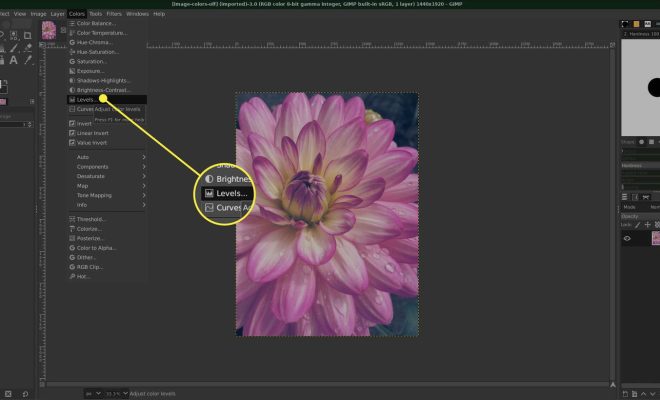
Another way to correct poor white balance in GIMP is to use the Levels tool. Here’s how:

1.Go to the Colors menu and select Levels.

2.In the Levels dialog box, you will see three sliders: Black Point, White Point, and Gamma.

3.Click the White Point eyedropper and then click on a neutral area in the image, such as a white or gray object.

4.The Levels tool will adjust the white balance based on the selected area, and the colors in the image should appear more natural.

5.If necessary, you can adjust the other sliders to fine-tune the colors.

6.Click OK to apply the changes.

In conclusion, correcting poor white balance in photos is an important step in post-processing to ensure that the colors in your images appear natural and realistic. With GIMP, you can easily adjust the colors using the Color Balance or Levels tool, and fine-tune the colors to achieve the desired result.


Previous Article

Facts Vs. Dimensions Tables in a Database

Next Article

Dali Oberon 5 Review

Matthew Lynch

Related articles More from author

  • Digital & Mobile Technology

    3D Secure Protects Your Online Payments: Here’s How It Works

    August 5, 2023
    By Matthew Lynch
  • Digital & Mobile Technology

    What is an Information Management System (IMS)?

    May 5, 2023
    By Matthew Lynch
  • Digital & Mobile Technology

    Pros and Cons of 3D TV

    June 23, 2023
    By Matthew Lynch
  • Digital & Mobile Technology

    How to Set Up a Wi-Fi Network on Your New Router

    July 31, 2023
    By Matthew Lynch
  • Digital & Mobile Technology

    Why Are Email Files so Large?

    June 4, 2023
    By Matthew Lynch
  • Digital & Mobile Technology

    Internet Speed Test Sites

    May 31, 2023
    By Matthew Lynch

Search

Login & Registration

  • Log in
  • Entries feed
  • Comments feed
  • WordPress.org

Newsletter

Signup for The Tech Edvocate Newsletter and have the latest in EdTech news and opinion delivered to your email address!

About Us

Since technology is not going anywhere and does more good than harm, adapting is the best course of action. That is where The Tech Edvocate comes in. We plan to cover the PreK-12 and Higher Education EdTech sectors and provide our readers with the latest news and opinion on the subject. From time to time, I will invite other voices to weigh in on important issues in EdTech. We hope to provide a well-rounded, multi-faceted look at the past, present, the future of EdTech in the US and internationally.

We started this journey back in June 2016, and we plan to continue it for many more years to come. I hope that you will join us in this discussion of the past, present and future of EdTech and lend your own insight to the issues that are discussed.

Newsletter

Signup for The Tech Edvocate Newsletter and have the latest in EdTech news and opinion delivered to your email address!

Contact Us

The Tech Edvocate
910 Goddin Street
Richmond, VA 23231
(601) 630-5238
[email protected]

Copyright © 2026 Matthew Lynch. All rights reserved.