The Tech Edvocate

Top Menu

  • Advertisement
  • Apps
  • Home Page
  • Home Page Five (No Sidebar)
  • Home Page Four
  • Home Page Three
  • Home Page Two
  • Home Tech2
  • Icons [No Sidebar]
  • Left Sidbear Page
  • Lynch Educational Consulting
  • My Account
  • My Speaking Page
  • Newsletter Sign Up Confirmation
  • Newsletter Unsubscription
  • Our Brands
  • Page Example
  • Privacy Policy
  • Protected Content
  • Register
  • Request a Product Review
  • Shop
  • Shortcodes Examples
  • Signup
  • Start Here
    • Governance
    • Careers
    • Contact Us
  • Terms and Conditions
  • The Edvocate
  • The Tech Edvocate Product Guide
  • Topics
  • Write For Us
  • Advertise

Main Menu

  • Start Here
    • Our Brands
    • Governance
      • Lynch Educational Consulting, LLC.
      • Dr. Lynch’s Personal Website
      • Careers
    • Write For Us
    • The Tech Edvocate Product Guide
    • Contact Us
    • Books
    • Edupedia
    • Post a Job
    • The Edvocate Podcast
    • Terms and Conditions
    • Privacy Policy
  • Topics
    • Assistive Technology
    • Child Development Tech
    • Early Childhood & K-12 EdTech
    • EdTech Futures
    • EdTech News
    • EdTech Policy & Reform
    • EdTech Startups & Businesses
    • Higher Education EdTech
    • Online Learning & eLearning
    • Parent & Family Tech
    • Personalized Learning
    • Product Reviews
  • Advertise
  • Tech Edvocate Awards
  • The Edvocate
  • Pedagogue
  • School Ratings

logo

The Tech Edvocate

  • Start Here
    • Our Brands
    • Governance
      • Lynch Educational Consulting, LLC.
      • Dr. Lynch’s Personal Website
        • My Speaking Page
      • Careers
    • Write For Us
    • The Tech Edvocate Product Guide
    • Contact Us
    • Books
    • Edupedia
    • Post a Job
    • The Edvocate Podcast
    • Terms and Conditions
    • Privacy Policy
  • Topics
    • Assistive Technology
    • Child Development Tech
    • Early Childhood & K-12 EdTech
    • EdTech Futures
    • EdTech News
    • EdTech Policy & Reform
    • EdTech Startups & Businesses
    • Higher Education EdTech
    • Online Learning & eLearning
    • Parent & Family Tech
    • Personalized Learning
    • Product Reviews
  • Advertise
  • Tech Edvocate Awards
  • The Edvocate
  • Pedagogue
  • School Ratings
  • How to use ClickUp goals feature

  • Trello for Business

  • Can Smartsheet do automation

  • How to use Microsoft Planner boards

  • How many transactions in Kashoo

  • Sage

  • Is Sage worth it for accountants

  • How to use Smartsheet templates

  • How many users in Zoho Books free plan

  • Can Wrike integrate with Adobe Creative Cloud

Digital & Mobile Technology
Home›Digital & Mobile Technology›How to Fix Genshin Impact Not Starting in Windows 11

How to Fix Genshin Impact Not Starting in Windows 11
By Matthew Lynch
July 31, 2023
0
Spread the love

Genshin Impact is an action role-playing video game that has become quite popular since its release. However, as with any game, players may run into technical issues that prevent them from launching the game. In this article, we will discuss some steps that you can take to fix Genshin Impact not starting in Windows 11.

1. Make sure that your PC meets the minimum system requirements

Before you start troubleshooting, it’s essential to ensure that your PC meets the minimum system requirements for Genshin Impact. You can check the system requirements on the game’s official website. If your PC doesn’t meet the minimum system requirements, you may not be able to run the game.

2. Restart your PC

If Genshin Impact isn’t starting on your PC, the first thing you should try is restarting your computer. Sometimes, a simple restart can fix common issues with games and applications.

3. Update your graphics card drivers

Outdated or corrupt graphics card drivers can prevent Genshin Impact from starting. You should ensure that you have the latest drivers installed for your graphics card. To update your graphics card drivers, visit the manufacturer’s website and download and install the latest drivers for your card.

4. Run the game as an Administrator

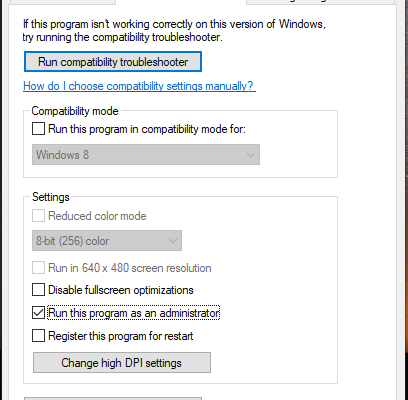
Running Genshin Impact as an Administrator can give it the necessary permissions it needs to run. To do this, right-click on the Genshin Impact shortcut and select “Run as Administrator” from the context menu.

5. Disable antivirus software

Your antivirus software may be blocking Genshin Impact from starting. You can try disabling your antivirus temporarily to see if it makes any difference. If the game launches successfully, you should add it as an exception in your antivirus software settings.

6. Verify the game files

If any of the game files are corrupt or missing, Genshin Impact may not start. You can verify the game files to see if there is an issue. To do this, open the game launcher and click on the gear icon at the top right. Select “Verify” to scan for any issues with the game files and repair them.

7. Reinstall the game

If none of the previous methods worked for you, you can try reinstalling Genshin Impact. Uninstall the game and delete any leftover files, then download and install the game again. This can sometimes fix issues with the game’s installation.

Conclusion

In summary, these are some steps you can take to fix Genshin Impact not starting in Windows 11. If none of these steps work for you, you may have to contact the game’s support team for further assistance. Remember to always keep your PC updated with the latest drivers and software to avoid any technical issues with Genshin Impact or any other game or application.


Previous Article

How to Connect Your iPhone to Your ...

Next Article

3 Types of Programming Errors and How ...

Matthew Lynch

Related articles More from author

  • Digital & Mobile Technology

    How to Create Your Own Memories in the iPhone Photos App

    August 1, 2023
    By Matthew Lynch
  • Digital & Mobile Technology

    How to Delete Downloads on an Android Phone

    May 28, 2023
    By Matthew Lynch
  • Digital & Mobile Technology

    How to Insert a Row or Column in an Excel Spreadsheet

    April 26, 2023
    By Matthew Lynch
  • Digital & Mobile Technology

    The Best Google Pixel Watch Accessories

    June 6, 2023
    By Matthew Lynch
  • Digital & Mobile Technology

    The Best HDMI Switchers of 2023 for Console Flexibility

    May 30, 2023
    By Matthew Lynch
  • Digital & Mobile Technology

    The Best Downloadable EPUB Readers for Your Ebooks

    June 23, 2023
    By Matthew Lynch

Search

Login & Registration

  • Log in
  • Entries feed
  • Comments feed
  • WordPress.org

Newsletter

Signup for The Tech Edvocate Newsletter and have the latest in EdTech news and opinion delivered to your email address!

About Us

Since technology is not going anywhere and does more good than harm, adapting is the best course of action. That is where The Tech Edvocate comes in. We plan to cover the PreK-12 and Higher Education EdTech sectors and provide our readers with the latest news and opinion on the subject. From time to time, I will invite other voices to weigh in on important issues in EdTech. We hope to provide a well-rounded, multi-faceted look at the past, present, the future of EdTech in the US and internationally.

We started this journey back in June 2016, and we plan to continue it for many more years to come. I hope that you will join us in this discussion of the past, present and future of EdTech and lend your own insight to the issues that are discussed.

Newsletter

Signup for The Tech Edvocate Newsletter and have the latest in EdTech news and opinion delivered to your email address!

Contact Us

The Tech Edvocate
910 Goddin Street
Richmond, VA 23231
(601) 630-5238
[email protected]

Copyright © 2026 Matthew Lynch. All rights reserved.