The Tech Edvocate

Top Menu

  • Advertisement
  • Apps
  • Home Page
  • Home Page Five (No Sidebar)
  • Home Page Four
  • Home Page Three
  • Home Page Two
  • Home Tech2
  • Icons [No Sidebar]
  • Left Sidbear Page
  • Lynch Educational Consulting
  • My Account
  • My Speaking Page
  • Newsletter Sign Up Confirmation
  • Newsletter Unsubscription
  • Our Brands
  • Page Example
  • Privacy Policy
  • Protected Content
  • Register
  • Request a Product Review
  • Shop
  • Shortcodes Examples
  • Signup
  • Start Here
    • Governance
    • Careers
    • Contact Us
  • Terms and Conditions
  • The Edvocate
  • The Tech Edvocate Product Guide
  • Topics
  • Write For Us
  • Advertise

Main Menu

  • Start Here
    • Our Brands
    • Governance
      • Lynch Educational Consulting, LLC.
      • Dr. Lynch’s Personal Website
      • Careers
    • Write For Us
    • The Tech Edvocate Product Guide
    • Contact Us
    • Books
    • Edupedia
    • Post a Job
    • The Edvocate Podcast
    • Terms and Conditions
    • Privacy Policy
  • Topics
    • Assistive Technology
    • Child Development Tech
    • Early Childhood & K-12 EdTech
    • EdTech Futures
    • EdTech News
    • EdTech Policy & Reform
    • EdTech Startups & Businesses
    • Higher Education EdTech
    • Online Learning & eLearning
    • Parent & Family Tech
    • Personalized Learning
    • Product Reviews
  • Advertise
  • Tech Edvocate Awards
  • The Edvocate
  • Pedagogue
  • School Ratings

logo

The Tech Edvocate

  • Start Here
    • Our Brands
    • Governance
      • Lynch Educational Consulting, LLC.
      • Dr. Lynch’s Personal Website
        • My Speaking Page
      • Careers
    • Write For Us
    • The Tech Edvocate Product Guide
    • Contact Us
    • Books
    • Edupedia
    • Post a Job
    • The Edvocate Podcast
    • Terms and Conditions
    • Privacy Policy
  • Topics
    • Assistive Technology
    • Child Development Tech
    • Early Childhood & K-12 EdTech
    • EdTech Futures
    • EdTech News
    • EdTech Policy & Reform
    • EdTech Startups & Businesses
    • Higher Education EdTech
    • Online Learning & eLearning
    • Parent & Family Tech
    • Personalized Learning
    • Product Reviews
  • Advertise
  • Tech Edvocate Awards
  • The Edvocate
  • Pedagogue
  • School Ratings
  • This PS5 Game Just Proved Everyone Wrong About Live Service Dominance

  • Aurora High School Police Cameras: Why This Expansion Has Civil Rights Groups Fuming

  • The Brutal Truth About AI and Reading: Why Top Students Are Avoiding It

  • Billion-Dollar Verdict: What This Facebook Privacy Lawsuit Means For YOU

  • Millions of VW Owners Face Sudden Steering Loss — The Critical Details You Need Now

  • This One EV Battery Breakthrough Could Drive Your Current Car’s Value Off a Cliff

  • This One Thing Is Crushing Stocks: Why a Good Jobs Report Could Be Devastating

  • 9 Industries Facing Catastrophe by 2026: Why the Numbers Hide a Brutal Truth

  • This One Project’s Collapse Left Investors Devastated — And Now They’re Fighting Back

  • Unbelievable: Pentagon Data Breach Hits 3 Million, FBI Faces Blackmail Over Own Hack

Digital & Mobile Technology
Home›Digital & Mobile Technology›How to Fix the Error Code 0x80072f8f – 0x20000 on Windows

How to Fix the Error Code 0x80072f8f – 0x20000 on Windows
By Matthew Lynch
June 23, 2023
0
Spread the love

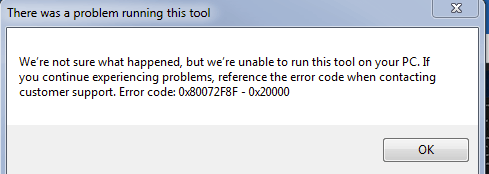
Error codes are never fun to see when trying to use your computer, and the 0x80072f8f – 0x20000 error code on Windows is no exception. This error code typically appears when attempting to activate or update Windows, and can be caused by a variety of issues. Fortunately, there are a few steps you can take to try and fix the problem and get your Windows operating system back up and running smoothly.

Check your date and time settings

One common cause of the 0x80072f8f – 0x20000 error code is incorrect date and time settings on your computer. Make sure that your system clock is set to the correct time and date for your time zone. You can check your date and time settings by clicking on the clock in the bottom right corner of your screen and selecting “Date and time settings.”

Run the Windows troubleshooter

Windows comes with a built-in troubleshooter that can help diagnose and fix many common issues. To run the troubleshooter for this error code, follow these steps:

1. Click on the Start menu and select Settings

2. Click on Update & Security

3. Click on Troubleshoot

4. Select “Windows Update” and click “Run the troubleshooter”

The troubleshooter will scan your system and attempt to fix any issues it finds. If it is unable to resolve the issue, it may provide further information about what is causing the problem, which can help you in the next steps of troubleshooting.

Check your firewall settings

Firewall settings can sometimes interfere with the activation and update processes on Windows. Try temporarily disabling your firewall (both Windows Firewall and any third-party firewalls you may have installed) and attempting to activate or update Windows again. If the problem goes away, you may need to add exceptions to your firewall settings to allow Windows to communicate with the activation or update servers.

Check for malware

Malware infections can cause a variety of issues on your computer, including the 0x80072f8f – 0x20000 error code. Run a full virus scan of your system using a trusted antivirus program to check for any malware on your computer. If malware is detected, follow the instructions from your antivirus program to remove it.

Perform a clean install of Windows

If all else fails, a clean install of Windows may be necessary to resolve the issue. This will wipe all of your files and settings from your computer, so it should only be done as a last resort. Before performing a clean install, make sure that you have backed up all of your important files and have access to any installation files or license keys you may need to reinstall programs after the clean install.


Previous Article

Ways to Fix Keyboard Input Lag on ...

Next Article

Best IT Certification Courses for Beginners

Matthew Lynch

Related articles More from author

  • Digital & Mobile Technology

    How to Quickly Remove Bloatware From Windows 11

    June 15, 2023
    By Matthew Lynch
  • Digital & Mobile Technology

    The Most Energy-Efficient Way to Set Your Thermostat

    June 15, 2023
    By Matthew Lynch
  • Digital & Mobile Technology

    What Is an ASPX File?

    June 1, 2023
    By Matthew Lynch
  • Digital & Mobile Technology

    Duolingo vs. Memrise: Which Language Learning App Is Better?

    July 31, 2023
    By Matthew Lynch
  • Digital & Mobile Technology

    How to Track Forwarded Emails

    May 29, 2023
    By Matthew Lynch
  • Digital & Mobile Technology

    The 10 Best Tools for Transcribing Video Meetings to Shareable Documents

    August 3, 2023
    By Matthew Lynch

Search

Login & Registration

  • Log in
  • Entries feed
  • Comments feed
  • WordPress.org

Newsletter

Signup for The Tech Edvocate Newsletter and have the latest in EdTech news and opinion delivered to your email address!

About Us

Since technology is not going anywhere and does more good than harm, adapting is the best course of action. That is where The Tech Edvocate comes in. We plan to cover the PreK-12 and Higher Education EdTech sectors and provide our readers with the latest news and opinion on the subject. From time to time, I will invite other voices to weigh in on important issues in EdTech. We hope to provide a well-rounded, multi-faceted look at the past, present, the future of EdTech in the US and internationally.

We started this journey back in June 2016, and we plan to continue it for many more years to come. I hope that you will join us in this discussion of the past, present and future of EdTech and lend your own insight to the issues that are discussed.

Newsletter

Signup for The Tech Edvocate Newsletter and have the latest in EdTech news and opinion delivered to your email address!

Contact Us

The Tech Edvocate
910 Goddin Street
Richmond, VA 23231
(601) 630-5238
[email protected]

Copyright © 2026 Matthew Lynch. All rights reserved.