The Tech Edvocate

Top Menu

  • Advertisement
  • Apps
  • Home Page
  • Home Page Five (No Sidebar)
  • Home Page Four
  • Home Page Three
  • Home Page Two
  • Home Tech2
  • Icons [No Sidebar]
  • Left Sidbear Page
  • Lynch Educational Consulting
  • My Account
  • My Speaking Page
  • Newsletter Sign Up Confirmation
  • Newsletter Unsubscription
  • Our Brands
  • Page Example
  • Privacy Policy
  • Protected Content
  • Register
  • Request a Product Review
  • Shop
  • Shortcodes Examples
  • Signup
  • Start Here
    • Governance
    • Careers
    • Contact Us
  • Terms and Conditions
  • The Edvocate
  • The Tech Edvocate Product Guide
  • Topics
  • Write For Us
  • Advertise

Main Menu

  • Start Here
    • Our Brands
    • Governance
      • Lynch Educational Consulting, LLC.
      • Dr. Lynch’s Personal Website
      • Careers
    • Write For Us
    • The Tech Edvocate Product Guide
    • Contact Us
    • Books
    • Edupedia
    • Post a Job
    • The Edvocate Podcast
    • Terms and Conditions
    • Privacy Policy
  • Topics
    • Assistive Technology
    • Child Development Tech
    • Early Childhood & K-12 EdTech
    • EdTech Futures
    • EdTech News
    • EdTech Policy & Reform
    • EdTech Startups & Businesses
    • Higher Education EdTech
    • Online Learning & eLearning
    • Parent & Family Tech
    • Personalized Learning
    • Product Reviews
  • Advertise
  • Tech Edvocate Awards
  • The Edvocate
  • Pedagogue
  • School Ratings

logo

The Tech Edvocate

  • Start Here
    • Our Brands
    • Governance
      • Lynch Educational Consulting, LLC.
      • Dr. Lynch’s Personal Website
        • My Speaking Page
      • Careers
    • Write For Us
    • The Tech Edvocate Product Guide
    • Contact Us
    • Books
    • Edupedia
    • Post a Job
    • The Edvocate Podcast
    • Terms and Conditions
    • Privacy Policy
  • Topics
    • Assistive Technology
    • Child Development Tech
    • Early Childhood & K-12 EdTech
    • EdTech Futures
    • EdTech News
    • EdTech Policy & Reform
    • EdTech Startups & Businesses
    • Higher Education EdTech
    • Online Learning & eLearning
    • Parent & Family Tech
    • Personalized Learning
    • Product Reviews
  • Advertise
  • Tech Edvocate Awards
  • The Edvocate
  • Pedagogue
  • School Ratings
  • How to create estimates in Buildertrend

  • How to use Bluebeam for punch lists

  • Procore vs Viewpoint features

  • How to submit invoices in Procore

  • How to set up Monday.com for contractors

  • Can PlanGrid track punch lists

  • How to create selections in CoConstruct

  • How to markup drawings in PlanGrid

  • How to use PlanGrid for blueprints

  • How to create custom tools in Bluebeam

Digital & Mobile Technology
Home›Digital & Mobile Technology›Essential Wear OS Apps Every Smartwatch User Should Download

Essential Wear OS Apps Every Smartwatch User Should Download
By Matthew Lynch
June 23, 2023
0
Spread the love

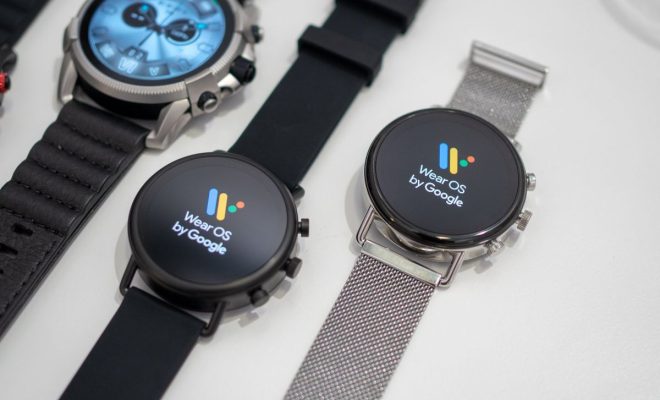
Wear OS is a smartwatch operating system developed by Google for smartwatches and other wearable devices. It provides a wide range of functionalities, including mobile notifications, health and fitness tracking, and voice commands. To make the most of your Wear OS smartwatch, you need to download some essential apps. In this article, we will discuss the top Wear OS apps every smartwatch user should have.

Google Assistant

Google Assistant is a built-in app in Wear OS that allows you to carry out specific tasks and provide you with answers to your inquiries without the need for looking at the watch. With voice commands, you can set appointments, send messages, ask for weather updates, and many more. Google assistant is a must-have app for any smartwatch user, as it provides you with a hands-free experience.

Spotify

If you’re a music lover, then Spotify is an app you need to download. With Spotify, you can sync and stream music directly on your Wear OS watch, so you can listen to your favorite tunes while on the go. You can also view your playlists, discover new music, and control playback with your voice. This app is free to download, but it requires a premium subscription to get the full benefit.

Google Fit

Google Fit is a health and fitness tracking app that offers real-time monitoring of your daily physical activity. With Google Fit, you can see your daily step count, monitor your heart rate, and track your workouts. This app synchronizes your data with your Google account, allowing you to monitor your fitness progress over time.

Strava

For serious fitness enthusiasts, Strava is the app of choice. It is a GPS tracking app specifically designed for cyclists and runners. Strava allows you to monitor your indoor and outdoor workouts, track your heart rate, and even compete with other Strava users. With Strava, you can join challenges and earn badges, making your workout experience more fun.

Wear Casts

If you’re a podcast lover, Wear Casts is the app you need. It is a podcast player that syncs with your phone and allows you to listen to your favorite podcasts from your smartwatch. You can also use voice commands to control playback and even download episodes to listen to offline. Wear Casts is free to download with a 7-day trial, and then it requires a one-time payment to get the full app.

Find My Device

Find My device is a built-in app in Wear OS that allows you to locate your lost or stolen smartwatch. This app helps you to find your device by showing you its last known location and sending a notification to your phone when your watch is found. With Find My Device, you can also remotely reset your watch to factory settings, in the event that it is stolen.

Previous Article

Clipchamp Has Been Out for a Day, ...

Next Article

How to Extract Icons From Application EXE ...

Matthew Lynch

Related articles More from author

  • Digital & Mobile Technology

    Cool Things You Can Do With Windows 11 God Mode

    June 21, 2023
    By Matthew Lynch
  • Digital & Mobile Technology

    How to Calibrate Google Maps for Better Directions

    June 4, 2023
    By Matthew Lynch
  • Digital & Mobile Technology

    Apps That Will Help You Find a Side Job Instantly

    June 6, 2023
    By Matthew Lynch
  • Digital & Mobile Technology

    How to Manage Disk Partitions in Linux With fdisk

    August 2, 2023
    By Matthew Lynch
  • Digital & Mobile Technology

    What is a Partition?

    April 18, 2023
    By Matthew Lynch
  • Digital & Mobile Technology

    How to Go Offline on Spotify

    September 7, 2023
    By Matthew Lynch

Search

Login & Registration

  • Log in
  • Entries feed
  • Comments feed
  • WordPress.org

Newsletter

Signup for The Tech Edvocate Newsletter and have the latest in EdTech news and opinion delivered to your email address!

About Us

Since technology is not going anywhere and does more good than harm, adapting is the best course of action. That is where The Tech Edvocate comes in. We plan to cover the PreK-12 and Higher Education EdTech sectors and provide our readers with the latest news and opinion on the subject. From time to time, I will invite other voices to weigh in on important issues in EdTech. We hope to provide a well-rounded, multi-faceted look at the past, present, the future of EdTech in the US and internationally.

We started this journey back in June 2016, and we plan to continue it for many more years to come. I hope that you will join us in this discussion of the past, present and future of EdTech and lend your own insight to the issues that are discussed.

Newsletter

Signup for The Tech Edvocate Newsletter and have the latest in EdTech news and opinion delivered to your email address!

Contact Us

The Tech Edvocate
910 Goddin Street
Richmond, VA 23231
(601) 630-5238
[email protected]

Copyright © 2026 Matthew Lynch. All rights reserved.