The Tech Edvocate

Top Menu

  • Advertisement
  • Apps
  • Home Page
  • Home Page Five (No Sidebar)
  • Home Page Four
  • Home Page Three
  • Home Page Two
  • Home Tech2
  • Icons [No Sidebar]
  • Left Sidbear Page
  • Lynch Educational Consulting
  • My Account
  • My Speaking Page
  • Newsletter Sign Up Confirmation
  • Newsletter Unsubscription
  • Our Brands
  • Page Example
  • Privacy Policy
  • Protected Content
  • Register
  • Request a Product Review
  • Shop
  • Shortcodes Examples
  • Signup
  • Start Here
    • Governance
    • Careers
    • Contact Us
  • Terms and Conditions
  • The Edvocate
  • The Tech Edvocate Product Guide
  • Topics
  • Write For Us
  • Advertise

Main Menu

  • Start Here
    • Our Brands
    • Governance
      • Lynch Educational Consulting, LLC.
      • Dr. Lynch’s Personal Website
      • Careers
    • Write For Us
    • The Tech Edvocate Product Guide
    • Contact Us
    • Books
    • Edupedia
    • Post a Job
    • The Edvocate Podcast
    • Terms and Conditions
    • Privacy Policy
  • Topics
    • Assistive Technology
    • Child Development Tech
    • Early Childhood & K-12 EdTech
    • EdTech Futures
    • EdTech News
    • EdTech Policy & Reform
    • EdTech Startups & Businesses
    • Higher Education EdTech
    • Online Learning & eLearning
    • Parent & Family Tech
    • Personalized Learning
    • Product Reviews
  • Advertise
  • Tech Edvocate Awards
  • The Edvocate
  • Pedagogue
  • School Ratings

logo

The Tech Edvocate

  • Start Here
    • Our Brands
    • Governance
      • Lynch Educational Consulting, LLC.
      • Dr. Lynch’s Personal Website
        • My Speaking Page
      • Careers
    • Write For Us
    • The Tech Edvocate Product Guide
    • Contact Us
    • Books
    • Edupedia
    • Post a Job
    • The Edvocate Podcast
    • Terms and Conditions
    • Privacy Policy
  • Topics
    • Assistive Technology
    • Child Development Tech
    • Early Childhood & K-12 EdTech
    • EdTech Futures
    • EdTech News
    • EdTech Policy & Reform
    • EdTech Startups & Businesses
    • Higher Education EdTech
    • Online Learning & eLearning
    • Parent & Family Tech
    • Personalized Learning
    • Product Reviews
  • Advertise
  • Tech Edvocate Awards
  • The Edvocate
  • Pedagogue
  • School Ratings
  • The Reckless Ben Controversy: An Outrageous Fight for Justice

  • Outrageous: The Sydney Sweeney Ad Controversy You Didn’t See Coming — And Why It’s Working

  • The AI CRM War: Why Salesforce Just Made a $2 Billion Bid for a Startup

  • OpenAI’s Navier-Stokes ‘Solution’ Ignites Firestorm: Did They Steal It?

  • Blizzard’s Boldest Bet: Why a StarCraft Shooter in 2030 Could Redefine Gaming

  • Volatile: Why Top AI Bosses Just Triggered a Massive AI Stocks Decline

  • ‘Godfather of AI’ backs Anthropic chief’s call to slow down development

  • Why Millions Are Flocking to Trade Schools as AI Reshapes the Job Market

  • Unmasking the Bizarre ‘Cat in the Hat’ Trend: Why Schools Are Sounding the Alarm

  • Florida DMV Hacked: 200,000 Driver Records Exposed in Stunning Breach

Apple Products and Technology
Home›Apple Products and Technology›9 Best Airpod Tips And Tricks For New Earbud Owners

9 Best Airpod Tips And Tricks For New Earbud Owners
By Matthew Lynch
March 29, 2024
0
Spread the love

Apple’s AirPods have emerged as one of the most popular wireless earbuds on the market, favored for their seamless integration with other Apple devices, sound quality, and convenience. However, even longtime users may not be familiar with all the features these compact devices offer. If you’re new to AirPods, here are nine tips and tricks to get the most out of your wireless earbuds:

1. Customize Double Tap: You can customize what happens when you double-tap an AirPod. Go to Settings > Bluetooth, tap on the info icon next to your AirPods, and select “Left” or “Right” to set different actions like invoking Siri, playing or pausing music, or skipping tracks.

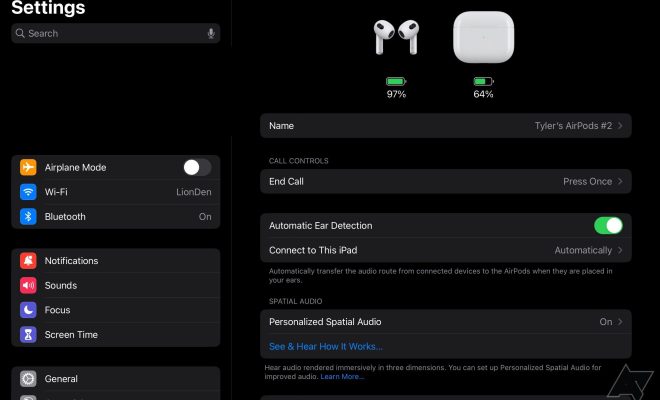
2. Check Battery Life: Easily keep an eye on your AirPods’ battery life by opening the case near your iPhone or asking Siri “How’s the battery on my AirPods?”

3. Share Audio: If you have iOS 13 or later, you can share audio with another pair of AirPods. Just bring the second pair close to your device and connect via the pop-up on your screen.

4. Announce Messages: With this feature enabled, Siri can automatically read out messages without you having to look at your phone. Activate it by going to Settings > Notifications > Announce Messages with Siri.

5. Ear Detection: Want to pause audio automatically when one earbud is taken out? Ensure that ‘Automatic Ear Detection’ is enabled in Bluetooth settings.

6. Customize Controls for AirPods Pro: If you have AirPods Pro, you can customize the press-and-hold action on each stem through Bluetooth settings – options include activating noise control modes or invoking Siri.

7. Find Lost AirPods: Using Apple’s Find My app allows you to play a sound through your AirPods if you’ve misplaced them or see their last known location on a map.

8. Use Them as a Hearing Aid: With ‘Live Listen’, you can turn your iPhone into a microphone that sends sounds to your AirPods – suitable for conversations in loud places or if you have difficulty hearing.

9. Switch Devices Seamlessly: Thanks to Apple’s H1 chip, you can move between devices connected to your iCloud account without needing to re-pair each time; just select your AirPods from the device’s Bluetooth menu.

Exploring these features will enhance your listening experience and ensure that you’re utilizing your new AirPods to their full potential!


Previous Article

16 Best Medium-Coverage Foundations

Next Article

14 Best Tote Bags For Travel: Luxurious, ...

Matthew Lynch

Related articles More from author

  • Apple Products and Technology

    What Is iPhone Analytics Data and How to Enable or Disable It

    February 20, 2024
    By Matthew Lynch
  • Apple Products and Technology

    3 New Features You Need to Know About on the iPhone 15 Pro and 15 Pro Max

    February 4, 2024
    By Matthew Lynch
  • Apple Products and Technology

    7 Best Fixes for Focus Mode Not Working on iPhone, iPad, and Mac

    February 19, 2024
    By Matthew Lynch
  • Apple Products and Technology

    Forget About iOS 17. Here’s 15 Cool Features in iOS 16 You Don’t Even Know About

    February 3, 2024
    By Matthew Lynch
  • Apple Products and Technology

    Apple’s Satellite Roadside Assistance Offers Help Without Cell Signal

    February 4, 2024
    By Matthew Lynch
  • Apple Products and Technology

    The future of Apple Watch fitness might be GymKit

    February 4, 2024
    By Matthew Lynch

Search

Login & Registration

  • Log in
  • Entries feed
  • Comments feed
  • WordPress.org

Newsletter

Signup for The Tech Edvocate Newsletter and have the latest in EdTech news and opinion delivered to your email address!

About Us

Since technology is not going anywhere and does more good than harm, adapting is the best course of action. That is where The Tech Edvocate comes in. We plan to cover the PreK-12 and Higher Education EdTech sectors and provide our readers with the latest news and opinion on the subject. From time to time, I will invite other voices to weigh in on important issues in EdTech. We hope to provide a well-rounded, multi-faceted look at the past, present, the future of EdTech in the US and internationally.

We started this journey back in June 2016, and we plan to continue it for many more years to come. I hope that you will join us in this discussion of the past, present and future of EdTech and lend your own insight to the issues that are discussed.

Newsletter

Signup for The Tech Edvocate Newsletter and have the latest in EdTech news and opinion delivered to your email address!

Contact Us

The Tech Edvocate
910 Goddin Street
Richmond, VA 23231
(601) 630-5238
[email protected]

Copyright © 2026 Matthew Lynch. All rights reserved.