The Tech Edvocate

Top Menu

  • Advertisement
  • Apps
  • Home Page
  • Home Page Five (No Sidebar)
  • Home Page Four
  • Home Page Three
  • Home Page Two
  • Home Tech2
  • Icons [No Sidebar]
  • Left Sidbear Page
  • Lynch Educational Consulting
  • My Account
  • My Speaking Page
  • Newsletter Sign Up Confirmation
  • Newsletter Unsubscription
  • Our Brands
  • Page Example
  • Privacy Policy
  • Protected Content
  • Register
  • Request a Product Review
  • Shop
  • Shortcodes Examples
  • Signup
  • Start Here
    • Governance
    • Careers
    • Contact Us
  • Terms and Conditions
  • The Edvocate
  • The Tech Edvocate Product Guide
  • Topics
  • Write For Us
  • Advertise

Main Menu

  • Start Here
    • Our Brands
    • Governance
      • Lynch Educational Consulting, LLC.
      • Dr. Lynch’s Personal Website
      • Careers
    • Write For Us
    • The Tech Edvocate Product Guide
    • Contact Us
    • Books
    • Edupedia
    • Post a Job
    • The Edvocate Podcast
    • Terms and Conditions
    • Privacy Policy
  • Topics
    • Assistive Technology
    • Child Development Tech
    • Early Childhood & K-12 EdTech
    • EdTech Futures
    • EdTech News
    • EdTech Policy & Reform
    • EdTech Startups & Businesses
    • Higher Education EdTech
    • Online Learning & eLearning
    • Parent & Family Tech
    • Personalized Learning
    • Product Reviews
  • Advertise
  • Tech Edvocate Awards
  • The Edvocate
  • Pedagogue
  • School Ratings

logo

The Tech Edvocate

  • Start Here
    • Our Brands
    • Governance
      • Lynch Educational Consulting, LLC.
      • Dr. Lynch’s Personal Website
        • My Speaking Page
      • Careers
    • Write For Us
    • The Tech Edvocate Product Guide
    • Contact Us
    • Books
    • Edupedia
    • Post a Job
    • The Edvocate Podcast
    • Terms and Conditions
    • Privacy Policy
  • Topics
    • Assistive Technology
    • Child Development Tech
    • Early Childhood & K-12 EdTech
    • EdTech Futures
    • EdTech News
    • EdTech Policy & Reform
    • EdTech Startups & Businesses
    • Higher Education EdTech
    • Online Learning & eLearning
    • Parent & Family Tech
    • Personalized Learning
    • Product Reviews
  • Advertise
  • Tech Edvocate Awards
  • The Edvocate
  • Pedagogue
  • School Ratings
  • Your Essential Guide to Navigating Consumer Tech News in 2023

  • Unveiling the Future: Must-Have Gadgets and Innovations Transforming Consumer Tech

  • Revolutionizing Everyday Life: The Must-Have Consumer Tech Innovations of 2026

  • Top Android Phones of 2026: Unveiling the Must-Have Smartphones for Every User

  • Fashion Nova 2026: A Comprehensive Review and Competitor Comparison

  • China and the US Engage in Crucial Economic Talks in Paris

  • Gold Prices in Turmoil: Will They Hold Above $5,200 Amid Geopolitical Tensions?

  • Bank of Japan Set to Maintain Interest Rates Amid Rising Global Uncertainty

  • Oil Prices Surge Amidst Geopolitical Tensions: A Closer Look at March 2026 Trends

  • Bitcoin’s Resilience: How BTC Holds Steady at $70,982 Amid Market Turbulence

Digital & Mobile Technology
Home›Digital & Mobile Technology›5 Ways to Create 3D Art Using the Paint 3D Toolbar

5 Ways to Create 3D Art Using the Paint 3D Toolbar
By Matthew Lynch
July 31, 2023
0
Spread the love

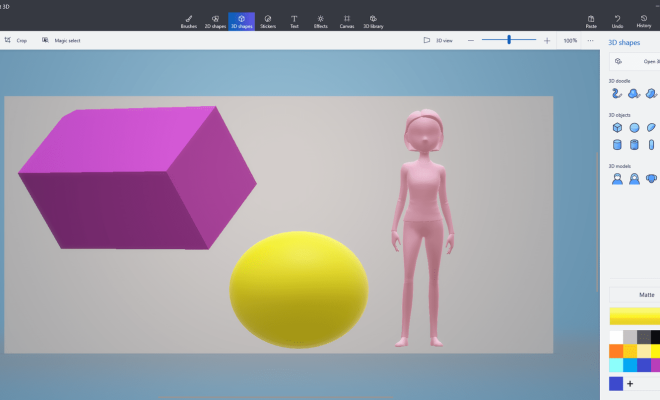
Paint 3D, which was released as part of Windows 10’s Creators Update, offers users a wide range of tools for making 3D art at the click of a button. Whether you’re a graphic artist or just starting to explore 3D design, Paint 3D’s intuitive and powerful tools can help you create great art. Here are five ways to create 3D art using the Paint 3D toolbar.

1. The 3D doodle tool

This tool is one of the best for those who are new to 3D drawing. With the 3D doodle tool, you simply draw a shape, and Paint 3D automatically creates a 3D model of it. You can control the thickness of the lines and the depth of the shape as you draw.

2. The Magic Select tool

This tool is great if you want to work with an existing photo or image. With the Magic Select tool, you can select anything from an image and move it into a new 3D model. You can also adjust or edit the image in any way you like.

3. The sticker tool

There is a wide range of stickers and decals available in Paint 3D. Once selected, you can move them, stretch them, and position them anywhere on your 3D model. This tool is perfect for adding text, logos, or other branding to your 3D art.

4. The fill tool

The fill tool is great for quickly adding color to your 3D models. You can choose from a range of pre-selected colors or create your own custom colors. Once you have chosen your color, simply click on the area you want to fill with color, and Paint 3D will do the rest.

5. The Effects tool

The Effects tool is the perfect tool to add the finishing touches to your 3D models. You can add lighting, shading, and textures to give your 3D art a professional and polished look. There are many different effects and textures to choose from.

In conclusion, the Paint 3D toolbar offers a wide range of tools to help you create 3D art with ease. Whether you’re new to 3D design or a seasoned expert, these tools can help you create amazing 3D art in no time. So, go ahead and experiment with Paint 3D today!


Previous Article

5 Things to Consider Before Buying Stereo ...

Next Article

How blizzb3ar Became Twitch’s Latest Comfort Streamer

Matthew Lynch

Related articles More from author

  • Digital & Mobile Technology

    Heroku Alternatives for Free Full Stack Hosting

    June 23, 2023
    By Matthew Lynch
  • Digital & Mobile Technology

    How to Reset an iPhone SIM Factory

    May 4, 2023
    By Matthew Lynch
  • Digital & Mobile Technology

    Best Wireless IP Phones of 2023

    June 6, 2023
    By Matthew Lynch
  • Digital & Mobile Technology

    How to Replace a TV Power Cord

    May 4, 2023
    By Matthew Lynch
  • Digital & Mobile Technology

    Best Rechargeable Fans

    August 5, 2023
    By Matthew Lynch
  • Digital & Mobile Technology

    Sick of Irrelevant YouTube Recommendations? Here’s What You Need to Do

    August 4, 2023
    By Matthew Lynch

Search

Login & Registration

  • Register
  • Log in
  • Entries feed
  • Comments feed
  • WordPress.org

Newsletter

Signup for The Tech Edvocate Newsletter and have the latest in EdTech news and opinion delivered to your email address!

About Us

Since technology is not going anywhere and does more good than harm, adapting is the best course of action. That is where The Tech Edvocate comes in. We plan to cover the PreK-12 and Higher Education EdTech sectors and provide our readers with the latest news and opinion on the subject. From time to time, I will invite other voices to weigh in on important issues in EdTech. We hope to provide a well-rounded, multi-faceted look at the past, present, the future of EdTech in the US and internationally.

We started this journey back in June 2016, and we plan to continue it for many more years to come. I hope that you will join us in this discussion of the past, present and future of EdTech and lend your own insight to the issues that are discussed.

Newsletter

Signup for The Tech Edvocate Newsletter and have the latest in EdTech news and opinion delivered to your email address!

Contact Us

The Tech Edvocate
910 Goddin Street
Richmond, VA 23231
(601) 630-5238
[email protected]

Copyright © 2025 Matthew Lynch. All rights reserved.