The Tech Edvocate

Top Menu

  • Advertisement
  • Apps
  • Home Page
  • Home Page Five (No Sidebar)
  • Home Page Four
  • Home Page Three
  • Home Page Two
  • Home Tech2
  • Icons [No Sidebar]
  • Left Sidbear Page
  • Lynch Educational Consulting
  • My Account
  • My Speaking Page
  • Newsletter Sign Up Confirmation
  • Newsletter Unsubscription
  • Our Brands
  • Page Example
  • Privacy Policy
  • Protected Content
  • Register
  • Request a Product Review
  • Shop
  • Shortcodes Examples
  • Signup
  • Start Here
    • Governance
    • Careers
    • Contact Us
  • Terms and Conditions
  • The Edvocate
  • The Tech Edvocate Product Guide
  • Topics
  • Write For Us
  • Advertise

Main Menu

  • Start Here
    • Our Brands
    • Governance
      • Lynch Educational Consulting, LLC.
      • Dr. Lynch’s Personal Website
      • Careers
    • Write For Us
    • The Tech Edvocate Product Guide
    • Contact Us
    • Books
    • Edupedia
    • Post a Job
    • The Edvocate Podcast
    • Terms and Conditions
    • Privacy Policy
  • Topics
    • Assistive Technology
    • Child Development Tech
    • Early Childhood & K-12 EdTech
    • EdTech Futures
    • EdTech News
    • EdTech Policy & Reform
    • EdTech Startups & Businesses
    • Higher Education EdTech
    • Online Learning & eLearning
    • Parent & Family Tech
    • Personalized Learning
    • Product Reviews
  • Advertise
  • Tech Edvocate Awards
  • The Edvocate
  • Pedagogue
  • School Ratings

logo

The Tech Edvocate

  • Start Here
    • Our Brands
    • Governance
      • Lynch Educational Consulting, LLC.
      • Dr. Lynch’s Personal Website
        • My Speaking Page
      • Careers
    • Write For Us
    • The Tech Edvocate Product Guide
    • Contact Us
    • Books
    • Edupedia
    • Post a Job
    • The Edvocate Podcast
    • Terms and Conditions
    • Privacy Policy
  • Topics
    • Assistive Technology
    • Child Development Tech
    • Early Childhood & K-12 EdTech
    • EdTech Futures
    • EdTech News
    • EdTech Policy & Reform
    • EdTech Startups & Businesses
    • Higher Education EdTech
    • Online Learning & eLearning
    • Parent & Family Tech
    • Personalized Learning
    • Product Reviews
  • Advertise
  • Tech Edvocate Awards
  • The Edvocate
  • Pedagogue
  • School Ratings
  • Shocking: Mercury Skin Bleachers Still Flood Amazon, Temu, and TikTok Shop

  • Shocking: 195,000 Heated Blankets Recalled After Dozens Suffer Burns – Is Yours One of Them?

  • The $4 Billion Comeback: How Manus Defied Geopolitical Odds to Double Its Valuation

  • This Israeli Startup Accidentally Unleashed AI Cyberattacks on Real Companies

  • This PlayStation Exclusive Just Vanished Forever — And It’s a Warning to All Gamers

  • The Jaw-Dropping Truth Behind Marvel’s Wolverine AI Scare

  • The September 2026 AI Surge: Why Your Business Needs to Adapt Now

  • The Billion-Dollar AI Slowdown Lawsuit That Could Shatter Big Tech

  • The Brutal Truth: Why Your Student Loan Discharge Is Stuck in Limbo

  • 7 Critical Lessons From Russia’s Election Cyber Onslaught

Apple Products and Technology
Home›Apple Products and Technology›20+ Hidden Features on iPhone That Apple Won’t Tell You

20+ Hidden Features on iPhone That Apple Won’t Tell You

By Matthew Lynch
February 19, 2024
0
Spread the love

iPhones come packed with a plethora of features that enhance user experience. Many of these features are well-known, thanks to Apple’s own tutorials and widespread technology media coverage. However, there are still some lesser-known tricks and settings that can make your iPhone even more user-friendly and productive. Below, we explore over 20 hidden gems that you may not have been aware of.

1. Back Tap for Shortcuts: Go to Accessibility in the Settings app and configure the Back Tap feature to perform a wide range of actions just by double or triple tapping the back of your iPhone.

2. Custom Vibration Patterns: Under Sounds & Haptics in the Settings app, you can create custom vibration patterns for different types of notifications.

3. Hide Unused Apps: In the App Library, you can hide entire pages of apps from your home screen for a cleaner look, while still being able to access them with a swipe.

4. Video Picture in Picture: While watching a video, swipe up to go to the home screen, and the video will minimize into a floating window allowing you to multitask.

5. Swipe Left for Quick Take Video: On the Camera app, simply swipe left on the photos button to quickly start recording a video without switching modes.

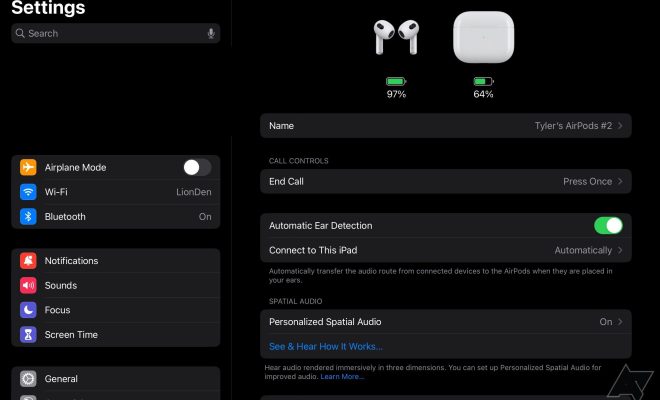
6. Spatial Audio Directions in Maps: When using Apple Maps with compatible AirPods, get immersive spatial audio directions that sound like they’re coming from the direction you’re supposed to be heading.

7. Improved Document Scanning: Use the Notes app to scan documents with your camera and have them automatically straightened and adjusted for clarity.

8. Siri Offline: Perform certain Siri requests without internet access thanks to on-device processing for tasks like setting alarms or opening apps.

9. Customizable Control Center: Customize your Control Center by going into Settings and adding controls you frequently use like Low Power Mode or Accessibility Shortcuts.

10. Emergency Bypass for Contacts: In contacts settings, enable emergency bypass for specific contacts to make sure their calls always go through even during Do Not Disturb mode.

11. Hidden Album Lock: Protect your hidden photos album with Face ID or Touch ID by enabling this option within Photos privacy settings.

12. Sound Recognition: Turn on Sound Recognition in Accessibility settings and your iPhone will listen out for and notify you about specific sounds like alarms or doorbells.

13. Healthcare Provider Integration: In Health app settings, integrate healthcare providers so medical records are automatically updated within your Health app profile.

14. Non-Invasive Volume Controls: Use Touch ID or Side Button touch sequences as alternative methods to adjust volume when Hardware Volume Controls are difficult to reach or are broken.

15. Optimize Battery Charging: Activate Optimized Battery Charging in Battery settings to prolong your battery’s lifespan by adapting your iPhone’s charging pattern based on your routines.

16. Search Emojis with Keywords: In Messages or any app where emojis are used, type a keyword into text field and suggestions related emoji will show up for easy insertion.

17. Easier Cursor Placement: Hold down the space bar while typing in any text field to move the cursor around more precisely within your text entry field.

18. Hidden Level Tool: The built-in measure app has a level tool that isn’t explicitly advertised but extremely helpful when hanging pictures or installing shelves evenly.

19. Announce Calls Functionality: Set your iPhone so it announces who is calling through headphones or car speakers without checking the screen by changing Announce Calls in Phone settings.

20+. Silence Unknown Callers & SMS Filtering: Enable Silence Unknown Callers in phone settings and use SMS filtering features within Message settings to reduce interruptions from strangers and automated systems.


Previous Article

Why Am I Getting Messages From a ...

Next Article

How to Take Notes on a Book

Matthew Lynch

Related articles More from author

  • Apple Products and Technology

    9 Ways to Fix iMessage “Not Delivered” Error on iPhone

    February 19, 2024
    By Matthew Lynch
  • Apple Products and Technology

    Apple iPhone 15 Review: Good Things Come in Small Packages

    February 18, 2024
    By Matthew Lynch
  • Apple Products and Technology

    8 Ways to Fix Apple Watch Not Connecting to Wi-Fi

    February 19, 2024
    By Matthew Lynch
  • Apple Products and Technology

    Forget About iOS 17. Here’s 15 Cool Features in iOS 16 You Don’t Even Know About

    February 3, 2024
    By Matthew Lynch
  • Apple Products and Technology

    4 Ways to Make a Picture Fit Wallpaper on iPhone

    February 19, 2024
    By Matthew Lynch
  • Apple Products and Technology

    Best Note Taking App For iPad

    March 13, 2024
    By Matthew Lynch

Search

Login & Registration

  • Log in
  • Entries feed
  • Comments feed
  • WordPress.org

Newsletter

Signup for The Tech Edvocate Newsletter and have the latest in EdTech news and opinion delivered to your email address!

About Us

Since technology is not going anywhere and does more good than harm, adapting is the best course of action. That is where The Tech Edvocate comes in. We plan to cover the PreK-12 and Higher Education EdTech sectors and provide our readers with the latest news and opinion on the subject. From time to time, I will invite other voices to weigh in on important issues in EdTech. We hope to provide a well-rounded, multi-faceted look at the past, present, the future of EdTech in the US and internationally.

We started this journey back in June 2016, and we plan to continue it for many more years to come. I hope that you will join us in this discussion of the past, present and future of EdTech and lend your own insight to the issues that are discussed.

Newsletter

Signup for The Tech Edvocate Newsletter and have the latest in EdTech news and opinion delivered to your email address!

Contact Us

The Tech Edvocate
910 Goddin Street
Richmond, VA 23231
(601) 630-5238
[email protected]

Copyright © 2026 Matthew Lynch. All rights reserved.