The Tech Edvocate

Top Menu

  • Advertisement
  • Apps
  • Home Page
  • Home Page Five (No Sidebar)
  • Home Page Four
  • Home Page Three
  • Home Page Two
  • Home Tech2
  • Icons [No Sidebar]
  • Left Sidbear Page
  • Lynch Educational Consulting
  • My Account
  • My Speaking Page
  • Newsletter Sign Up Confirmation
  • Newsletter Unsubscription
  • Our Brands
  • Page Example
  • Privacy Policy
  • Protected Content
  • Register
  • Request a Product Review
  • Shop
  • Shortcodes Examples
  • Signup
  • Start Here
    • Governance
    • Careers
    • Contact Us
  • Terms and Conditions
  • The Edvocate
  • The Tech Edvocate Product Guide
  • Topics
  • Write For Us
  • Advertise

Main Menu

  • Start Here
    • Our Brands
    • Governance
      • Lynch Educational Consulting, LLC.
      • Dr. Lynch’s Personal Website
      • Careers
    • Write For Us
    • The Tech Edvocate Product Guide
    • Contact Us
    • Books
    • Edupedia
    • Post a Job
    • The Edvocate Podcast
    • Terms and Conditions
    • Privacy Policy
  • Topics
    • Assistive Technology
    • Child Development Tech
    • Early Childhood & K-12 EdTech
    • EdTech Futures
    • EdTech News
    • EdTech Policy & Reform
    • EdTech Startups & Businesses
    • Higher Education EdTech
    • Online Learning & eLearning
    • Parent & Family Tech
    • Personalized Learning
    • Product Reviews
  • Advertise
  • Tech Edvocate Awards
  • The Edvocate
  • Pedagogue
  • School Ratings

logo

The Tech Edvocate

  • Start Here
    • Our Brands
    • Governance
      • Lynch Educational Consulting, LLC.
      • Dr. Lynch’s Personal Website
        • My Speaking Page
      • Careers
    • Write For Us
    • The Tech Edvocate Product Guide
    • Contact Us
    • Books
    • Edupedia
    • Post a Job
    • The Edvocate Podcast
    • Terms and Conditions
    • Privacy Policy
  • Topics
    • Assistive Technology
    • Child Development Tech
    • Early Childhood & K-12 EdTech
    • EdTech Futures
    • EdTech News
    • EdTech Policy & Reform
    • EdTech Startups & Businesses
    • Higher Education EdTech
    • Online Learning & eLearning
    • Parent & Family Tech
    • Personalized Learning
    • Product Reviews
  • Advertise
  • Tech Edvocate Awards
  • The Edvocate
  • Pedagogue
  • School Ratings
  • 100 Best Google Workspace Add-ons

  • 100 Best Microsoft 365 Add-ins

  • 100 Best HubSpot Integrations

  • 100 Best Salesforce Apps

  • 100 Best Notion Integrations

  • 100 Best Windows Apps

  • 100 Best Mac Apps

  • 100 Best Android Apps

  • 100 Best iOS Apps

  • 100 Best Chrome Extensions

Digital & Mobile Technology
Home›Digital & Mobile Technology›Why You Should Use Microsoft’s OneDrive Personal Cloud Storage

Why You Should Use Microsoft’s OneDrive Personal Cloud Storage
By Matthew Lynch
July 4, 2023
0
Spread the love

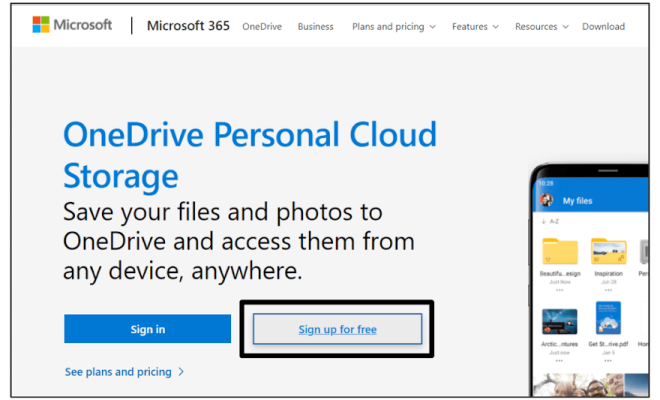
The digital age has made it easier to store files and keep them accessible from anywhere with an internet connection. However, this has also created a challenge for data management, with files often scattered across multiple devices and platforms. This is where cloud storage comes in; it provides a centralized location for all your files, accessible from any device whenever you need them. One of the leading cloud storage services is Microsoft’s OneDrive, and here are some reasons why you should consider using it for your personal storage needs.

Large Storage Capacity

OneDrive provides a large storage capacity. With a free account, you get 5GB of storage, and if you subscribe to Microsoft 365, you get additional storage – up to 1TB, depending on your subscription. This means you can easily store your documents, photos, videos, and other files without worrying about running out of space. Furthermore, if you need more storage, you can upgrade to a higher plan or add storage on demand.

Accessibility

OneDrive is available on all major platforms, including Windows, macOS, iOS, Android, and web browsers. This means you can access your files from any of your devices, whether you are at home, at work, or on the go. Moreover, it synchronizes your files across all your devices, ensuring that you always have the latest version of your documents, photos, and videos at your fingertips.

Security

OneDrive has robust security measures to protect your files, including encryption, two-factor authentication, and virus scanning. Furthermore, you can set permissions to control who has access to your files, and you can also password-protect your shared links.

Collaboration

OneDrive makes it easy to collaborate with others on your files. You can share your files with others, grant them permission to edit or view your files, and collaborate in real-time. Furthermore, you can leave comments on files, track changes, and restore previous versions if necessary. This makes it easy to work with others, even if you are not in the same location.

Backup

OneDrive provides an automatic backup feature called “Folder Protection.” This feature automatically backs up your Desktop, Documents, and Pictures folders to OneDrive, ensuring that your important files are always safe, even if your device is lost or stolen.

Previous Article

Why You Should Use Apple MFI Certified ...

Next Article

Why You Shouldn’t Learn to Code With ...

Matthew Lynch

Related articles More from author

  • Digital & Mobile Technology

    IMAP vs. POP3: What’s the Difference? Which One Should You Use?

    June 22, 2023
    By Matthew Lynch
  • Digital & Mobile Technology

    How to Change the User Folder Name in Windows 10

    June 6, 2023
    By Matthew Lynch
  • Digital & Mobile Technology

    Google Play Store vs. Samsung Galaxy Store: What’s the Difference and Which Should You Use?

    June 22, 2023
    By Matthew Lynch
  • Digital & Mobile Technology

    Macs

    June 3, 2023
    By Matthew Lynch
  • Digital & Mobile Technology

    How Fast Is a Wi-Fi Network?

    June 6, 2023
    By Matthew Lynch
  • Digital & Mobile Technology

    Should You Upgrade to macOS Ventura? Here’s How to Decide

    June 21, 2023
    By Matthew Lynch

Search

Login & Registration

  • Log in
  • Entries feed
  • Comments feed
  • WordPress.org

Newsletter

Signup for The Tech Edvocate Newsletter and have the latest in EdTech news and opinion delivered to your email address!

About Us

Since technology is not going anywhere and does more good than harm, adapting is the best course of action. That is where The Tech Edvocate comes in. We plan to cover the PreK-12 and Higher Education EdTech sectors and provide our readers with the latest news and opinion on the subject. From time to time, I will invite other voices to weigh in on important issues in EdTech. We hope to provide a well-rounded, multi-faceted look at the past, present, the future of EdTech in the US and internationally.

We started this journey back in June 2016, and we plan to continue it for many more years to come. I hope that you will join us in this discussion of the past, present and future of EdTech and lend your own insight to the issues that are discussed.

Newsletter

Signup for The Tech Edvocate Newsletter and have the latest in EdTech news and opinion delivered to your email address!

Contact Us

The Tech Edvocate
910 Goddin Street
Richmond, VA 23231
(601) 630-5238
[email protected]

Copyright © 2026 Matthew Lynch. All rights reserved.