The Tech Edvocate

Top Menu

  • Advertisement
  • Apps
  • Home Page
  • Home Page Five (No Sidebar)
  • Home Page Four
  • Home Page Three
  • Home Page Two
  • Home Tech2
  • Icons [No Sidebar]
  • Left Sidbear Page
  • Lynch Educational Consulting
  • My Account
  • My Speaking Page
  • Newsletter Sign Up Confirmation
  • Newsletter Unsubscription
  • Our Brands
  • Page Example
  • Privacy Policy
  • Protected Content
  • Register
  • Request a Product Review
  • Shop
  • Shortcodes Examples
  • Signup
  • Start Here
    • Governance
    • Careers
    • Contact Us
  • Terms and Conditions
  • The Edvocate
  • The Tech Edvocate Product Guide
  • Topics
  • Write For Us
  • Advertise

Main Menu

  • Start Here
    • Our Brands
    • Governance
      • Lynch Educational Consulting, LLC.
      • Dr. Lynch’s Personal Website
      • Careers
    • Write For Us
    • The Tech Edvocate Product Guide
    • Contact Us
    • Books
    • Edupedia
    • Post a Job
    • The Edvocate Podcast
    • Terms and Conditions
    • Privacy Policy
  • Topics
    • Assistive Technology
    • Child Development Tech
    • Early Childhood & K-12 EdTech
    • EdTech Futures
    • EdTech News
    • EdTech Policy & Reform
    • EdTech Startups & Businesses
    • Higher Education EdTech
    • Online Learning & eLearning
    • Parent & Family Tech
    • Personalized Learning
    • Product Reviews
  • Advertise
  • Tech Edvocate Awards
  • The Edvocate
  • Pedagogue
  • School Ratings

logo

The Tech Edvocate

  • Start Here
    • Our Brands
    • Governance
      • Lynch Educational Consulting, LLC.
      • Dr. Lynch’s Personal Website
        • My Speaking Page
      • Careers
    • Write For Us
    • The Tech Edvocate Product Guide
    • Contact Us
    • Books
    • Edupedia
    • Post a Job
    • The Edvocate Podcast
    • Terms and Conditions
    • Privacy Policy
  • Topics
    • Assistive Technology
    • Child Development Tech
    • Early Childhood & K-12 EdTech
    • EdTech Futures
    • EdTech News
    • EdTech Policy & Reform
    • EdTech Startups & Businesses
    • Higher Education EdTech
    • Online Learning & eLearning
    • Parent & Family Tech
    • Personalized Learning
    • Product Reviews
  • Advertise
  • Tech Edvocate Awards
  • The Edvocate
  • Pedagogue
  • School Ratings
  • 100 Best Apps for Data Cleaning

  • 100 Best Apps for Data Entry

  • 100 Best Apps for Business Process Automation

  • 100 Best Apps for Operational Efficiency

  • 100 Best Apps for Improving Processes

  • 100 Best Apps for Scaling Operations

  • 100 Best Apps for Community-Led Growth

  • 100 Best Apps for Product-Led Growth

  • 100 Best Apps for User Activation

  • 100 Best Apps for Acquiring Customers

Assistive Technology
Home›Assistive Technology›What to Do With Old Computer Monitors

What to Do With Old Computer Monitors
By Matthew Lynch
June 23, 2023
0
Spread the love

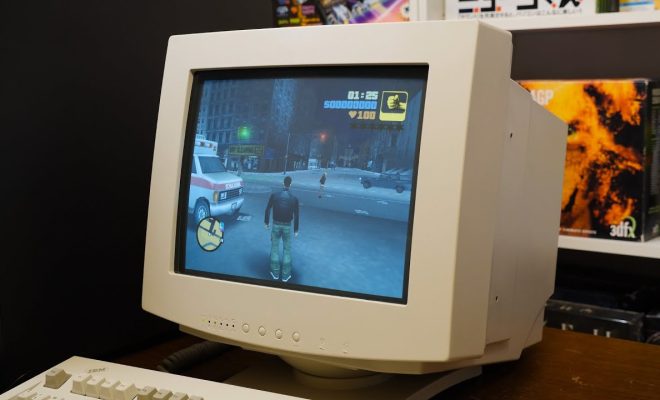
Technology is ever-evolving, and as we progress, we find ourselves replacing old gadgets with new ones. This can lead to an accumulation of old gadgets, including computer monitors, that we no longer have a use for. However, these monitors can be repurposed in various ways, rather than throwing them to waste.

Here are some ideas on what to do with old computer monitors:

  1. Donate them

One way to put your computer monitor to good use is by donating it. There are various organizations that accept electronic donations, such as schools, charity organizations, and non-profits. These organizations can use the monitors for various purposes, including setting up computer labs for underprivileged communities.

  1. Sell them

If your old monitor is still in good shape, you can sell it online or give it to a second-hand dealer. You can earn some extra cash while also helping someone who cannot afford a new monitor. Make sure you erase all your personal data before selling or giving your old monitor away.

  1. Recycle them

Electronic waste is a growing concern globally. Recycling old computer monitors is essential to reduce the environmental impact of electronic waste. You can check with your local authorities or electronic stores to see if they have recycling programs for computer monitors. Most of these programs ensure that the monitors are safely disposed of and the valuable parts are recycled.

  1. Use them as a second screen

You can repurpose your old computer monitor as a second screen. This is an excellent idea for people who require multiple screens when working from home. By connecting your old monitor to your computer, you can extend your desktop and use the second screen for various purposes, including video conferencing, research, and running applications.

  1. Turn them into digital picture frames

Another creative way to use old computer monitors is by transforming them into digital picture frames. You can remove the monitor from its casing, add a digital picture frame kit and use it to display your favorite pictures. This is an excellent way to showcase your family pictures and your creativity.

Previous Article

Why Thousands of Etsy Sellers Have Gone ...

Next Article

Clipchamp Has Been Out for a Day, ...

Matthew Lynch

Related articles More from author

  • Assistive Technology

    How to Use Bixby Routines on Your Samsung Phone to Automate Your Day

    June 14, 2023
    By Matthew Lynch
  • Assistive Technology

    How to Set Your Current Book as Your Kindle Lock Screen

    August 5, 2023
    By Matthew Lynch
  • Assistive Technology

    What to Do if Startup Repair Fails to Fix Your PC

    June 5, 2023
    By Matthew Lynch
  • Assistive Technology

    Ways to Improve the GPS Location Accuracy on Android Devices

    June 6, 2023
    By Matthew Lynch
  • Assistive Technology

    Ways You Can Customize Your Mac’s Keyboard Settings

    June 22, 2023
    By Matthew Lynch
  • Assistive Technology

    How to Add Chrome Extensions

    June 15, 2023
    By Matthew Lynch

Search

Login & Registration

  • Log in
  • Entries feed
  • Comments feed
  • WordPress.org

Newsletter

Signup for The Tech Edvocate Newsletter and have the latest in EdTech news and opinion delivered to your email address!

About Us

Since technology is not going anywhere and does more good than harm, adapting is the best course of action. That is where The Tech Edvocate comes in. We plan to cover the PreK-12 and Higher Education EdTech sectors and provide our readers with the latest news and opinion on the subject. From time to time, I will invite other voices to weigh in on important issues in EdTech. We hope to provide a well-rounded, multi-faceted look at the past, present, the future of EdTech in the US and internationally.

We started this journey back in June 2016, and we plan to continue it for many more years to come. I hope that you will join us in this discussion of the past, present and future of EdTech and lend your own insight to the issues that are discussed.

Newsletter

Signup for The Tech Edvocate Newsletter and have the latest in EdTech news and opinion delivered to your email address!

Contact Us

The Tech Edvocate
910 Goddin Street
Richmond, VA 23231
(601) 630-5238
[email protected]

Copyright © 2026 Matthew Lynch. All rights reserved.