The Tech Edvocate

Top Menu

  • Advertisement
  • Apps
  • Home Page
  • Home Page Five (No Sidebar)
  • Home Page Four
  • Home Page Three
  • Home Page Two
  • Home Tech2
  • Icons [No Sidebar]
  • Left Sidbear Page
  • Lynch Educational Consulting
  • My Account
  • My Speaking Page
  • Newsletter Sign Up Confirmation
  • Newsletter Unsubscription
  • Our Brands
  • Page Example
  • Privacy Policy
  • Protected Content
  • Register
  • Request a Product Review
  • Shop
  • Shortcodes Examples
  • Signup
  • Start Here
    • Governance
    • Careers
    • Contact Us
  • Terms and Conditions
  • The Edvocate
  • The Tech Edvocate Product Guide
  • Topics
  • Write For Us
  • Advertise

Main Menu

  • Start Here
    • Our Brands
    • Governance
      • Lynch Educational Consulting, LLC.
      • Dr. Lynch’s Personal Website
      • Careers
    • Write For Us
    • The Tech Edvocate Product Guide
    • Contact Us
    • Books
    • Edupedia
    • Post a Job
    • The Edvocate Podcast
    • Terms and Conditions
    • Privacy Policy
  • Topics
    • Assistive Technology
    • Child Development Tech
    • Early Childhood & K-12 EdTech
    • EdTech Futures
    • EdTech News
    • EdTech Policy & Reform
    • EdTech Startups & Businesses
    • Higher Education EdTech
    • Online Learning & eLearning
    • Parent & Family Tech
    • Personalized Learning
    • Product Reviews
  • Advertise
  • Tech Edvocate Awards
  • The Edvocate
  • Pedagogue
  • School Ratings

logo

The Tech Edvocate

  • Start Here
    • Our Brands
    • Governance
      • Lynch Educational Consulting, LLC.
      • Dr. Lynch’s Personal Website
        • My Speaking Page
      • Careers
    • Write For Us
    • The Tech Edvocate Product Guide
    • Contact Us
    • Books
    • Edupedia
    • Post a Job
    • The Edvocate Podcast
    • Terms and Conditions
    • Privacy Policy
  • Topics
    • Assistive Technology
    • Child Development Tech
    • Early Childhood & K-12 EdTech
    • EdTech Futures
    • EdTech News
    • EdTech Policy & Reform
    • EdTech Startups & Businesses
    • Higher Education EdTech
    • Online Learning & eLearning
    • Parent & Family Tech
    • Personalized Learning
    • Product Reviews
  • Advertise
  • Tech Edvocate Awards
  • The Edvocate
  • Pedagogue
  • School Ratings
  • This One Skill Is Quietly Reshaping Every Career — And How to Master It Now

  • The Silent Threat: How AI Is Reshaping Recent College Graduates’ Job Prospects

  • This Crucial Shift in AI Will Devastate Millions of College Grads

  • The Brutal Truth: Zero-Day Exploit Analysis vs. Traditional Cybersecurity Careers — Which Path Pays $300,000?

  • The Urgent Truth: Why These Certifications Are Your Only Defense Against Zero-Day Attacks

  • The FBI Investigates a Zero-Day Attack on Your Job Applications

  • The Startling Truth About AI’s Impact on Your Coding Job by 2026

  • The Shocking Truth About Your Code: AI Is Already Rewriting Your Future

  • Is This Why Code Review Is Dead? AI’s Staggering Impact on Tech Jobs

  • The Shocking Truth About CogniBoost vs Focus Drugs: What No One Is Telling You

Digital & Mobile Technology
Home›Digital & Mobile Technology›What is Yahoo Account Key and How Does it Work? 1

What is Yahoo Account Key and How Does it Work? 1
By Matthew Lynch
June 10, 2023
0
Spread the love

Yahoo Account Key is a password-less authentication feature introduced by Yahoo to simplify and secure login to its services. With Yahoo Account Key, you don’t have to remember your Yahoo account password or enter it every time you want to access your account. Instead, you use your mobile device to verify your identity and grant access to your account. This article explains the workings of Yahoo Account Key and why it is a useful feature.

How Does Yahoo Account Key Work?

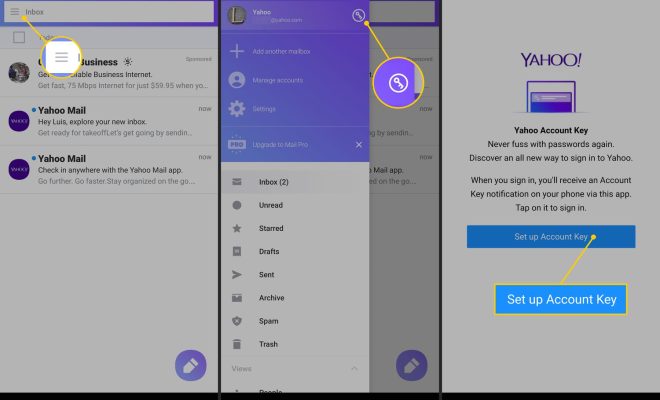
Yahoo Account Key replaces the traditional username and password login process with a more secure and convenient authentication method. To activate Yahoo Account Key, you need to link your mobile device (phone or tablet) to your Yahoo account. Once linked, you receive a notification on your mobile device as soon as you try to access your Yahoo account from a new device or web browser. The notification contains a simple Yes/No prompt that asks if you are trying to access your account from that device or browser. If you confirm that you are, you gain access to your account without entering your password.

To set up Yahoo Account Key, follow these steps:

1. Log in to your Yahoo account
2. Click on your profile icon in the top right corner
3. Select Account Info
4. Click on Account Security
5. Scroll down to Account Key and click on the toggle button to enable it
6. Link your mobile device to your Yahoo account (you can choose to receive a text message or push notification for authentication)
7. Verify your mobile device by entering the code sent to you

Once you have set up Yahoo Account Key, you will not be required to enter your password again unless you log out of your account on all devices.

Benefits of Using Yahoo Account Key

Yahoo Account Key provides several benefits over traditional username and password authentication, including:

1. Enhanced Security: Yahoo Account Key reduces the risk of identity theft and unauthorized access as it eliminates the need to enter a password. Since passwords can be leaked or stolen, Yahoo Account Key enhances the security of your account.

2. Convenience: Yahoo Account Key eliminates the need to remember and enter a password every time you want to access your account. The authentication process is fast and straightforward, which saves time and effort.

3. Multi-Device Access: With Yahoo Account Key, you can log in to your Yahoo account on multiple devices without having to remember each device’s password. You only need your mobile device to verify your identity and grant access to your account.

4. Control: Yahoo Account Key gives you more control over your account as you receive notifications each time someone tries to access it. You can quickly approve or deny access, giving you peace of mind.

Conclusion

Yahoo Account Key is a useful feature that simplifies and secures the login process to Yahoo services. With Yahoo Account Key, you don’t have to remember your password, which avoids the risk of it being hacked or stolen. The authentication process is fast, simple, and convenient, allowing you to access your account quickly using your mobile device. Yahoo Account Key is an excellent addition to Yahoo’s account security features and a great tool to protect your digital identity.

Previous Article

How to Use Google Voice For Video ...

Next Article

StarCraft Series of Real Time Strategy Games

Matthew Lynch

Related articles More from author

  • Digital & Mobile Technology

    What Is a TOSLINK Audio Connection?

    June 12, 2023
    By Matthew Lynch
  • Digital & Mobile Technology

    Should You Engrave Your Apple Devices?

    June 22, 2023
    By Matthew Lynch
  • Digital & Mobile Technology

    How to Use Autocorrect on Android

    September 7, 2023
    By Matthew Lynch
  • Digital & Mobile Technology

    How to Fix OneDrive’s “The Tag Present in the Reparse Point Buffer Is Invalid” Error on Windows

    June 8, 2023
    By Matthew Lynch
  • Digital & Mobile Technology

    How to Add the Current Time to Google Sheets

    August 3, 2023
    By Matthew Lynch
  • Digital & Mobile Technology

    How to Fix It When Facebook Messenger Isn’t Sending Messages

    June 2, 2023
    By Matthew Lynch

Search

Login & Registration

  • Log in
  • Entries feed
  • Comments feed
  • WordPress.org

Newsletter

Signup for The Tech Edvocate Newsletter and have the latest in EdTech news and opinion delivered to your email address!

About Us

Since technology is not going anywhere and does more good than harm, adapting is the best course of action. That is where The Tech Edvocate comes in. We plan to cover the PreK-12 and Higher Education EdTech sectors and provide our readers with the latest news and opinion on the subject. From time to time, I will invite other voices to weigh in on important issues in EdTech. We hope to provide a well-rounded, multi-faceted look at the past, present, the future of EdTech in the US and internationally.

We started this journey back in June 2016, and we plan to continue it for many more years to come. I hope that you will join us in this discussion of the past, present and future of EdTech and lend your own insight to the issues that are discussed.

Newsletter

Signup for The Tech Edvocate Newsletter and have the latest in EdTech news and opinion delivered to your email address!

Contact Us

The Tech Edvocate
910 Goddin Street
Richmond, VA 23231
(601) 630-5238
[email protected]

Copyright © 2026 Matthew Lynch. All rights reserved.