The Tech Edvocate

Top Menu

  • Advertisement
  • Apps
  • Home Page
  • Home Page Five (No Sidebar)
  • Home Page Four
  • Home Page Three
  • Home Page Two
  • Home Tech2
  • Icons [No Sidebar]
  • Left Sidbear Page
  • Lynch Educational Consulting
  • My Account
  • My Speaking Page
  • Newsletter Sign Up Confirmation
  • Newsletter Unsubscription
  • Our Brands
  • Page Example
  • Privacy Policy
  • Protected Content
  • Register
  • Request a Product Review
  • Shop
  • Shortcodes Examples
  • Signup
  • Start Here
    • Governance
    • Careers
    • Contact Us
  • Terms and Conditions
  • The Edvocate
  • The Tech Edvocate Product Guide
  • Topics
  • Write For Us
  • Advertise

Main Menu

  • Start Here
    • Our Brands
    • Governance
      • Lynch Educational Consulting, LLC.
      • Dr. Lynch’s Personal Website
      • Careers
    • Write For Us
    • The Tech Edvocate Product Guide
    • Contact Us
    • Books
    • Edupedia
    • Post a Job
    • The Edvocate Podcast
    • Terms and Conditions
    • Privacy Policy
  • Topics
    • Assistive Technology
    • Child Development Tech
    • Early Childhood & K-12 EdTech
    • EdTech Futures
    • EdTech News
    • EdTech Policy & Reform
    • EdTech Startups & Businesses
    • Higher Education EdTech
    • Online Learning & eLearning
    • Parent & Family Tech
    • Personalized Learning
    • Product Reviews
  • Advertise
  • Tech Edvocate Awards
  • The Edvocate
  • Pedagogue
  • School Ratings

logo

The Tech Edvocate

  • Start Here
    • Our Brands
    • Governance
      • Lynch Educational Consulting, LLC.
      • Dr. Lynch’s Personal Website
        • My Speaking Page
      • Careers
    • Write For Us
    • The Tech Edvocate Product Guide
    • Contact Us
    • Books
    • Edupedia
    • Post a Job
    • The Edvocate Podcast
    • Terms and Conditions
    • Privacy Policy
  • Topics
    • Assistive Technology
    • Child Development Tech
    • Early Childhood & K-12 EdTech
    • EdTech Futures
    • EdTech News
    • EdTech Policy & Reform
    • EdTech Startups & Businesses
    • Higher Education EdTech
    • Online Learning & eLearning
    • Parent & Family Tech
    • Personalized Learning
    • Product Reviews
  • Advertise
  • Tech Edvocate Awards
  • The Edvocate
  • Pedagogue
  • School Ratings
  • Miro vs Conceptboard for project management

  • How to use Teamwork for resource management

  • How much does Procore cost per month

  • How to organize Microsoft Planner buckets

  • Is Teamwork good for billable hours

  • Procore vs Buildertrend which is better

  • Airtable project management templates

  • Can Miro track project progress

  • How to use Basecamp for client work

  • Can Lucidchart create swimlane diagrams

Digital & Mobile Technology
Home›Digital & Mobile Technology›What Is the Wacatac.B!ml Trojan? How to Remove It From Windows

What Is the Wacatac.B!ml Trojan? How to Remove It From Windows
By Matthew Lynch
June 23, 2023
0
Spread the love

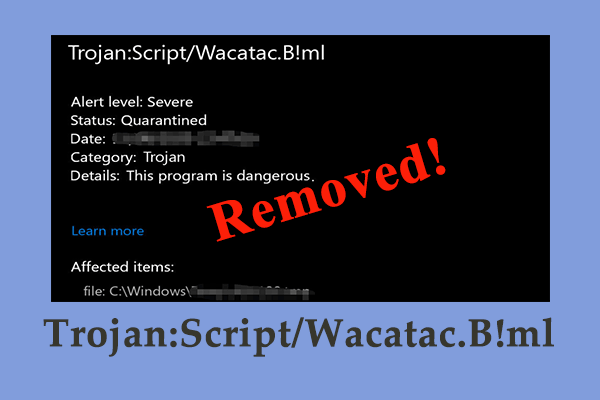
Wacatac.B!ml Trojan is a malware or virus that infects computer systems through fraudulent emails or attachments, internet downloads, or social engineering attacks. It is a dangerous Trojan that can potentially damage your computer and steal your personal information.

Wacatac.B!ml Trojan typically hides in the background of your computer system, waiting for commands from its creators. It can perform a range of malicious activities such as recording your keystrokes, stealing your passwords, banking data, and other sensitive information. This Trojan can also install additional malware on your computer, opening a backdoor for hackers to access your system remotely.

If you suspect your computer has been infected by Wacatac.B!ml Trojan, don’t panic. Several ways can help you remove this malicious software from your Windows computers. Here are some effective techniques to follow.

1. Use Antivirus Software

The first and most effective way to remove Wacatac.B!ml Trojan from your computer is using reliable antivirus software. Antivirus software is designed to locate and remove malicious software from your system. If your antivirus software detects Wacatac.B!ml Trojan, it will eliminate it from your computer automatically.
Ensure that your antivirus software is up-to-date to detect and remove the latest threats. Also, frequently scanning your system can help detect any malicious software and remove it.

2. Use Windows Defender

Microsoft has an inbuilt security feature known as Windows Defender, which helps detect and remove malware from your computer. Ensure that you have activated Windows Defender and that it is updated regularly. Windows Defender can locate Wacatac.B!ml Trojan and remove it from your computer.

To activate Windows Defender, click the Windows Start button, then click ‘Settings,’ select ‘Updates & Security,’ then click on ‘Windows Security.’ From the Windows Security interface, click on ‘Virus & threat protection,’ then ‘Scan options.’ Finally, select ‘Full scan’ and click ‘Scan now.’ Windows Defender will scan your computer, and if Wacatac.B!ml Trojan is detected, it will remove it.

3. Use Malwarebytes

Malwarebytes is an anti-malware tool that can help you eliminate Wacatac.B!ml Trojan from your computer. Download and install Malwarebytes from the official website, then run a full scan of your computer system. Malwarebytes will detect and remove any malware infections found.

Previous Article

Best Free Video Watermark Removal Services Online

Next Article

How to Modify and Manage the Hosts ...

Matthew Lynch

Related articles More from author

  • Digital & Mobile Technology

    Bits Per Second Explained

    June 12, 2023
    By Matthew Lynch
  • Digital & Mobile Technology

    Writing in All Caps Is Like Shouting

    June 3, 2023
    By Matthew Lynch
  • Digital & Mobile Technology

    How to Stream Hulu in 4K

    July 28, 2023
    By Matthew Lynch
  • Digital & Mobile Technology

    The 8 Best Social Media Management Applications of 2023

    June 4, 2023
    By Matthew Lynch
  • Digital & Mobile Technology

    What Is Network Discovery on Windows 10? How to Turn It On or Off

    August 5, 2023
    By Matthew Lynch
  • Digital & Mobile Technology

    How to Connect Nest Thermostat to Alexa

    June 4, 2023
    By Matthew Lynch

Search

Login & Registration

  • Log in
  • Entries feed
  • Comments feed
  • WordPress.org

Newsletter

Signup for The Tech Edvocate Newsletter and have the latest in EdTech news and opinion delivered to your email address!

About Us

Since technology is not going anywhere and does more good than harm, adapting is the best course of action. That is where The Tech Edvocate comes in. We plan to cover the PreK-12 and Higher Education EdTech sectors and provide our readers with the latest news and opinion on the subject. From time to time, I will invite other voices to weigh in on important issues in EdTech. We hope to provide a well-rounded, multi-faceted look at the past, present, the future of EdTech in the US and internationally.

We started this journey back in June 2016, and we plan to continue it for many more years to come. I hope that you will join us in this discussion of the past, present and future of EdTech and lend your own insight to the issues that are discussed.

Newsletter

Signup for The Tech Edvocate Newsletter and have the latest in EdTech news and opinion delivered to your email address!

Contact Us

The Tech Edvocate
910 Goddin Street
Richmond, VA 23231
(601) 630-5238
[email protected]

Copyright © 2026 Matthew Lynch. All rights reserved.