The Tech Edvocate

Top Menu

  • Advertisement
  • Apps
  • Home Page
  • Home Page Five (No Sidebar)
  • Home Page Four
  • Home Page Three
  • Home Page Two
  • Home Tech2
  • Icons [No Sidebar]
  • Left Sidbear Page
  • Lynch Educational Consulting
  • My Account
  • My Speaking Page
  • Newsletter Sign Up Confirmation
  • Newsletter Unsubscription
  • Our Brands
  • Page Example
  • Privacy Policy
  • Protected Content
  • Register
  • Request a Product Review
  • Shop
  • Shortcodes Examples
  • Signup
  • Start Here
    • Governance
    • Careers
    • Contact Us
  • Terms and Conditions
  • The Edvocate
  • The Tech Edvocate Product Guide
  • Topics
  • Write For Us
  • Advertise

Main Menu

  • Start Here
    • Our Brands
    • Governance
      • Lynch Educational Consulting, LLC.
      • Dr. Lynch’s Personal Website
      • Careers
    • Write For Us
    • The Tech Edvocate Product Guide
    • Contact Us
    • Books
    • Edupedia
    • Post a Job
    • The Edvocate Podcast
    • Terms and Conditions
    • Privacy Policy
  • Topics
    • Assistive Technology
    • Child Development Tech
    • Early Childhood & K-12 EdTech
    • EdTech Futures
    • EdTech News
    • EdTech Policy & Reform
    • EdTech Startups & Businesses
    • Higher Education EdTech
    • Online Learning & eLearning
    • Parent & Family Tech
    • Personalized Learning
    • Product Reviews
  • Advertise
  • Tech Edvocate Awards
  • The Edvocate
  • Pedagogue
  • School Ratings

logo

The Tech Edvocate

  • Start Here
    • Our Brands
    • Governance
      • Lynch Educational Consulting, LLC.
      • Dr. Lynch’s Personal Website
        • My Speaking Page
      • Careers
    • Write For Us
    • The Tech Edvocate Product Guide
    • Contact Us
    • Books
    • Edupedia
    • Post a Job
    • The Edvocate Podcast
    • Terms and Conditions
    • Privacy Policy
  • Topics
    • Assistive Technology
    • Child Development Tech
    • Early Childhood & K-12 EdTech
    • EdTech Futures
    • EdTech News
    • EdTech Policy & Reform
    • EdTech Startups & Businesses
    • Higher Education EdTech
    • Online Learning & eLearning
    • Parent & Family Tech
    • Personalized Learning
    • Product Reviews
  • Advertise
  • Tech Edvocate Awards
  • The Edvocate
  • Pedagogue
  • School Ratings
  • Miro vs Conceptboard for project management

  • How to use Teamwork for resource management

  • How much does Procore cost per month

  • How to organize Microsoft Planner buckets

  • Is Teamwork good for billable hours

  • Procore vs Buildertrend which is better

  • Airtable project management templates

  • Can Miro track project progress

  • How to use Basecamp for client work

  • Can Lucidchart create swimlane diagrams

Digital & Mobile Technology
Home›Digital & Mobile Technology›What Is POST (Power-on Self Test)?

What Is POST (Power-on Self Test)?
By Matthew Lynch
June 22, 2023
0
Spread the love

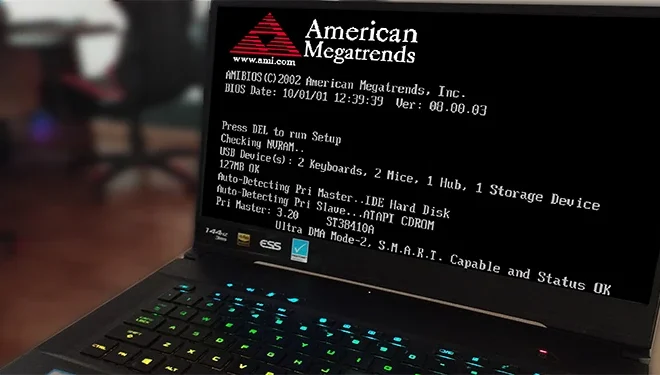
POST, short for Power-On Self Test, is a diagnostic test that runs automatically when a computer is first turned on. The POST tests the computer’s hardware components, ensuring that everything is functioning correctly before the operating system is loaded and applications are run.

The POST is essential to ensure that a computer is operational and ready to use. This diagnostic test is designed to detect any hardware issues such as memory errors, CPU failures, hard drive problems, and other issues. Without the POST, the computer would not be able to operate correctly or boot up.

The POST is initiated when a computer is turned on and it tests all internal components of the computer. It also checks all peripheral devices attached to the system for proper connection and compatibility. If any issues are found, the POST will either freeze or halt the system from booting up further. This can often be resolved by replacing or repairing the faulty hardware component.

The POST can take anywhere from a few seconds to over a minute to complete, depending on the complexity of the computer system and the number of components being tested. A series of beeps can often accompany the POST, which can indicate any error codes that have been detected.

In addition to checking the hardware components, the POST can also configure system settings, such as the CPU speed, hard drive settings, and memory settings. These settings can be accessed and adjusted in the BIOS (Basic Input/Output System), which is part of the firmware on the computer’s motherboard.

The importance of the POST cannot be overstated. Without it, the computer would not function correctly or could potentially cause damage to the hardware components. It is essential to allow the test to run its full course to ensure that all issues are detected and resolved before use.


Previous Article

How to Fix the Steam Black Screen ...

Next Article

How to Take a Screenshot on a ...

Matthew Lynch

Related articles More from author

  • Digital & Mobile Technology

    What Is the Difference Between CHKDSK, SFC, and DISM in Windows 10?

    September 7, 2023
    By Matthew Lynch
  • Digital & Mobile Technology

    How to Make a Duck Using a QWERTY Keyboard

    April 28, 2023
    By Matthew Lynch
  • Digital & Mobile Technology

    How to Set Up a New Gmail Account for Yourself or Others

    August 5, 2023
    By Matthew Lynch
  • Digital & Mobile Technology

    How to Use Showtime Streaming Services

    June 9, 2023
    By Matthew Lynch
  • Digital & Mobile Technology

    How Long Do PC Parts and Components Last? (And How to Extend Their Lifespan)

    August 5, 2023
    By Matthew Lynch
  • Digital & Mobile Technology

    Reasons Why You Should NOT Buy a Bluetooth Keyboard

    September 8, 2023
    By Matthew Lynch

Search

Login & Registration

  • Log in
  • Entries feed
  • Comments feed
  • WordPress.org

Newsletter

Signup for The Tech Edvocate Newsletter and have the latest in EdTech news and opinion delivered to your email address!

About Us

Since technology is not going anywhere and does more good than harm, adapting is the best course of action. That is where The Tech Edvocate comes in. We plan to cover the PreK-12 and Higher Education EdTech sectors and provide our readers with the latest news and opinion on the subject. From time to time, I will invite other voices to weigh in on important issues in EdTech. We hope to provide a well-rounded, multi-faceted look at the past, present, the future of EdTech in the US and internationally.

We started this journey back in June 2016, and we plan to continue it for many more years to come. I hope that you will join us in this discussion of the past, present and future of EdTech and lend your own insight to the issues that are discussed.

Newsletter

Signup for The Tech Edvocate Newsletter and have the latest in EdTech news and opinion delivered to your email address!

Contact Us

The Tech Edvocate
910 Goddin Street
Richmond, VA 23231
(601) 630-5238
[email protected]

Copyright © 2026 Matthew Lynch. All rights reserved.