The Tech Edvocate

Top Menu

  • Advertisement
  • Apps
  • Home Page
  • Home Page Five (No Sidebar)
  • Home Page Four
  • Home Page Three
  • Home Page Two
  • Home Tech2
  • Icons [No Sidebar]
  • Left Sidbear Page
  • Lynch Educational Consulting
  • My Account
  • My Speaking Page
  • Newsletter Sign Up Confirmation
  • Newsletter Unsubscription
  • Our Brands
  • Page Example
  • Privacy Policy
  • Protected Content
  • Register
  • Request a Product Review
  • Shop
  • Shortcodes Examples
  • Signup
  • Start Here
    • Governance
    • Careers
    • Contact Us
  • Terms and Conditions
  • The Edvocate
  • The Tech Edvocate Product Guide
  • Topics
  • Write For Us
  • Advertise

Main Menu

  • Start Here
    • Our Brands
    • Governance
      • Lynch Educational Consulting, LLC.
      • Dr. Lynch’s Personal Website
      • Careers
    • Write For Us
    • The Tech Edvocate Product Guide
    • Contact Us
    • Books
    • Edupedia
    • Post a Job
    • The Edvocate Podcast
    • Terms and Conditions
    • Privacy Policy
  • Topics
    • Assistive Technology
    • Child Development Tech
    • Early Childhood & K-12 EdTech
    • EdTech Futures
    • EdTech News
    • EdTech Policy & Reform
    • EdTech Startups & Businesses
    • Higher Education EdTech
    • Online Learning & eLearning
    • Parent & Family Tech
    • Personalized Learning
    • Product Reviews
  • Advertise
  • Tech Edvocate Awards
  • The Edvocate
  • Pedagogue
  • School Ratings

logo

The Tech Edvocate

  • Start Here
    • Our Brands
    • Governance
      • Lynch Educational Consulting, LLC.
      • Dr. Lynch’s Personal Website
        • My Speaking Page
      • Careers
    • Write For Us
    • The Tech Edvocate Product Guide
    • Contact Us
    • Books
    • Edupedia
    • Post a Job
    • The Edvocate Podcast
    • Terms and Conditions
    • Privacy Policy
  • Topics
    • Assistive Technology
    • Child Development Tech
    • Early Childhood & K-12 EdTech
    • EdTech Futures
    • EdTech News
    • EdTech Policy & Reform
    • EdTech Startups & Businesses
    • Higher Education EdTech
    • Online Learning & eLearning
    • Parent & Family Tech
    • Personalized Learning
    • Product Reviews
  • Advertise
  • Tech Edvocate Awards
  • The Edvocate
  • Pedagogue
  • School Ratings
  • A Visitors Guide to Lyon, France

  • JisuLife Ultra2 Portable Fan: A Powerful Multi-Function Cooling Solution

  • A Visitors Guide to Viña del Mar, Chile

  • A Visitors Guide to Århus, Denmark

  • A Visitors Guide to Bakersfield (CA), United States

  • A Visitors Guide to Aurora (CO), United States

  • A Visitor’s Guide to Toledo (OH), United States

  • A Visitors Guide to Cincinnati (OH), United States

  • The MagicEagle Cam 5: Revolutionizing Wildlife Monitoring with Smart 4G Technology

  • A Visitors Guide to Pittsburgh (PA), United States

Digital & Mobile Technology
Home›Digital & Mobile Technology›What Is Plex and How Does It Work?

What Is Plex and How Does It Work?
By Matthew Lynch
June 26, 2023
0
Spread the love

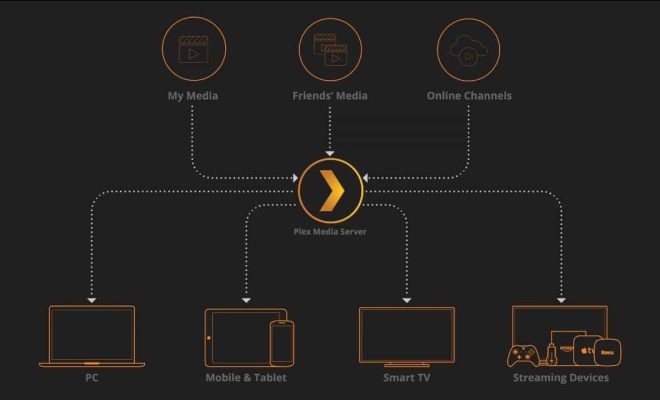
Plex is a streaming platform that allows users to organize and stream their personal media files such as photos, videos, music, and movies across multiple devices. This software serves as a central hub for all media files, providing easy access to users for their entertainment needs. Plex was first launched in 2008 and has become one of the most popular media software globally.

How does it work?

Plex operates on a client-server model, where users install the Plex media server software on their desired device and use it to store and organize their media files. This media server software runs on Windows, Mac, Linux, or a network-attached storage device (NAS). Once the server is set up, users can access their media files through the Plex app that is available on multiple platforms such as Roku, Chromecast, Apple TV, Xbox, Playstation, Android, iOS, and many others.

The Plex app connects to the media server and displays all the media files organized in various categories such as Movies, TV Shows, Music, Photos, and more. The app provides a clean and intuitive interface, with easily searchable categories and allows users to create playlists or mark certain items as favourites for quick access.

Plex also offers a range of features to enhance the media streaming experience, such as automatic transcoding. Transcoding is the ability to convert media files into a format that is supported on the streaming device, ensuring that the media files can be played seamlessly without any buffering or lagging issues. With transcoding, users can stream their media files on devices that do not support the original file format, enabling greater compatibility.

Another useful feature of Plex is remote access, allowing users to access their media files from anywhere in the world. Users can create an account and log in to their media server remotely, giving them the freedom to stream their media files from any device with an internet connection.

In conclusion, Plex offers a simple and efficient way for users to organize and stream their personal media files across multiple devices. With its easy-to-use interface and features such as automatic transcoding and remote access, Plex offers an unparalleled media streaming experience. It is no wonder why it has become a go-to for millions of users worldwide looking to manage their media needs.


Previous Article

PlayStation Plus vs. Xbox Game Pass: Which ...

Next Article

What Does XInput and DirectInput Mean?

Matthew Lynch

Related articles More from author

  • Digital & Mobile Technology

    All About Cydia

    June 2, 2023
    By Matthew Lynch
  • Digital & Mobile Technology

    How to Browse Dating Websites Without Registering

    May 19, 2023
    By Matthew Lynch
  • Digital & Mobile Technology

    PS5 VR aka PSVR 2: News, Price, Release Date, Specs, and More

    June 6, 2023
    By Matthew Lynch
  • Digital & Mobile Technology

    Best PS4 Gaming Headset for

    April 11, 2023
    By Matthew Lynch
  • Digital & Mobile Technology

    How to Rotate Multiple Photos at Once on an iPhone

    June 15, 2023
    By Matthew Lynch
  • Digital & Mobile Technology

    Best Table of Contents Template Examples for Microsoft Word

    September 8, 2023
    By Matthew Lynch

Search

Login & Registration

  • Register
  • Log in
  • Entries feed
  • Comments feed
  • WordPress.org

Newsletter

Signup for The Tech Edvocate Newsletter and have the latest in EdTech news and opinion delivered to your email address!

About Us

Since technology is not going anywhere and does more good than harm, adapting is the best course of action. That is where The Tech Edvocate comes in. We plan to cover the PreK-12 and Higher Education EdTech sectors and provide our readers with the latest news and opinion on the subject. From time to time, I will invite other voices to weigh in on important issues in EdTech. We hope to provide a well-rounded, multi-faceted look at the past, present, the future of EdTech in the US and internationally.

We started this journey back in June 2016, and we plan to continue it for many more years to come. I hope that you will join us in this discussion of the past, present and future of EdTech and lend your own insight to the issues that are discussed.

Newsletter

Signup for The Tech Edvocate Newsletter and have the latest in EdTech news and opinion delivered to your email address!

Contact Us

The Tech Edvocate
910 Goddin Street
Richmond, VA 23231
(601) 630-5238
[email protected]

Copyright © 2025 Matthew Lynch. All rights reserved.