The Tech Edvocate

Top Menu

  • Advertisement
  • Apps
  • Home Page
  • Home Page Five (No Sidebar)
  • Home Page Four
  • Home Page Three
  • Home Page Two
  • Home Tech2
  • Icons [No Sidebar]
  • Left Sidbear Page
  • Lynch Educational Consulting
  • My Account
  • My Speaking Page
  • Newsletter Sign Up Confirmation
  • Newsletter Unsubscription
  • Our Brands
  • Page Example
  • Privacy Policy
  • Protected Content
  • Register
  • Request a Product Review
  • Shop
  • Shortcodes Examples
  • Signup
  • Start Here
    • Governance
    • Careers
    • Contact Us
  • Terms and Conditions
  • The Edvocate
  • The Tech Edvocate Product Guide
  • Topics
  • Write For Us
  • Advertise

Main Menu

  • Start Here
    • Our Brands
    • Governance
      • Lynch Educational Consulting, LLC.
      • Dr. Lynch’s Personal Website
      • Careers
    • Write For Us
    • The Tech Edvocate Product Guide
    • Contact Us
    • Books
    • Edupedia
    • Post a Job
    • The Edvocate Podcast
    • Terms and Conditions
    • Privacy Policy
  • Topics
    • Assistive Technology
    • Child Development Tech
    • Early Childhood & K-12 EdTech
    • EdTech Futures
    • EdTech News
    • EdTech Policy & Reform
    • EdTech Startups & Businesses
    • Higher Education EdTech
    • Online Learning & eLearning
    • Parent & Family Tech
    • Personalized Learning
    • Product Reviews
  • Advertise
  • Tech Edvocate Awards
  • The Edvocate
  • Pedagogue
  • School Ratings

logo

The Tech Edvocate

  • Start Here
    • Our Brands
    • Governance
      • Lynch Educational Consulting, LLC.
      • Dr. Lynch’s Personal Website
        • My Speaking Page
      • Careers
    • Write For Us
    • The Tech Edvocate Product Guide
    • Contact Us
    • Books
    • Edupedia
    • Post a Job
    • The Edvocate Podcast
    • Terms and Conditions
    • Privacy Policy
  • Topics
    • Assistive Technology
    • Child Development Tech
    • Early Childhood & K-12 EdTech
    • EdTech Futures
    • EdTech News
    • EdTech Policy & Reform
    • EdTech Startups & Businesses
    • Higher Education EdTech
    • Online Learning & eLearning
    • Parent & Family Tech
    • Personalized Learning
    • Product Reviews
  • Advertise
  • Tech Edvocate Awards
  • The Edvocate
  • Pedagogue
  • School Ratings
  • Navigating the Challenges of Neurodiversity Support in Schools

  • The Best European Cities for Graduates to Live and Work

  • States With the Biggest School Enrollment Drops Revealed

  • Empowering Future Innovators: The Role of STEAM Education in Tribal Communities

  • The Personal Liability of Founders in AI Misrepresentation Cases

  • The Rise of Skilled Trades: A Viable Alternative to Traditional College Degrees

  • The Rise of U.S. Youth Soccer: A New Frontier for Investment

  • The Human Element in Language Learning: A Challenge with Preply

  • What Can Healthcare Engagement Learn From Sports Betting?

  • Addressing the Rise of Fatigue: Expert Insights from Patrice Bonfiglio

Online Learning & eLearning
Home›Online Learning & eLearning›What Is Nvidia’s Resizable BAR? How Does It Work?

What Is Nvidia’s Resizable BAR? How Does It Work?
By Matthew Lynch
July 31, 2023
0
Spread the love

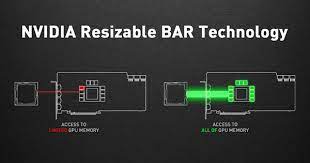
Nvidia’s Resizable BAR is a technology that has been designed to improve the performance of graphics processing units (GPUs) by allowing the processor to access the entire memory of the system’s CPU more effectively. It is a feature that has been made available in the more recent Nvidia RTX 3000 series graphics cards, and certain GPUs from the previous generation.

Essentially, Resizable BAR creates a larger communication pathway between the CPU and the GPU by removing the current limitations that limit the GPU’s access to memory. When the CPU sends a request to access the system’s memory, the Resizable BAR allows the GPU to also request and access the system’s memory directly. This means that data can be transferred faster and more efficiently between the CPU and GPU, ultimately leading to better performance.

For example, when playing a game, CPU and GPU work together to process the game’s data. The CPU is responsible for handling background processes, game logic, and anything that happens outside of rendering the game. Meanwhile, the GPU is responsible for rendering the game’s graphics. Due to the limited access that GPU has to the CPU’s memory, it can cause a bottleneck in communication – this delayed communication eventually shows up in the form of lower frame rates, stuttering, and other performance issues.

Resizable BAR technology works by testing memory access patterns, detecting bandwidth bottlenecks, and reducing overhead latencies. By giving the GPU more direct access to CPU memory, the process of transferring data can be done at a faster rate. This means that gameplay is smoother, loading times are faster, and graphics rendering can be done more efficiently.

To take full advantage of Resizable BAR, a few things need to be in place. First, your motherboard needs to support this technology, which requires a hardware and architecture update. Secondly, your graphics card must support the technology – currently, the Nvidia RTX 3000 series gpu, along with a few others, support the feature. Lastly, you must have a compatible CPU, such as an Intel 10th or 11th gen processor, Ryzen 5000 series processor, or others that support resizable bar.

In summary, Nvidia’s Resizable BAR is a technology designed to improve the performance of GPUs by providing better access to the system’s memory. By improving the transfer of data between the CPU and GPU, gamers can expect improved performance, resulting in smoother game-play, faster loading screens, and improved graphics rendering. If you’re in the market for a new GPU, check to make sure it supports this feature, and ensure that your other components also support this technology to take full advantage of the benefits it provides.


 

Previous Article

Are RAM Drives Faster Than SSDs? 5 ...

Next Article

6 Reasons Why Mobile Gaming Actually Sucks

Matthew Lynch

Related articles More from author

  • Online Learning & eLearning

    Minecraft Guide: Exploring Minecraft Game Modes

    March 28, 2023
    By Matthew Lynch
  • Digital & Mobile TechnologyOnline Learning & eLearning

    The Best JBL Bluetooth Speakers

    June 13, 2023
    By Matthew Lynch
  • Online Learning & eLearning

    Top 6 Ways to Restore the Missing Google Chrome Toolbar

    March 19, 2023
    By Matthew Lynch
  • Online Learning & eLearning

    What is a Nanometer?

    June 8, 2023
    By Matthew Lynch
  • Online Learning & eLearning

    How to Overcome Resistance to Online Education in Higher Ed

    September 4, 2020
    By Matthew Lynch
  • Online Learning & eLearning

    Top 5 Bluetooth Speakers With AUX Input

    April 2, 2023
    By Matthew Lynch

Search

Login & Registration

  • Log in
  • Entries feed
  • Comments feed
  • WordPress.org

Newsletter

Signup for The Tech Edvocate Newsletter and have the latest in EdTech news and opinion delivered to your email address!

About Us

Since technology is not going anywhere and does more good than harm, adapting is the best course of action. That is where The Tech Edvocate comes in. We plan to cover the PreK-12 and Higher Education EdTech sectors and provide our readers with the latest news and opinion on the subject. From time to time, I will invite other voices to weigh in on important issues in EdTech. We hope to provide a well-rounded, multi-faceted look at the past, present, the future of EdTech in the US and internationally.

We started this journey back in June 2016, and we plan to continue it for many more years to come. I hope that you will join us in this discussion of the past, present and future of EdTech and lend your own insight to the issues that are discussed.

Newsletter

Signup for The Tech Edvocate Newsletter and have the latest in EdTech news and opinion delivered to your email address!

Contact Us

The Tech Edvocate
910 Goddin Street
Richmond, VA 23231
(601) 630-5238
[email protected]

Copyright © 2026 Matthew Lynch. All rights reserved.