The Tech Edvocate

Top Menu

  • Advertisement
  • Apps
  • Home Page
  • Home Page Five (No Sidebar)
  • Home Page Four
  • Home Page Three
  • Home Page Two
  • Home Tech2
  • Icons [No Sidebar]
  • Left Sidbear Page
  • Lynch Educational Consulting
  • My Account
  • My Speaking Page
  • Newsletter Sign Up Confirmation
  • Newsletter Unsubscription
  • Our Brands
  • Page Example
  • Privacy Policy
  • Protected Content
  • Register
  • Request a Product Review
  • Shop
  • Shortcodes Examples
  • Signup
  • Start Here
    • Governance
    • Careers
    • Contact Us
  • Terms and Conditions
  • The Edvocate
  • The Tech Edvocate Product Guide
  • Topics
  • Write For Us
  • Advertise

Main Menu

  • Start Here
    • Our Brands
    • Governance
      • Lynch Educational Consulting, LLC.
      • Dr. Lynch’s Personal Website
      • Careers
    • Write For Us
    • The Tech Edvocate Product Guide
    • Contact Us
    • Books
    • Edupedia
    • Post a Job
    • The Edvocate Podcast
    • Terms and Conditions
    • Privacy Policy
  • Topics
    • Assistive Technology
    • Child Development Tech
    • Early Childhood & K-12 EdTech
    • EdTech Futures
    • EdTech News
    • EdTech Policy & Reform
    • EdTech Startups & Businesses
    • Higher Education EdTech
    • Online Learning & eLearning
    • Parent & Family Tech
    • Personalized Learning
    • Product Reviews
  • Advertise
  • Tech Edvocate Awards
  • The Edvocate
  • Pedagogue
  • School Ratings

logo

The Tech Edvocate

  • Start Here
    • Our Brands
    • Governance
      • Lynch Educational Consulting, LLC.
      • Dr. Lynch’s Personal Website
        • My Speaking Page
      • Careers
    • Write For Us
    • The Tech Edvocate Product Guide
    • Contact Us
    • Books
    • Edupedia
    • Post a Job
    • The Edvocate Podcast
    • Terms and Conditions
    • Privacy Policy
  • Topics
    • Assistive Technology
    • Child Development Tech
    • Early Childhood & K-12 EdTech
    • EdTech Futures
    • EdTech News
    • EdTech Policy & Reform
    • EdTech Startups & Businesses
    • Higher Education EdTech
    • Online Learning & eLearning
    • Parent & Family Tech
    • Personalized Learning
    • Product Reviews
  • Advertise
  • Tech Edvocate Awards
  • The Edvocate
  • Pedagogue
  • School Ratings
  • The Reckless Ben Controversy: An Outrageous Fight for Justice

  • Outrageous: The Sydney Sweeney Ad Controversy You Didn’t See Coming — And Why It’s Working

  • The AI CRM War: Why Salesforce Just Made a $2 Billion Bid for a Startup

  • OpenAI’s Navier-Stokes ‘Solution’ Ignites Firestorm: Did They Steal It?

  • Blizzard’s Boldest Bet: Why a StarCraft Shooter in 2030 Could Redefine Gaming

  • Volatile: Why Top AI Bosses Just Triggered a Massive AI Stocks Decline

  • ‘Godfather of AI’ backs Anthropic chief’s call to slow down development

  • Why Millions Are Flocking to Trade Schools as AI Reshapes the Job Market

  • Unmasking the Bizarre ‘Cat in the Hat’ Trend: Why Schools Are Sounding the Alarm

  • Florida DMV Hacked: 200,000 Driver Records Exposed in Stunning Breach

Adaptive Learning
Home›Adaptive Learning›What Is a STOP Code? (Bug Check Code, BSOD Code)

What Is a STOP Code? (Bug Check Code, BSOD Code)
By Matthew Lynch
June 12, 2023
0
Spread the love

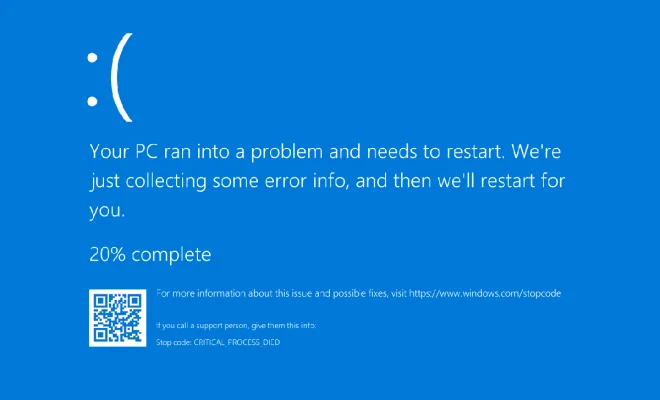
Have you ever encountered a blue screen while using your computer? If you have, then you’ve probably also seen a STOP code or also known as a bug check code. This code appears on a blue screen of death (BSOD) and indicates that there’s a system error or crash.

What is a STOP code, and why does it matter?

In computer programming, a STOP code is a specific numeric value assigned to a system error, which indicates the cause of the crash. The code, also known as a bug check code, is designed to help programmers and system administrators identify and diagnose the cause of the error.

When a computer encounters a problem, it automatically generates a STOP code, which is displayed on a blue screen. This blue screen is commonly known as the Blue Screen of Death, or BSOD for short. The BSOD is your computer’s way of telling you that something serious has gone wrong, and it needs to stop before it causes more damage.

Understanding What STOP Codes Mean

STOP codes are cryptic and challenging to decipher, but they provide vital information for programmers and system administrators, and advanced users. These codes can help determine the cause of the problem, such as a hardware malfunction, an incompatible device driver, or a corrupted operating system file.

Each STOP code consists of a 0x prefix, followed by eight hexadecimal digits, bringing the total to ten characters. The hexadecimal digits represent the error, and they’re divided into four groups of two characters each.

For example, the most common STOP code is 0x0000007B, which indicates an INACCESSIBLE_BOOT_DEVICE error. This error occurs when the computer can’t boot up due to a problem with the boot disk or the storage drive.

What to Do If You Encounter a STOP Code

Encountering a STOP code can be frustrating, but it’s an essential part of diagnosing system problems. If you encounter a STOP code, don’t panic. First, jot down the code and any information on the blue screen, such as the error message or file name.

Next, restart the computer and see if the error recurs. If it does, try to replicate the problem and take note of any steps you’ve taken that might have caused the error.

If the problem persists, you can try researching the STOP code online, looking for solutions or seeking professional help. Drivers, hardware components, and operating system updates can sometimes cause conflicts resulting in a STOP error. Troubleshooting the issue is the only way to determine the root cause of the problem and prevent it from happening again in the future.

Conclusion

STOP codes are essential diagnostic tools that help identify and troubleshoot system errors and crashes. Although they can be cryptic, they provide valuable information to programmers, system administrators, and advanced computer users. The next time you see a BSOD on your computer, don’t panic. Instead, take note of the STOP code, research it, and seek out help if needed.


Previous Article

How to Trial Spotify Premium for Free ...

Next Article

Are There Too Many Streaming TV Services?

Matthew Lynch

Related articles More from author

  • Adaptive Learning

    5 Best Practices To Forge A Data Education Governance Framework

    November 29, 2021
    By Matthew Lynch
  • Adaptive Learning

    Exploring Scenario-based Learning For Young Students

    September 9, 2021
    By Matthew Lynch
  • Adaptive Learning

    The Flipped Classroom: How to Create a Win-Win Situation for Students and Teachers

    September 14, 2020
    By Matthew Lynch
  • Adaptive Learning

    Adaptive Learning is a Transformational Education Reform

    February 12, 2023
    By Matthew Lynch
  • Adaptive Learning

    When Does a Battery Need Electrolyte Instead of Water?

    June 9, 2023
    By Matthew Lynch
  • Adaptive Learning

    Modern Classrooms Clear The Way For New Pedagogies In Higher Education

    November 15, 2021
    By Matthew Lynch

Search

Login & Registration

  • Log in
  • Entries feed
  • Comments feed
  • WordPress.org

Newsletter

Signup for The Tech Edvocate Newsletter and have the latest in EdTech news and opinion delivered to your email address!

About Us

Since technology is not going anywhere and does more good than harm, adapting is the best course of action. That is where The Tech Edvocate comes in. We plan to cover the PreK-12 and Higher Education EdTech sectors and provide our readers with the latest news and opinion on the subject. From time to time, I will invite other voices to weigh in on important issues in EdTech. We hope to provide a well-rounded, multi-faceted look at the past, present, the future of EdTech in the US and internationally.

We started this journey back in June 2016, and we plan to continue it for many more years to come. I hope that you will join us in this discussion of the past, present and future of EdTech and lend your own insight to the issues that are discussed.

Newsletter

Signup for The Tech Edvocate Newsletter and have the latest in EdTech news and opinion delivered to your email address!

Contact Us

The Tech Edvocate
910 Goddin Street
Richmond, VA 23231
(601) 630-5238
[email protected]

Copyright © 2026 Matthew Lynch. All rights reserved.