The Tech Edvocate

Top Menu

  • Advertisement
  • Apps
  • Home Page
  • Home Page Five (No Sidebar)
  • Home Page Four
  • Home Page Three
  • Home Page Two
  • Home Tech2
  • Icons [No Sidebar]
  • Left Sidbear Page
  • Lynch Educational Consulting
  • My Account
  • My Speaking Page
  • Newsletter Sign Up Confirmation
  • Newsletter Unsubscription
  • Our Brands
  • Page Example
  • Privacy Policy
  • Protected Content
  • Register
  • Request a Product Review
  • Shop
  • Shortcodes Examples
  • Signup
  • Start Here
    • Governance
    • Careers
    • Contact Us
  • Terms and Conditions
  • The Edvocate
  • The Tech Edvocate Product Guide
  • Topics
  • Write For Us
  • Advertise

Main Menu

  • Start Here
    • Our Brands
    • Governance
      • Lynch Educational Consulting, LLC.
      • Dr. Lynch’s Personal Website
      • Careers
    • Write For Us
    • The Tech Edvocate Product Guide
    • Contact Us
    • Books
    • Edupedia
    • Post a Job
    • The Edvocate Podcast
    • Terms and Conditions
    • Privacy Policy
  • Topics
    • Assistive Technology
    • Child Development Tech
    • Early Childhood & K-12 EdTech
    • EdTech Futures
    • EdTech News
    • EdTech Policy & Reform
    • EdTech Startups & Businesses
    • Higher Education EdTech
    • Online Learning & eLearning
    • Parent & Family Tech
    • Personalized Learning
    • Product Reviews
  • Advertise
  • Tech Edvocate Awards
  • The Edvocate
  • Pedagogue
  • School Ratings

logo

The Tech Edvocate

  • Start Here
    • Our Brands
    • Governance
      • Lynch Educational Consulting, LLC.
      • Dr. Lynch’s Personal Website
        • My Speaking Page
      • Careers
    • Write For Us
    • The Tech Edvocate Product Guide
    • Contact Us
    • Books
    • Edupedia
    • Post a Job
    • The Edvocate Podcast
    • Terms and Conditions
    • Privacy Policy
  • Topics
    • Assistive Technology
    • Child Development Tech
    • Early Childhood & K-12 EdTech
    • EdTech Futures
    • EdTech News
    • EdTech Policy & Reform
    • EdTech Startups & Businesses
    • Higher Education EdTech
    • Online Learning & eLearning
    • Parent & Family Tech
    • Personalized Learning
    • Product Reviews
  • Advertise
  • Tech Edvocate Awards
  • The Edvocate
  • Pedagogue
  • School Ratings
  • The Brutal Truth: 8 Lies Scammers Tell About Your Student Loans

  • New Student Loan Rules: The Shocking Truth About 2026 Relief Programs

  • New Repayment Plan Changes Trigger Student Loan Scam Epidemic

  • Why Millions Are Ditching Degrees for This One Skill-Boosting Secret

  • The Quiet Revolution: How Micro-Credentials Are Reshaping Tech Careers

  • Why 96% of Employers Are Now Demanding Micro-Credentials

  • This One Incident Exposed How Vulnerable Your Student Data Really Is

  • The Brutal Truth About EdTech Security: 10 Solutions to Prevent Another Canvas LMS Disaster

  • The Billion-User Data Heist: Why Your Child’s School Data Is Under Attack

  • This Crucial Mistake Is Killing Your Tech Career (It’s Not What You Think)

Digital & Mobile Technology
Home›Digital & Mobile Technology›What Is a KML File?

What Is a KML File?

By Matthew Lynch
June 23, 2023
0
Spread the love

A KML file, short for Keyhole Markup Language file, is a type of file format commonly used to display geographic data in three-dimensional earth browsers like Google Earth and Google Maps. The format was originally created by Keyhole, a company later acquired by Google, and has since become an industry standard for sharing geospatial information.

At its core, a KML file is a text-based document that contains key elements, such as coordinates, images, and media, that all tend to describe a single point or area on the earth’s surface. The file can also incorporate data such as placemarks, polygons, and paths, which allows users to create detailed maps and visualizations of any location around the world.

KML files can be created using a variety of software tools specifically designed for this purpose, including Google Earth and its web-based version, Google Maps. To create a KML file, one must import data from multiple sources and merge them into a single file using a KML editor. These tools typically offer a wide range of features to customize the map appearance and functionality, allowing users to add photos, videos, and links to external resources for a richer user experience.

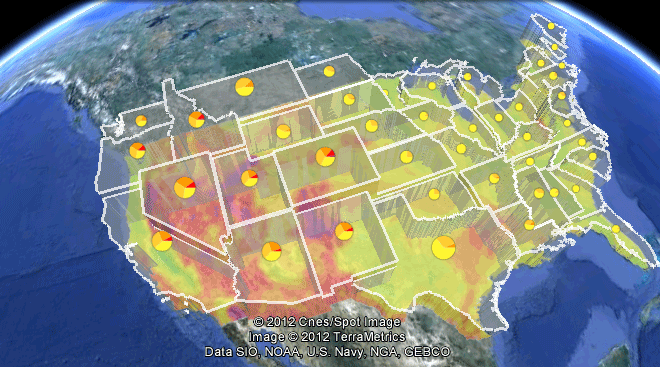
KML files can be displayed in a number of different ways, depending on the program being used. For example, Google Earth displays KML files as layered overlays on top of the earth, allowing users to zoom in and out or pan around to explore the data further. These features make it possible to visualize everything from historical landmarks and natural disasters to real-time traffic and weather patterns in a dynamic and interactive way.

KML files can be shared easily, making them an ideal tool for geospatial data exchange. For example, scientists studying climate change could use KML files to visualize changes in sea level, temperature, and precipitation over time. This information could then be shared with policymakers, urban planners, and other relevant stakeholders to help inform decisions about how to best mitigate the effects of climate change.

In summary, KML files are an essential tool for anyone interested in displaying geographic data in a user-friendly and engaging way. They allow developers to create custom maps and visualizations that can be easily shared and viewed by anyone with access to a standard web browser. With the rise of real-time mapping technologies, KML files are becoming increasingly important for tracking and analyzing the world around us.


Previous Article

How to Check Battery Life on Apple ...

Next Article

Create Pictures From PowerPoint Slides

Matthew Lynch

Related articles More from author

  • Digital & Mobile Technology

    What Is HDMI-CEC and What Does It Do?

    June 23, 2023
    By Matthew Lynch
  • Digital & Mobile Technology

    Port Numbers Used for Computer Networks

    June 10, 2023
    By Matthew Lynch
  • Digital & Mobile Technology

    Tango – Free Text, Voice and Video Calls

    July 6, 2023
    By Matthew Lynch
  • Digital & Mobile Technology

    Best Apps for YouTube Creators

    June 22, 2023
    By Matthew Lynch
  • Digital & Mobile Technology

    Do Hashtags Work on Facebook? What You Need to Know

    June 12, 2023
    By Matthew Lynch
  • Digital & Mobile Technology

    WEP, WPA, WPA2, or WPA3: How to Tell What Security Type Your Wi-Fi Uses

    June 23, 2023
    By Matthew Lynch

Search

Login & Registration

  • Log in
  • Entries feed
  • Comments feed
  • WordPress.org

Newsletter

Signup for The Tech Edvocate Newsletter and have the latest in EdTech news and opinion delivered to your email address!

About Us

Since technology is not going anywhere and does more good than harm, adapting is the best course of action. That is where The Tech Edvocate comes in. We plan to cover the PreK-12 and Higher Education EdTech sectors and provide our readers with the latest news and opinion on the subject. From time to time, I will invite other voices to weigh in on important issues in EdTech. We hope to provide a well-rounded, multi-faceted look at the past, present, the future of EdTech in the US and internationally.

We started this journey back in June 2016, and we plan to continue it for many more years to come. I hope that you will join us in this discussion of the past, present and future of EdTech and lend your own insight to the issues that are discussed.

Newsletter

Signup for The Tech Edvocate Newsletter and have the latest in EdTech news and opinion delivered to your email address!

Contact Us

The Tech Edvocate
910 Goddin Street
Richmond, VA 23231
(601) 630-5238
[email protected]

Copyright © 2026 Matthew Lynch. All rights reserved.