The Tech Edvocate

Top Menu

  • Advertisement
  • Apps
  • Home Page
  • Home Page Five (No Sidebar)
  • Home Page Four
  • Home Page Three
  • Home Page Two
  • Home Tech2
  • Icons [No Sidebar]
  • Left Sidbear Page
  • Lynch Educational Consulting
  • My Account
  • My Speaking Page
  • Newsletter Sign Up Confirmation
  • Newsletter Unsubscription
  • Our Brands
  • Page Example
  • Privacy Policy
  • Protected Content
  • Register
  • Request a Product Review
  • Shop
  • Shortcodes Examples
  • Signup
  • Start Here
    • Governance
    • Careers
    • Contact Us
  • Terms and Conditions
  • The Edvocate
  • The Tech Edvocate Product Guide
  • Topics
  • Write For Us
  • Advertise

Main Menu

  • Start Here
    • Our Brands
    • Governance
      • Lynch Educational Consulting, LLC.
      • Dr. Lynch’s Personal Website
      • Careers
    • Write For Us
    • The Tech Edvocate Product Guide
    • Contact Us
    • Books
    • Edupedia
    • Post a Job
    • The Edvocate Podcast
    • Terms and Conditions
    • Privacy Policy
  • Topics
    • Assistive Technology
    • Child Development Tech
    • Early Childhood & K-12 EdTech
    • EdTech Futures
    • EdTech News
    • EdTech Policy & Reform
    • EdTech Startups & Businesses
    • Higher Education EdTech
    • Online Learning & eLearning
    • Parent & Family Tech
    • Personalized Learning
    • Product Reviews
  • Advertise
  • Tech Edvocate Awards
  • The Edvocate
  • Pedagogue
  • School Ratings

logo

The Tech Edvocate

  • Start Here
    • Our Brands
    • Governance
      • Lynch Educational Consulting, LLC.
      • Dr. Lynch’s Personal Website
        • My Speaking Page
      • Careers
    • Write For Us
    • The Tech Edvocate Product Guide
    • Contact Us
    • Books
    • Edupedia
    • Post a Job
    • The Edvocate Podcast
    • Terms and Conditions
    • Privacy Policy
  • Topics
    • Assistive Technology
    • Child Development Tech
    • Early Childhood & K-12 EdTech
    • EdTech Futures
    • EdTech News
    • EdTech Policy & Reform
    • EdTech Startups & Businesses
    • Higher Education EdTech
    • Online Learning & eLearning
    • Parent & Family Tech
    • Personalized Learning
    • Product Reviews
  • Advertise
  • Tech Edvocate Awards
  • The Edvocate
  • Pedagogue
  • School Ratings
  • How to use ClickUp goals feature

  • Trello for Business

  • Can Smartsheet do automation

  • How to use Microsoft Planner boards

  • How many transactions in Kashoo

  • Sage

  • Is Sage worth it for accountants

  • How to use Smartsheet templates

  • How many users in Zoho Books free plan

  • Can Wrike integrate with Adobe Creative Cloud

Digital & Mobile Technology
Home›Digital & Mobile Technology›What Does Cache Mean?

What Does Cache Mean?
By Matthew Lynch
June 10, 2023
0
Spread the love

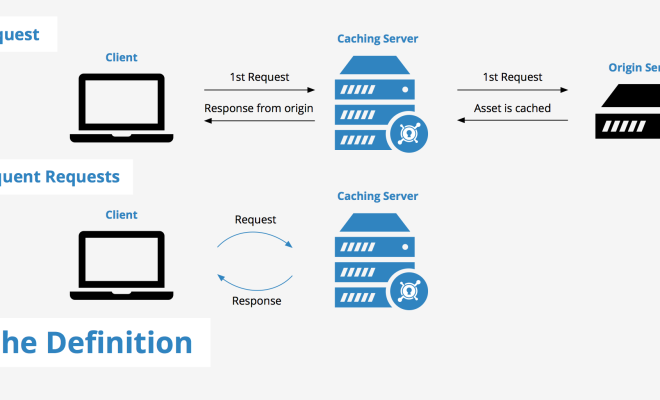
Cache is a term that is widely used in the world of technology. It is most commonly heard in the context of web browsing, computer systems, and mobile devices, but what does cache mean exactly? In simple terms, cache is a space or memory where recently accessed information is stored or held in a temporary location.

To break it down further, when you visit a website or use an application, the browser or the application stores various data elements like images, videos, text, and code snippets. This data is stored in the computer’s temporary memory or cache. So, instead of downloading this information every time you visit a particular website, the browser can retrieve the data from cache memory, which speeds up the loading time and reduces the unnecessary data transfer.

In addition, cache memory helps in improving the overall performance of a computer system. When a system runs out of RAM, the operating system uses the hard drive to store data temporarily, which significantly slows down the computer’s performance. But with cache memory, the most frequently accessed data is stored in a faster location, which reduces the amount of hard drive activity and improves the system’s performance.

There are different types of cache memory. For example, web cache or browser cache is the type of cache memory used by web browsers to store website data locally. Cache memory can be system-wide or application-specific, such as app-based caches that are used to store data from applications like Spotify, Instagram, and Facebook.

However, cache memory can also have drawbacks. Sometimes it can store outdated information, and you may not be able to access the latest information from a website or application. This is usually because the cached information is not updated frequently, and some changes made on the webserver may not reflect immediately in the cache.

Moreover, sometimes cache memory can slow down the computer’s performance instead of improving it. This is because the memory needs to be cleared periodically to keep the stored data in check, and if it isn’t, the cache can overflow and damage the overall performance of the system.

In conclusion, cache memory helps to improve the system’s overall speed and performance. It’s widely used by computers, web browsers, and mobile devices for a smoother user experience. While it does have a few disadvantages, they can be easily managed and balanced out by regularly clearing the cache and updating it with the latest information.


Previous Article

What Are Packet Sniffers and How Do ...

Next Article

How to Delete Tinder

Matthew Lynch

Related articles More from author

  • Digital & Mobile Technology

    Ways to Fix Blurry Screen Issues on Windows 11

    June 22, 2023
    By Matthew Lynch
  • Digital & Mobile Technology

    Best Weightlifting Apps to Boost Your Muscle Gains

    June 14, 2023
    By Matthew Lynch
  • Digital & Mobile Technology

    The Best Streaming TV Services (Free and Paid)

    August 1, 2023
    By Matthew Lynch
  • Digital & Mobile Technology

    Can You Connect AirPods to Xbox Series X or S?

    June 1, 2023
    By Matthew Lynch
  • Digital & Mobile Technology

    A Closer Look at the New FaceTime Features in macOS Ventura

    July 31, 2023
    By Matthew Lynch
  • Digital & Mobile Technology

    How to Restart or Reset Your Amazon Kindle

    May 4, 2023
    By Matthew Lynch

Search

Login & Registration

  • Log in
  • Entries feed
  • Comments feed
  • WordPress.org

Newsletter

Signup for The Tech Edvocate Newsletter and have the latest in EdTech news and opinion delivered to your email address!

About Us

Since technology is not going anywhere and does more good than harm, adapting is the best course of action. That is where The Tech Edvocate comes in. We plan to cover the PreK-12 and Higher Education EdTech sectors and provide our readers with the latest news and opinion on the subject. From time to time, I will invite other voices to weigh in on important issues in EdTech. We hope to provide a well-rounded, multi-faceted look at the past, present, the future of EdTech in the US and internationally.

We started this journey back in June 2016, and we plan to continue it for many more years to come. I hope that you will join us in this discussion of the past, present and future of EdTech and lend your own insight to the issues that are discussed.

Newsletter

Signup for The Tech Edvocate Newsletter and have the latest in EdTech news and opinion delivered to your email address!

Contact Us

The Tech Edvocate
910 Goddin Street
Richmond, VA 23231
(601) 630-5238
[email protected]

Copyright © 2026 Matthew Lynch. All rights reserved.