The Tech Edvocate

Top Menu

  • Advertisement
  • Apps
  • Home Page
  • Home Page Five (No Sidebar)
  • Home Page Four
  • Home Page Three
  • Home Page Two
  • Home Tech2
  • Icons [No Sidebar]
  • Left Sidbear Page
  • Lynch Educational Consulting
  • My Account
  • My Speaking Page
  • Newsletter Sign Up Confirmation
  • Newsletter Unsubscription
  • Our Brands
  • Page Example
  • Privacy Policy
  • Protected Content
  • Register
  • Request a Product Review
  • Shop
  • Shortcodes Examples
  • Signup
  • Start Here
    • Governance
    • Careers
    • Contact Us
  • Terms and Conditions
  • The Edvocate
  • The Tech Edvocate Product Guide
  • Topics
  • Write For Us
  • Advertise

Main Menu

  • Start Here
    • Our Brands
    • Governance
      • Lynch Educational Consulting, LLC.
      • Dr. Lynch’s Personal Website
      • Careers
    • Write For Us
    • The Tech Edvocate Product Guide
    • Contact Us
    • Books
    • Edupedia
    • Post a Job
    • The Edvocate Podcast
    • Terms and Conditions
    • Privacy Policy
  • Topics
    • Assistive Technology
    • Child Development Tech
    • Early Childhood & K-12 EdTech
    • EdTech Futures
    • EdTech News
    • EdTech Policy & Reform
    • EdTech Startups & Businesses
    • Higher Education EdTech
    • Online Learning & eLearning
    • Parent & Family Tech
    • Personalized Learning
    • Product Reviews
  • Advertise
  • Tech Edvocate Awards
  • The Edvocate
  • Pedagogue
  • School Ratings

logo

The Tech Edvocate

  • Start Here
    • Our Brands
    • Governance
      • Lynch Educational Consulting, LLC.
      • Dr. Lynch’s Personal Website
        • My Speaking Page
      • Careers
    • Write For Us
    • The Tech Edvocate Product Guide
    • Contact Us
    • Books
    • Edupedia
    • Post a Job
    • The Edvocate Podcast
    • Terms and Conditions
    • Privacy Policy
  • Topics
    • Assistive Technology
    • Child Development Tech
    • Early Childhood & K-12 EdTech
    • EdTech Futures
    • EdTech News
    • EdTech Policy & Reform
    • EdTech Startups & Businesses
    • Higher Education EdTech
    • Online Learning & eLearning
    • Parent & Family Tech
    • Personalized Learning
    • Product Reviews
  • Advertise
  • Tech Edvocate Awards
  • The Edvocate
  • Pedagogue
  • School Ratings
  • A Visitors Guide to Pittsburgh (PA), United States

  • A Visitors Guide to Colorado Springs (CO), United States

  • 5 Pairs of Shoes That Will Instantly Step Your Shoe Game Up

  • Radiant Youthful Skin is the Perfect Christmas Gift

  • Give Your Loved One the Gift of Youthful, Radiant Skin this Christmas

  • Give Your Loved One the Gift of a Restful Night Sleep this Christmas

  • Nex Playground’s Holiday Sales Bring Active Play Indoors This Seaso

  • A Visitors Guide to Louisville (KY), United States

  • A Visitor’s Guide to Nashville-Davidson (TN), United States

  • A Visitors Guide to Portland (OR), United States

Digital & Mobile Technology
Home›Digital & Mobile Technology›Ways to Run Android Apps in Windows

Ways to Run Android Apps in Windows
By Matthew Lynch
April 10, 2023
0
Spread the love

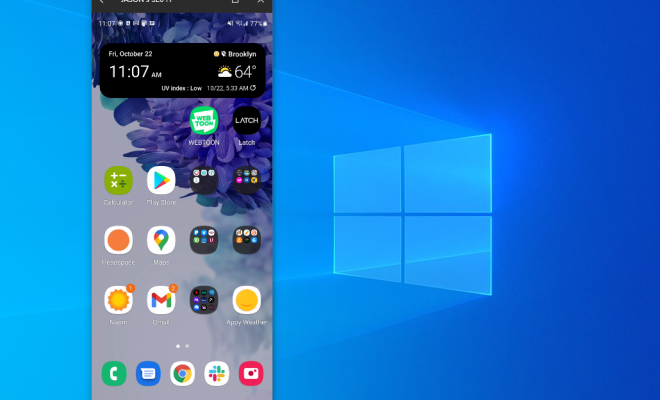
Android apps have gained immense popularity in recent years, making them an indispensable tool for mobile users. However, you may want to run these apps on your computer for various reasons, such as using them in a larger display or simply because you don’t have access to a mobile device at the moment. Fortunately, there are several ways to run Android apps on Windows. Here are some popular methods:

1. Using an Android Emulator:

The most popular way to run Android apps on Windows is by using an Android emulator. An Android emulator creates a virtual Android device on your computer that allows you to install and run Android apps. Some of the most popular Android emulators are Bluestacks, NOX Player, LDPlayer, and Genymotion. All you need is to download and install the emulator of your choice, then open it, and install the Android app of your choice.

2. Using Chrome Browser:

Google Chrome comes with a built-in feature that allows users to run Android apps from within the browser. This feature is called the ARC Welder. To use this feature, you need to install the ARC Welder extension from the Chrome Web Store. Once installed, you can upload an APK file (Android app) to the browser and run it.

3. Using Third-party Software:

There are various third-party software programs that allow you to run Android apps on Windows. Some popular software programs include those like Andy and Phoenix OS. These programs work similarly to Android emulators, creating a virtual Android environment on your Windows computer.

4. Dual-Boot with Android:

Dual-boot is the process of installing two operating systems on the same computer, and this process can be used to run Android apps on Windows. There are many ways to perform dual-booting, but the most common method is to create a partition on your hard drive and install the Android operating system on that partition. Then, each time you start your computer, you can choose which operating system to boot into.

5. Cloud-Based Android Operating System:

Cloud-based Android systems are becoming more popular as they offer a convenient way to run Android apps on Windows without installing anything. Some popular cloud-based Android operating systems include Browserstack, Genymotion Cloud, and Amazon Web Services (AWS). These cloud-based Android systems run a virtual Android environment in the cloud, allowing you to use Android apps on your Windows computer through a browser or a remote desktop connection.

In conclusion, there are several ways to run Android apps on Windows, and each method has its own advantages and disadvantages. Ultimately, the choice of method depends on your needs and preferences. Whether you choose to use an Android emulator, a cloud-based Android system or a dual-boot system, ways to run Android apps on Windows are several, giving you the flexibility to use your favorite Android apps on your preferred device.

Previous Article

The Art of Staying Human-centric When You’re ...

Next Article

Plus Power Supply Ratings and What They ...

Matthew Lynch

Related articles More from author

  • Digital & Mobile Technology

    How to Use the Excel INDEX Function

    July 6, 2023
    By Matthew Lynch
  • Digital & Mobile Technology

    Best Home Weather Stations of 2023

    May 31, 2023
    By Matthew Lynch
  • Digital & Mobile Technology

    How to Use the Chkdsk Command in Windows

    June 1, 2023
    By Matthew Lynch
  • Digital & Mobile Technology

    Adobe Lightroom vs. Camera Raw: What Are the Similarities and Differences?

    June 9, 2023
    By Matthew Lynch
  • Digital & Mobile Technology

    Mouse Not Working on Your Mac? Tips to Fix It

    June 7, 2023
    By Matthew Lynch
  • Digital & Mobile Technology

    How to Sort a Mailbox in Outlook

    July 31, 2023
    By Matthew Lynch

Search

Login & Registration

  • Register
  • Log in
  • Entries feed
  • Comments feed
  • WordPress.org

Newsletter

Signup for The Tech Edvocate Newsletter and have the latest in EdTech news and opinion delivered to your email address!

About Us

Since technology is not going anywhere and does more good than harm, adapting is the best course of action. That is where The Tech Edvocate comes in. We plan to cover the PreK-12 and Higher Education EdTech sectors and provide our readers with the latest news and opinion on the subject. From time to time, I will invite other voices to weigh in on important issues in EdTech. We hope to provide a well-rounded, multi-faceted look at the past, present, the future of EdTech in the US and internationally.

We started this journey back in June 2016, and we plan to continue it for many more years to come. I hope that you will join us in this discussion of the past, present and future of EdTech and lend your own insight to the issues that are discussed.

Newsletter

Signup for The Tech Edvocate Newsletter and have the latest in EdTech news and opinion delivered to your email address!

Contact Us

The Tech Edvocate
910 Goddin Street
Richmond, VA 23231
(601) 630-5238
[email protected]

Copyright © 2025 Matthew Lynch. All rights reserved.