The Tech Edvocate

Top Menu

  • Advertisement
  • Apps
  • Home Page
  • Home Page Five (No Sidebar)
  • Home Page Four
  • Home Page Three
  • Home Page Two
  • Home Tech2
  • Icons [No Sidebar]
  • Left Sidbear Page
  • Lynch Educational Consulting
  • My Account
  • My Speaking Page
  • Newsletter Sign Up Confirmation
  • Newsletter Unsubscription
  • Our Brands
  • Page Example
  • Privacy Policy
  • Protected Content
  • Register
  • Request a Product Review
  • Shop
  • Shortcodes Examples
  • Signup
  • Start Here
    • Governance
    • Careers
    • Contact Us
  • Terms and Conditions
  • The Edvocate
  • The Tech Edvocate Product Guide
  • Topics
  • Write For Us
  • Advertise

Main Menu

  • Start Here
    • Our Brands
    • Governance
      • Lynch Educational Consulting, LLC.
      • Dr. Lynch’s Personal Website
      • Careers
    • Write For Us
    • The Tech Edvocate Product Guide
    • Contact Us
    • Books
    • Edupedia
    • Post a Job
    • The Edvocate Podcast
    • Terms and Conditions
    • Privacy Policy
  • Topics
    • Assistive Technology
    • Child Development Tech
    • Early Childhood & K-12 EdTech
    • EdTech Futures
    • EdTech News
    • EdTech Policy & Reform
    • EdTech Startups & Businesses
    • Higher Education EdTech
    • Online Learning & eLearning
    • Parent & Family Tech
    • Personalized Learning
    • Product Reviews
  • Advertise
  • Tech Edvocate Awards
  • The Edvocate
  • Pedagogue
  • School Ratings

logo

The Tech Edvocate

  • Start Here
    • Our Brands
    • Governance
      • Lynch Educational Consulting, LLC.
      • Dr. Lynch’s Personal Website
        • My Speaking Page
      • Careers
    • Write For Us
    • The Tech Edvocate Product Guide
    • Contact Us
    • Books
    • Edupedia
    • Post a Job
    • The Edvocate Podcast
    • Terms and Conditions
    • Privacy Policy
  • Topics
    • Assistive Technology
    • Child Development Tech
    • Early Childhood & K-12 EdTech
    • EdTech Futures
    • EdTech News
    • EdTech Policy & Reform
    • EdTech Startups & Businesses
    • Higher Education EdTech
    • Online Learning & eLearning
    • Parent & Family Tech
    • Personalized Learning
    • Product Reviews
  • Advertise
  • Tech Edvocate Awards
  • The Edvocate
  • Pedagogue
  • School Ratings
  • The Brutal Truth: Why 75% of Fintech Startups Collapse in 5 Years

  • This AI Company’s Staggering 14 Million Record Data Leak Is Just The Beginning

  • New York Rep Introduces Bill That Could Keep Games Playable for Longer – PCMag

  • Mind-Blowing: These AI Investment Funds Are Crushing the Market — Here’s How

  • The AI Detector Deception: Why Universities Are Pulling the Plug

  • Stunning: New Student Loan Repayment Rules Could Hike Payments for Millions

  • Shocking: California’s Billion-Dollar Clean Transit Initiative Drove Nowhere

  • Why EV Charging Reliability Soared Despite Cratering Sales

  • A new lithium-ion battery breakthrough could lead to cells that deliver more power for longer — they might be useful for everything from EVs to gaming laptops to robots to drones | TechRadar

  • One Breakthrough: How AI is Reshaping Medicine Faster Than Anyone Imagined

Digital & Mobile Technology
Home›Digital & Mobile Technology›Ways to Fix Grammarly Extension Not Working on Chrome

Ways to Fix Grammarly Extension Not Working on Chrome
By Matthew Lynch
March 19, 2023
0
Spread the love

Are you using the Grammarly extension on Google Chrome but facing issues with its functionality? Don’t worry, you are not alone! Many users have reported that Grammarly extension stops working on Chrome. Fortunately, there are ways to fix Grammarly extension not working on Chrome, and we will discuss them in this article.

1. Check the Extension Status

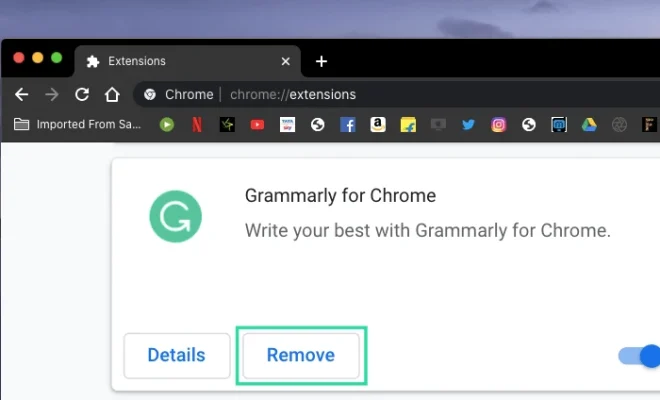
The first thing you should do when Grammarly extension stops working on Chrome is to check its current status. To do so, navigate to the top-right corner of your Google Chrome window and click on the three dots. From the drop-down menu, go to “More Tools” and click on “Extensions.” Look for the Grammarly extension and make sure it is enabled. If it is disabled, turn it on and reload the page.

2. Clear Cache and Cookies

Sometimes, the issue with Grammarly extension not working on Chrome can be caused by accumulated cache and cookies. These files store the website data, and when they are overloaded, it can cause issues with extensions. To fix this, clear your Chrome browser’s cache and cookies. To do so, navigate to the top-right corner of your Chrome window and click on the three dots. Go to “More Tools” and click on “Clear browsing data.” Select the time range and choose the option “Cookies and other site data.” Finally, click on the “Clear data” button.

3. Update Grammarly Extension

If you are using an outdated version of the Grammarly extension, it can cause issues with its functionality on Chrome. To fix this, update Grammarly to its latest version. To do so, navigate to the “Extensions” page in Chrome, locate Grammarly, and click on the update button.

4. Check Firewall or Antivirus Settings

Firewall or Antivirus settings can sometimes interfere with the extension’s functionality. Ensure that the Grammarly extension is allowed in the Firewall or Antivirus settings. If not, add it to the exception list.

5. Reset Chrome Settings

Resetting Google Chrome settings to default can fix various issues, including those with the Grammarly extension. To do so, navigate to the top-right corner of your Chrome window and click on the three dots. Go to “Settings” and scroll down to “Advanced”. Click on “Reset settings” and confirm the action.

In conclusion, these simple troubleshooting steps can help fix Grammarly extension not working on Chrome. Always ensure that you install Grammarly from a trusted source, and regularly update it to its latest version to avoid any compatibility issues.


Previous Article

Best Crossword Apps for Word Enthusiasts

Next Article

Top 7 Ways to Fix Samsung Keyboard ...

Matthew Lynch

Related articles More from author

  • Digital & Mobile Technology

    Chrome Sound Not Working in Windows? Here’s the Fix

    August 4, 2023
    By Matthew Lynch
  • Digital & Mobile Technology

    What Is a Good Download Speed and Upload Speed?

    May 31, 2023
    By Matthew Lynch
  • Digital & Mobile Technology

    Where to Buy Amazon Gift Cards

    June 3, 2023
    By Matthew Lynch
  • Digital & Mobile Technology

    DIY Long Range Wi-Fi Antennas You Can Make at Home

    August 5, 2023
    By Matthew Lynch
  • Digital & Mobile Technology

    Ways to Check Your Windows Computer’s Model Name

    September 8, 2023
    By Matthew Lynch
  • Digital & Mobile Technology

    Network Interface Cards (NICs) Explained

    June 6, 2023
    By Matthew Lynch

Search

Login & Registration

  • Log in
  • Entries feed
  • Comments feed
  • WordPress.org

Newsletter

Signup for The Tech Edvocate Newsletter and have the latest in EdTech news and opinion delivered to your email address!

About Us

Since technology is not going anywhere and does more good than harm, adapting is the best course of action. That is where The Tech Edvocate comes in. We plan to cover the PreK-12 and Higher Education EdTech sectors and provide our readers with the latest news and opinion on the subject. From time to time, I will invite other voices to weigh in on important issues in EdTech. We hope to provide a well-rounded, multi-faceted look at the past, present, the future of EdTech in the US and internationally.

We started this journey back in June 2016, and we plan to continue it for many more years to come. I hope that you will join us in this discussion of the past, present and future of EdTech and lend your own insight to the issues that are discussed.

Newsletter

Signup for The Tech Edvocate Newsletter and have the latest in EdTech news and opinion delivered to your email address!

Contact Us

The Tech Edvocate
910 Goddin Street
Richmond, VA 23231
(601) 630-5238
[email protected]

Copyright © 2026 Matthew Lynch. All rights reserved.