The Tech Edvocate

Top Menu

  • Advertisement
  • Apps
  • Home Page
  • Home Page Five (No Sidebar)
  • Home Page Four
  • Home Page Three
  • Home Page Two
  • Home Tech2
  • Icons [No Sidebar]
  • Left Sidbear Page
  • Lynch Educational Consulting
  • My Account
  • My Speaking Page
  • Newsletter Sign Up Confirmation
  • Newsletter Unsubscription
  • Our Brands
  • Page Example
  • Privacy Policy
  • Protected Content
  • Register
  • Request a Product Review
  • Shop
  • Shortcodes Examples
  • Signup
  • Start Here
    • Governance
    • Careers
    • Contact Us
  • Terms and Conditions
  • The Edvocate
  • The Tech Edvocate Product Guide
  • Topics
  • Write For Us
  • Advertise

Main Menu

  • Start Here
    • Our Brands
    • Governance
      • Lynch Educational Consulting, LLC.
      • Dr. Lynch’s Personal Website
      • Careers
    • Write For Us
    • The Tech Edvocate Product Guide
    • Contact Us
    • Books
    • Edupedia
    • Post a Job
    • The Edvocate Podcast
    • Terms and Conditions
    • Privacy Policy
  • Topics
    • Assistive Technology
    • Child Development Tech
    • Early Childhood & K-12 EdTech
    • EdTech Futures
    • EdTech News
    • EdTech Policy & Reform
    • EdTech Startups & Businesses
    • Higher Education EdTech
    • Online Learning & eLearning
    • Parent & Family Tech
    • Personalized Learning
    • Product Reviews
  • Advertise
  • Tech Edvocate Awards
  • The Edvocate
  • Pedagogue
  • School Ratings

logo

The Tech Edvocate

  • Start Here
    • Our Brands
    • Governance
      • Lynch Educational Consulting, LLC.
      • Dr. Lynch’s Personal Website
        • My Speaking Page
      • Careers
    • Write For Us
    • The Tech Edvocate Product Guide
    • Contact Us
    • Books
    • Edupedia
    • Post a Job
    • The Edvocate Podcast
    • Terms and Conditions
    • Privacy Policy
  • Topics
    • Assistive Technology
    • Child Development Tech
    • Early Childhood & K-12 EdTech
    • EdTech Futures
    • EdTech News
    • EdTech Policy & Reform
    • EdTech Startups & Businesses
    • Higher Education EdTech
    • Online Learning & eLearning
    • Parent & Family Tech
    • Personalized Learning
    • Product Reviews
  • Advertise
  • Tech Edvocate Awards
  • The Edvocate
  • Pedagogue
  • School Ratings
  • The Brutal Truth: Why Your AI Skills Training Is Failing (And How to Fix It)

  • 8 Essential AI Upskilling Programs Your Business Needs to Thrive Now

  • One Critical Mistake Companies Make With AI Skills Training

  • The AI Career Showdown: Which Path Pays More And Fits You Best?

  • The Shocking Truth About the Highest Paying AI Jobs in 2026

  • The Staggering Truth About 5 AI Job Roles That Will Redefine Your Career by 2026

  • Crypto Crackdown: Is the FCA’s Iron Fist Crushing Innovation, or Just Protecting You?

  • 7 Critical Steps to Survive the Crypto Crackdown: How to Navigate FCA Regulations

  • This One Thing Is Quietly Reshaping Illegal Crypto Trading — And Regulators Are Panicking

  • The AI Cyberattack That Changed Everything: Top Autonomous Security Software Reviews 2026

Digital & Mobile Technology
Home›Digital & Mobile Technology›Video Game Emulators You Can Use on Your Xbox Series X|S

Video Game Emulators You Can Use on Your Xbox Series X|S
By Matthew Lynch
June 26, 2023
0
Spread the love

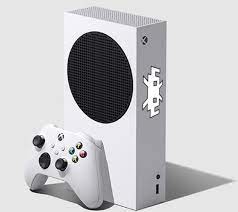
Video game emulation has become increasingly popular in recent years, allowing gamers to play classic games on newer hardware. With the release of the Xbox Series X|S, gamers have a new platform to explore a vast library of video games through emulation. In this article, we’ll explore the different video game emulators that you can use on your Xbox Series X|S.

Firstly, it’s important to understand what exactly a video game emulator is. Emulation software is essentially a program that can replicate the functionality of an older video game console or computer, allowing newer hardware to play games from previous generations. This means that Xbox Series X|S owners can play classic games from consoles like the Nintendo 64, PlayStation, and even arcade machines.

One popular emulator that can be used on the Xbox Series X|S is RetroArch. RetroArch is a multi-system emulator that can run games from a variety of consoles, including the NES, SNES, Game Boy, Game Boy Advance, Sega Genesis, and many more. RetroArch also supports various filters and shaders to enhance the look of classic games on newer displays.

Another emulator that Xbox Series X|S owners can use the Cxbx-Reloaded emulator. This emulator is specifically designed to run original Xbox games on newer hardware, making it a perfect choice for Xbox Series X|S owners who want to relive classic Xbox games. The Cxbx-Reloaded emulator can run games at higher resolutions and frame rates than the original console, providing an improved gaming experience for players.

For gamers who want to experience classic arcade games, the MAME (Multiple Arcade Machine Emulator) emulator is an excellent choice. MAME can run thousands of arcade games from the 70s, 80s, and 90s, including classics like Pac-Man, Donkey Kong, and Street Fighter II. The MAME emulator can be a bit complicated to set up, but once properly configured, it offers an unrivaled arcade gaming experience.

Finally, there’s the PCSX2 emulator, which allows Xbox Series X|S owners play games from the PlayStation 2 console. PCSX2 is a powerful emulator that can run PS2 games at higher resolutions and frame rates, further enhancing the gaming experience. However, it’s worth noting that not all PS2 games are compatible with the emulator, and some may require additional configuration to run properly.

Previous Article

Streaming Services You Can Use on Your ...

Next Article

How to Download and Play Fall Guys ...

Matthew Lynch

Related articles More from author

  • Digital & Mobile Technology

    Most Useful Alexa Skills of 2023

    July 4, 2023
    By Matthew Lynch
  • Digital & Mobile Technology

    What Are Steam Points? How to Get and Use Them

    June 23, 2023
    By Matthew Lynch
  • Digital & Mobile Technology

    How to Delete a Notebook in OneNote

    August 3, 2023
    By Matthew Lynch
  • Digital & Mobile Technology

    How to Disable Google Assistant on Android

    June 8, 2023
    By Matthew Lynch
  • Digital & Mobile Technology

    What is a Mechanical Transfer Registered Jack (MT-RJ)?

    April 18, 2023
    By Matthew Lynch
  • Digital & Mobile Technology

    Playstation 3 Backward Compatibility (PS2 Playable)

    May 30, 2023
    By Matthew Lynch

Search

Login & Registration

  • Log in
  • Entries feed
  • Comments feed
  • WordPress.org

Newsletter

Signup for The Tech Edvocate Newsletter and have the latest in EdTech news and opinion delivered to your email address!

About Us

Since technology is not going anywhere and does more good than harm, adapting is the best course of action. That is where The Tech Edvocate comes in. We plan to cover the PreK-12 and Higher Education EdTech sectors and provide our readers with the latest news and opinion on the subject. From time to time, I will invite other voices to weigh in on important issues in EdTech. We hope to provide a well-rounded, multi-faceted look at the past, present, the future of EdTech in the US and internationally.

We started this journey back in June 2016, and we plan to continue it for many more years to come. I hope that you will join us in this discussion of the past, present and future of EdTech and lend your own insight to the issues that are discussed.

Newsletter

Signup for The Tech Edvocate Newsletter and have the latest in EdTech news and opinion delivered to your email address!

Contact Us

The Tech Edvocate
910 Goddin Street
Richmond, VA 23231
(601) 630-5238
[email protected]

Copyright © 2026 Matthew Lynch. All rights reserved.