The Tech Edvocate

Top Menu

  • Advertisement
  • Apps
  • Home Page
  • Home Page Five (No Sidebar)
  • Home Page Four
  • Home Page Three
  • Home Page Two
  • Home Tech2
  • Icons [No Sidebar]
  • Left Sidbear Page
  • Lynch Educational Consulting
  • My Account
  • My Speaking Page
  • Newsletter Sign Up Confirmation
  • Newsletter Unsubscription
  • Our Brands
  • Page Example
  • Privacy Policy
  • Protected Content
  • Register
  • Request a Product Review
  • Shop
  • Shortcodes Examples
  • Signup
  • Start Here
    • Governance
    • Careers
    • Contact Us
  • Terms and Conditions
  • The Edvocate
  • The Tech Edvocate Product Guide
  • Topics
  • Write For Us
  • Advertise

Main Menu

  • Start Here
    • Our Brands
    • Governance
      • Lynch Educational Consulting, LLC.
      • Dr. Lynch’s Personal Website
      • Careers
    • Write For Us
    • The Tech Edvocate Product Guide
    • Contact Us
    • Books
    • Edupedia
    • Post a Job
    • The Edvocate Podcast
    • Terms and Conditions
    • Privacy Policy
  • Topics
    • Assistive Technology
    • Child Development Tech
    • Early Childhood & K-12 EdTech
    • EdTech Futures
    • EdTech News
    • EdTech Policy & Reform
    • EdTech Startups & Businesses
    • Higher Education EdTech
    • Online Learning & eLearning
    • Parent & Family Tech
    • Personalized Learning
    • Product Reviews
  • Advertise
  • Tech Edvocate Awards
  • The Edvocate
  • Pedagogue
  • School Ratings

logo

The Tech Edvocate

  • Start Here
    • Our Brands
    • Governance
      • Lynch Educational Consulting, LLC.
      • Dr. Lynch’s Personal Website
        • My Speaking Page
      • Careers
    • Write For Us
    • The Tech Edvocate Product Guide
    • Contact Us
    • Books
    • Edupedia
    • Post a Job
    • The Edvocate Podcast
    • Terms and Conditions
    • Privacy Policy
  • Topics
    • Assistive Technology
    • Child Development Tech
    • Early Childhood & K-12 EdTech
    • EdTech Futures
    • EdTech News
    • EdTech Policy & Reform
    • EdTech Startups & Businesses
    • Higher Education EdTech
    • Online Learning & eLearning
    • Parent & Family Tech
    • Personalized Learning
    • Product Reviews
  • Advertise
  • Tech Edvocate Awards
  • The Edvocate
  • Pedagogue
  • School Ratings
  • A Visitors Guide to Long Beach (CA), United States

  • A Visitor’s Guide to Fresno (CA), United States

  • A Visitors Guide to New Orleans (LA), United States

  • A Visitors Guide to Sacramento (CA), United States

  • A Visitors Guide to Lyon, France

  • JisuLife Ultra2 Portable Fan: A Powerful Multi-Function Cooling Solution

  • A Visitors Guide to Viña del Mar, Chile

  • A Visitors Guide to Århus, Denmark

  • A Visitors Guide to Bakersfield (CA), United States

  • A Visitors Guide to Aurora (CO), United States

Digital & Mobile Technology
Home›Digital & Mobile Technology›Video Game Emulators: What You Need to Know

Video Game Emulators: What You Need to Know
By Matthew Lynch
June 4, 2023
0
Spread the love

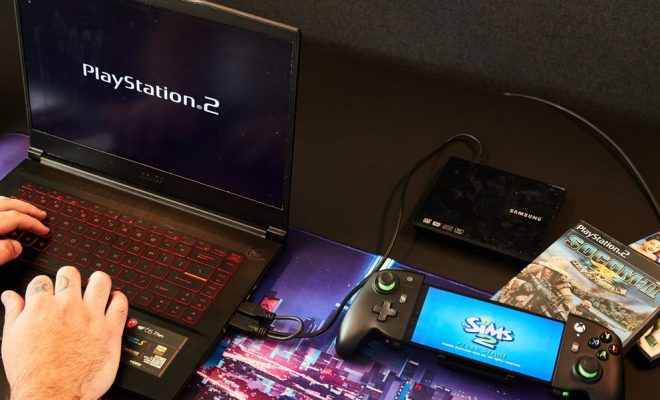
Gone are the days when video games were played only on consoles or physical disks. With the advent of video game emulators, players can now enjoy their favorite games on their personal computers or even mobile devices. But what are video game emulators, and how do they work?

Simply put, a video game emulator is a software program that allows your computer or mobile device to run games developed for a different platform. For example, you can use a Super Nintendo Entertainment System (SNES) emulator to play classic SNES games on your Windows PC or Android smartphone.

Emulators work by mimicking the hardware and software of the original gaming console. They can also simulate the functions of controllers, such as keyboards or gamepads, allowing players to play the games as if on the actual console. This means that you can play games from various consoles, such as Nintendo 64, PlayStation 1, and even arcade machines without owning the original hardware.

However, it’s essential to note that downloading games and ROMs (read-only memory) for emulators is a legal gray area. While emulators themselves aren’t illegal, downloading ROMs of games you don’t own is a violation of copyright law.

There are a few things you need to know before using an emulator:

1. You need to have the original game or console: As stated earlier, owning the original game or console is vital to ensure that you’re not breaking any laws by emulating the games. If you don’t own them, it’s best to purchase them legally.

2. Emulators may not work on your device: Emulators require a specific set of hardware and software requirements to run smoothly. Thus, not all devices may be compatible with all emulators.

3. There are different types of emulators: Emulators can vary by platform or console, and each emulator may provide a different gaming experience. Make sure to choose the right emulator for the game you want to play and the device you’re using.

4. You need to configure the emulator properly: Configuring the emulator settings, including the controller, graphics, and sound, may take some time to optimize the gameplay experience.

In a nutshell, video game emulators can bring back nostalgic memories of classic games and provide access to games that are no longer available on physical consoles. However, using emulators can also come with legal and technical implications. It’s crucial to ensure that you’re using the emulator and ROMs legally, and your device meets the emulator’s requirements before starting the game.

So, if you’re interested in playing classic video games on your PC or mobile device, consider using an emulator. With proper research and caution, you can relive your favorite gaming moments hassle-free.

Previous Article

What Is a GBA File?

Next Article

How to Find Your Steam ID

Matthew Lynch

Related articles More from author

  • Digital & Mobile Technology

    Ways to Fix the “Task Manager Has Been Disabled By Your Administrator” Error in Windows 10

    August 5, 2023
    By Matthew Lynch
  • Digital & Mobile Technology

    How to Pin Extensions to the Google Chrome Toolbar

    May 1, 2023
    By Matthew Lynch
  • Digital & Mobile Technology

    How to Fix a Computer That Keeps Restarting

    May 28, 2023
    By Matthew Lynch
  • Digital & Mobile Technology

    How to Convert Apple Keynote Files to PowerPoint Presentations

    August 3, 2023
    By Matthew Lynch
  • Digital & Mobile Technology

    The Best Free RSS Readers

    June 9, 2023
    By Matthew Lynch
  • Digital & Mobile Technology

    Exclusive F-Droid Apps You Can’t Get on the Google Play Store

    June 22, 2023
    By Matthew Lynch

Search

Login & Registration

  • Register
  • Log in
  • Entries feed
  • Comments feed
  • WordPress.org

Newsletter

Signup for The Tech Edvocate Newsletter and have the latest in EdTech news and opinion delivered to your email address!

About Us

Since technology is not going anywhere and does more good than harm, adapting is the best course of action. That is where The Tech Edvocate comes in. We plan to cover the PreK-12 and Higher Education EdTech sectors and provide our readers with the latest news and opinion on the subject. From time to time, I will invite other voices to weigh in on important issues in EdTech. We hope to provide a well-rounded, multi-faceted look at the past, present, the future of EdTech in the US and internationally.

We started this journey back in June 2016, and we plan to continue it for many more years to come. I hope that you will join us in this discussion of the past, present and future of EdTech and lend your own insight to the issues that are discussed.

Newsletter

Signup for The Tech Edvocate Newsletter and have the latest in EdTech news and opinion delivered to your email address!

Contact Us

The Tech Edvocate
910 Goddin Street
Richmond, VA 23231
(601) 630-5238
[email protected]

Copyright © 2025 Matthew Lynch. All rights reserved.