The Tech Edvocate

Top Menu

  • Advertisement
  • Apps
  • Home Page
  • Home Page Five (No Sidebar)
  • Home Page Four
  • Home Page Three
  • Home Page Two
  • Home Tech2
  • Icons [No Sidebar]
  • Left Sidbear Page
  • Lynch Educational Consulting
  • My Account
  • My Speaking Page
  • Newsletter Sign Up Confirmation
  • Newsletter Unsubscription
  • Our Brands
  • Page Example
  • Privacy Policy
  • Protected Content
  • Register
  • Request a Product Review
  • Shop
  • Shortcodes Examples
  • Signup
  • Start Here
    • Governance
    • Careers
    • Contact Us
  • Terms and Conditions
  • The Edvocate
  • The Tech Edvocate Product Guide
  • Topics
  • Write For Us
  • Advertise

Main Menu

  • Start Here
    • Our Brands
    • Governance
      • Lynch Educational Consulting, LLC.
      • Dr. Lynch’s Personal Website
      • Careers
    • Write For Us
    • The Tech Edvocate Product Guide
    • Contact Us
    • Books
    • Edupedia
    • Post a Job
    • The Edvocate Podcast
    • Terms and Conditions
    • Privacy Policy
  • Topics
    • Assistive Technology
    • Child Development Tech
    • Early Childhood & K-12 EdTech
    • EdTech Futures
    • EdTech News
    • EdTech Policy & Reform
    • EdTech Startups & Businesses
    • Higher Education EdTech
    • Online Learning & eLearning
    • Parent & Family Tech
    • Personalized Learning
    • Product Reviews
  • Advertise
  • Tech Edvocate Awards
  • The Edvocate
  • Pedagogue
  • School Ratings

logo

The Tech Edvocate

  • Start Here
    • Our Brands
    • Governance
      • Lynch Educational Consulting, LLC.
      • Dr. Lynch’s Personal Website
        • My Speaking Page
      • Careers
    • Write For Us
    • The Tech Edvocate Product Guide
    • Contact Us
    • Books
    • Edupedia
    • Post a Job
    • The Edvocate Podcast
    • Terms and Conditions
    • Privacy Policy
  • Topics
    • Assistive Technology
    • Child Development Tech
    • Early Childhood & K-12 EdTech
    • EdTech Futures
    • EdTech News
    • EdTech Policy & Reform
    • EdTech Startups & Businesses
    • Higher Education EdTech
    • Online Learning & eLearning
    • Parent & Family Tech
    • Personalized Learning
    • Product Reviews
  • Advertise
  • Tech Edvocate Awards
  • The Edvocate
  • Pedagogue
  • School Ratings
  • Shocking Truth: The Real Cost of Building Data Centers No One Talks About

  • The Unseen War: How Unionization Is Quietly Reshaping Tech Jobs

  • The Unseen War: Why Data Center Jobs Are Sparking a Political Firestorm

  • The Next Big Shake-Up: 10 PropTech Startups Poised for Acquisition in 2026

  • How to Leverage AI-Powered Tools for Real Estate Transactions in 2026

  • This One Tech Trend Is Quietly Reshaping Real Estate by 2026

  • The Shocking Truth About Duck Creek vs Reserv: Is One Quietly Dominating AI Insurance?

  • The AI Revolution: 10 Platforms Fixing Insurance Claims Forever

  • This One Change Is Quietly Revolutionizing Insurance for Millions

  • The Mind-Blowing Battle: Space Solar Power vs. Traditional Renewables – Which Will Power Our Future?

Digital & Mobile Technology
Home›Digital & Mobile Technology›Vector vs. Bitmap Images

Vector vs. Bitmap Images
By Matthew Lynch
June 3, 2023
0
Spread the love

When it comes to creating digital graphics, there are two main types of images: vector and bitmap. Both have their own strengths and weaknesses, and choosing the right one for your project can make all the difference.

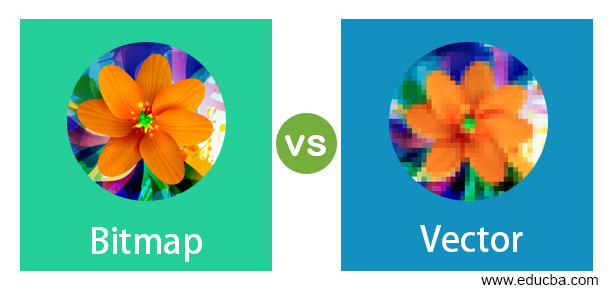
Vector images are made up of shapes and lines that are defined by mathematical equations. This means that they can be resized infinitely without losing any quality or becoming pixelated. Vector graphics are most commonly used for logos, icons, and illustrations.

On the other hand, bitmap images are made up of pixels, or tiny dots of color, that come together to create an image. Bitmap graphics are ideal for photographs and complex images with many colors and shades. However, when bitmap images are resized, they can become pixelated and blurry.

One of the biggest advantages of vector graphics is that they are scalable, meaning they can be easily resized without any loss of quality. This makes them ideal for use in print materials like business cards and billboards, as well as on websites and mobile apps. Additionally, vector images are often smaller in file size than bitmap images, which can improve website loading times and save storage space.

Bitmap images, on the other hand, are better suited for complex images that require a lot of detail and color depth. Photographs, for example, are best represented in bitmap format because they contain many shades of colors and gradations that would be difficult to replicate in vector form. Bitmap images are also more widely supported across various software and devices, making them a more universal format for image sharing and editing.

Another important factor to consider when choosing between vector and bitmap graphics is the intended use of the image. Just because vector images can be resized infinitely doesn’t mean they are always the best choice. For example, if the image is only going to be used on a website, which doesn’t require high print-quality resolution, then using a bitmap image will do the job perfectly fine.

In the end, the choice between vector and bitmap images depends on a variety of factors, including the intended use, size, and complexity of the image. While each has its own strengths and weaknesses, it is important to consider your needs carefully before making a decision. With the right choice, your digital graphics can be both stunning and effective.

Previous Article

The 9 Best Free Coding Games of ...

Next Article

Using Outlook.com Search Operators

Matthew Lynch

Related articles More from author

  • Digital & Mobile Technology

    Is the App & Browser Control Missing in Windows Security? Try These 7 Fixes

    July 31, 2023
    By Matthew Lynch
  • Digital & Mobile Technology

    What is a Roku Smart TV?

    June 10, 2023
    By Matthew Lynch
  • Digital & Mobile Technology

    The Best DDR5 RAM for Next-Gen PCs

    June 12, 2023
    By Matthew Lynch
  • Digital & Mobile Technology

    How to Add Tags to Word Documents

    June 4, 2023
    By Matthew Lynch
  • Digital & Mobile Technology

    What Is Whitelisting and How Do You Use It?

    June 8, 2023
    By Matthew Lynch
  • Digital & Mobile Technology

    The Pros and Cons of Using a Virtual Machine to Run Windows on a Mac

    June 13, 2023
    By Matthew Lynch

Search

Login & Registration

  • Log in
  • Entries feed
  • Comments feed
  • WordPress.org

Newsletter

Signup for The Tech Edvocate Newsletter and have the latest in EdTech news and opinion delivered to your email address!

About Us

Since technology is not going anywhere and does more good than harm, adapting is the best course of action. That is where The Tech Edvocate comes in. We plan to cover the PreK-12 and Higher Education EdTech sectors and provide our readers with the latest news and opinion on the subject. From time to time, I will invite other voices to weigh in on important issues in EdTech. We hope to provide a well-rounded, multi-faceted look at the past, present, the future of EdTech in the US and internationally.

We started this journey back in June 2016, and we plan to continue it for many more years to come. I hope that you will join us in this discussion of the past, present and future of EdTech and lend your own insight to the issues that are discussed.

Newsletter

Signup for The Tech Edvocate Newsletter and have the latest in EdTech news and opinion delivered to your email address!

Contact Us

The Tech Edvocate
910 Goddin Street
Richmond, VA 23231
(601) 630-5238
[email protected]

Copyright © 2026 Matthew Lynch. All rights reserved.