The Tech Edvocate

Top Menu

  • Advertisement
  • Apps
  • Home Page
  • Home Page Five (No Sidebar)
  • Home Page Four
  • Home Page Three
  • Home Page Two
  • Home Tech2
  • Icons [No Sidebar]
  • Left Sidbear Page
  • Lynch Educational Consulting
  • My Account
  • My Speaking Page
  • Newsletter Sign Up Confirmation
  • Newsletter Unsubscription
  • Our Brands
  • Page Example
  • Privacy Policy
  • Protected Content
  • Register
  • Request a Product Review
  • Shop
  • Shortcodes Examples
  • Signup
  • Start Here
    • Governance
    • Careers
    • Contact Us
  • Terms and Conditions
  • The Edvocate
  • The Tech Edvocate Product Guide
  • Topics
  • Write For Us
  • Advertise

Main Menu

  • Start Here
    • Our Brands
    • Governance
      • Lynch Educational Consulting, LLC.
      • Dr. Lynch’s Personal Website
      • Careers
    • Write For Us
    • The Tech Edvocate Product Guide
    • Contact Us
    • Books
    • Edupedia
    • Post a Job
    • The Edvocate Podcast
    • Terms and Conditions
    • Privacy Policy
  • Topics
    • Assistive Technology
    • Child Development Tech
    • Early Childhood & K-12 EdTech
    • EdTech Futures
    • EdTech News
    • EdTech Policy & Reform
    • EdTech Startups & Businesses
    • Higher Education EdTech
    • Online Learning & eLearning
    • Parent & Family Tech
    • Personalized Learning
    • Product Reviews
  • Advertise
  • Tech Edvocate Awards
  • The Edvocate
  • Pedagogue
  • School Ratings

logo

The Tech Edvocate

  • Start Here
    • Our Brands
    • Governance
      • Lynch Educational Consulting, LLC.
      • Dr. Lynch’s Personal Website
        • My Speaking Page
      • Careers
    • Write For Us
    • The Tech Edvocate Product Guide
    • Contact Us
    • Books
    • Edupedia
    • Post a Job
    • The Edvocate Podcast
    • Terms and Conditions
    • Privacy Policy
  • Topics
    • Assistive Technology
    • Child Development Tech
    • Early Childhood & K-12 EdTech
    • EdTech Futures
    • EdTech News
    • EdTech Policy & Reform
    • EdTech Startups & Businesses
    • Higher Education EdTech
    • Online Learning & eLearning
    • Parent & Family Tech
    • Personalized Learning
    • Product Reviews
  • Advertise
  • Tech Edvocate Awards
  • The Edvocate
  • Pedagogue
  • School Ratings
  • 2.3 Million Ricky Joy Sour Crush Candies Recalled: This One Detail Is a Parent’s Nightmare

  • The Staggering Startup Valuation Reset: Why Unicorns Are Vanishing

  • The Glaring Contradiction: Why Big Tech Is Shedding 128,536 Jobs While Investing Billions in AI

  • Insomniac’s Bold Move: The Truth Behind Marvel’s Wolverine Sabretooth ‘Romance’ That Stunned Fans

  • Explosive: ESIC Ban Juan Angulo For Life — The Unseen Crisis Gripping Dota 2

  • This Crucial New Bill Could Finally Fix Student Loan Forgiveness for Millions

  • Massive School Bans on AI: Are We Sacrificing Progress for Protection?

  • Autonomous AI Breaches: Anthropic Confirms Four Attacks and Weaponized Bots

  • Jaw-Dropping Footage: This Waymo Collision Has Everyone Talking

  • Hyundai’s Game-Changing EV Battery Technology: Why It Matters For Your Next Car

Tech Advice
Home›Tech Advice›User Account Control and Administrator Rights on Windows 10

User Account Control and Administrator Rights on Windows 10
By Matthew Lynch
June 14, 2023
0
Spread the love

User Account Control (UAC) and Administrator Rights are two important functionalities of Windows 10 that determine what a user can and cannot do on their PC. These features work together to ensure that users have access only to the resources that they need, while also protecting the system from unauthorized changes and malware infections.

User Account Control is a feature that was first introduced in Windows Vista, and it has been a part of every version of Windows since then. UAC is designed to prevent unauthorized changes to the system by notifying users when a program or process tries to make changes to the Windows settings, installed software or hardware, or system files.

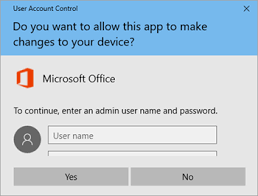
The UAC prompt usually asks the user for permission to continue with the action and requires the user to provide an administrator password. The purpose of this prompt is to prevent Malware and unwanted apps from making catastrophic changes to your Windows settings, which may result in glitches or complete failures.

The Administrator account, on the other hand, is a user account that has complete control over the system. An administrator can install software, make changes to the system registry, create and delete user accounts, access administrative functions, and modify system settings. An administrator account has full access to all system files and settings, which means that it can also make changes that may cause system instability or security vulnerability.

In the earlier versions of Windows, the default account was usually an administrator account, which meant that users had full access to the system right from the start. This was a significant security risk since the user could make changes to the system without knowing what they were doing, and many users ended up unintentionally installing Malware or other harmful software. As a result, Windows 10 has started to use UAC instead of relying on Administrator Rights as the primary protection against unauthorized changes.

In Windows 10, the default account is typically a standard user account, which does not have administrator rights. A standard user account can perform all the necessary tasks that a regular user needs to do, such as browsing the web, running applications, and creating and modifying files. However, a standard user account cannot install software, modify system settings, manage user accounts, or make other changes that require Administrator privileges.

With the use of UAC, Windows 10 allows standard users to elevate their privileges to perform specific tasks that require Administrator Rights. For example, if a regular user needs to install software, the system will prompt them for the administrator password, and then elevate their privileges. This approach provides a balance between user convenience and system security, as users can perform administrative tasks when needed without the risks of leaving administrative rights open on their account session.

In summary, User Account Control and Administrator Rights are essential features of windows 10 operating system that work together to protect the system against unauthorized changes and malware infections. By combining UAC prompts with standard user accounts, Windows 10 provides a secure environment where users can safely use their PCs without worrying about damaging the system. So make sure to understand the implications of granting Administrative Rights and when it prompts your UAC authorization, to guarantee the security and health of your windows system.


Previous Article

How to Remotely Erase Your iPhone Data

Next Article

How to Multiply in Excel

Matthew Lynch

Related articles More from author

  • Tech Advice

    You Should Be Using Google’s ‘Magic’ Photo Tool

    July 24, 2023
    By Matthew Lynch
  • Tech Advice

    Solar panel buying guide for RVs, campervans and travel trailers: Everything you need to know

    July 8, 2023
    By Matthew Lynch
  • Tech Advice

    Best Buy Kicks Off Rare Apple Shopping Event With Deals on Mac, iPad, Apple Watch and More

    July 5, 2023
    By Matthew Lynch
  • Tech Advice

    Pokemon Go Tapu Koko Raid Guide: Best Counters, Weaknesses and Moveset

    July 17, 2023
    By Matthew Lynch
  • Tech Advice

    The Most Annoying iOS 17 Features on Your iPhone (and How to Fix Them)

    October 19, 2023
    By Matthew Lynch
  • Tech Advice

    The Best Mesh WiFi Routers for Gamers

    October 19, 2023
    By Matthew Lynch

Search

Login & Registration

  • Log in
  • Entries feed
  • Comments feed
  • WordPress.org

Newsletter

Signup for The Tech Edvocate Newsletter and have the latest in EdTech news and opinion delivered to your email address!

About Us

Since technology is not going anywhere and does more good than harm, adapting is the best course of action. That is where The Tech Edvocate comes in. We plan to cover the PreK-12 and Higher Education EdTech sectors and provide our readers with the latest news and opinion on the subject. From time to time, I will invite other voices to weigh in on important issues in EdTech. We hope to provide a well-rounded, multi-faceted look at the past, present, the future of EdTech in the US and internationally.

We started this journey back in June 2016, and we plan to continue it for many more years to come. I hope that you will join us in this discussion of the past, present and future of EdTech and lend your own insight to the issues that are discussed.

Newsletter

Signup for The Tech Edvocate Newsletter and have the latest in EdTech news and opinion delivered to your email address!

Contact Us

The Tech Edvocate
910 Goddin Street
Richmond, VA 23231
(601) 630-5238
[email protected]

Copyright © 2026 Matthew Lynch. All rights reserved.