The Tech Edvocate

Top Menu

  • Advertisement
  • Apps
  • Home Page
  • Home Page Five (No Sidebar)
  • Home Page Four
  • Home Page Three
  • Home Page Two
  • Home Tech2
  • Icons [No Sidebar]
  • Left Sidbear Page
  • Lynch Educational Consulting
  • My Account
  • My Speaking Page
  • Newsletter Sign Up Confirmation
  • Newsletter Unsubscription
  • Our Brands
  • Page Example
  • Privacy Policy
  • Protected Content
  • Register
  • Request a Product Review
  • Shop
  • Shortcodes Examples
  • Signup
  • Start Here
    • Governance
    • Careers
    • Contact Us
  • Terms and Conditions
  • The Edvocate
  • The Tech Edvocate Product Guide
  • Topics
  • Write For Us
  • Advertise

Main Menu

  • Start Here
    • Our Brands
    • Governance
      • Lynch Educational Consulting, LLC.
      • Dr. Lynch’s Personal Website
      • Careers
    • Write For Us
    • The Tech Edvocate Product Guide
    • Contact Us
    • Books
    • Edupedia
    • Post a Job
    • The Edvocate Podcast
    • Terms and Conditions
    • Privacy Policy
  • Topics
    • Assistive Technology
    • Child Development Tech
    • Early Childhood & K-12 EdTech
    • EdTech Futures
    • EdTech News
    • EdTech Policy & Reform
    • EdTech Startups & Businesses
    • Higher Education EdTech
    • Online Learning & eLearning
    • Parent & Family Tech
    • Personalized Learning
    • Product Reviews
  • Advertise
  • Tech Edvocate Awards
  • The Edvocate
  • Pedagogue
  • School Ratings

logo

The Tech Edvocate

  • Start Here
    • Our Brands
    • Governance
      • Lynch Educational Consulting, LLC.
      • Dr. Lynch’s Personal Website
        • My Speaking Page
      • Careers
    • Write For Us
    • The Tech Edvocate Product Guide
    • Contact Us
    • Books
    • Edupedia
    • Post a Job
    • The Edvocate Podcast
    • Terms and Conditions
    • Privacy Policy
  • Topics
    • Assistive Technology
    • Child Development Tech
    • Early Childhood & K-12 EdTech
    • EdTech Futures
    • EdTech News
    • EdTech Policy & Reform
    • EdTech Startups & Businesses
    • Higher Education EdTech
    • Online Learning & eLearning
    • Parent & Family Tech
    • Personalized Learning
    • Product Reviews
  • Advertise
  • Tech Edvocate Awards
  • The Edvocate
  • Pedagogue
  • School Ratings
  • 100 Best Apps for Data Backup

  • 100 Best Apps for Data Migration

  • 100 Best Apps for Data Transformation

  • 100 Best Apps for Data Cleaning

  • 100 Best Apps for Data Entry

  • 100 Best Apps for Business Process Automation

  • 100 Best Apps for Operational Efficiency

  • 100 Best Apps for Improving Processes

  • 100 Best Apps for Scaling Operations

  • 100 Best Apps for Community-Led Growth

Digital & Mobile Technology
Home›Digital & Mobile Technology›Useful Ways to Reuse an Old Mac

Useful Ways to Reuse an Old Mac
By Matthew Lynch
June 15, 2023
0
Spread the love

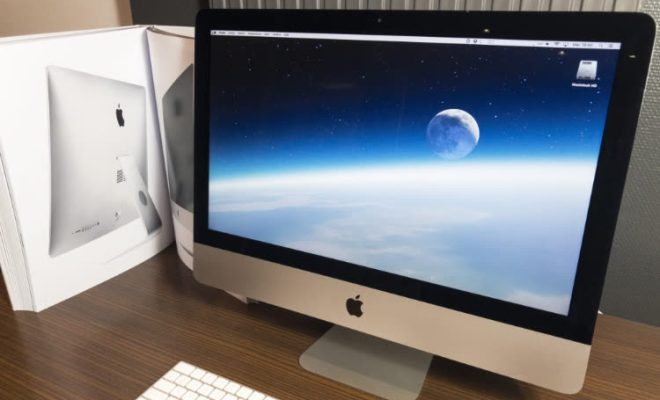
Mac computers are known for their quality and longevity. You may have an old Mac lying around that still works, but you may not be sure what to do with it. There are plenty of ways to repurpose an old Mac and make the most of its capabilities. Here are some useful ways to reuse an old Mac:

  1. Convert it into a media server

An old Mac can be an excellent media server for your home. You can store your music, photos, and videos on it and access them from any device in your home. You can use software like Plex or Emby to set up a media server on your Mac. This will allow you to stream your media to devices like TVs, smartphones, and tablets.

  1. Turn it into a dedicated backup device

Backups are essential to protect your important data. You can use an old Mac as a dedicated backup device for your primary system. You can schedule backups to run automatically, and you can store them locally or remotely. There are many backup software options available for Macs, such as Time Machine, Carbon Copy Cloner, and SuperDuper!.

  1. Make it into a retro game console

If you have an old Mac with classic games, why not turn it into a retro game console? You can install emulators and play classic games from systems like Atari, Nintendo, and Sega. You can also set up a Bluetooth controller to play games and connect your Mac to a TV for a better gaming experience.

  1. Use it as a second display

If you have a newer Mac and an older Mac lying around, you can use the older model as a second display. You can use software like AirDisplay or Duet Display to extend your desktop between the two devices. This can be helpful if you need more screen real estate for work or if you want to view content on a larger display.

  1. Donate it to a charitable organization

Another useful way to reuse an old Mac is by donating it to a charitable organization. Many schools, libraries, and nonprofits will accept donations of old Macs. These computers can be used to help students learn, provide access to online resources, and more.


Previous Article

How to Change Your Reddit App Icon

Next Article

Best Free Online Sticky Note Tools

Matthew Lynch

Related articles More from author

  • Digital & Mobile Technology

    How to Get Local Weather Channels on DirecTV

    April 26, 2023
    By Matthew Lynch
  • Digital & Mobile Technology

    What is Headphone Virtualization?

    May 22, 2023
    By Matthew Lynch
  • Digital & Mobile Technology

    What to Consider Before You Buy an Unlocked Smartphone

    June 3, 2023
    By Matthew Lynch
  • Digital & Mobile Technology

    What is Electronic Software Distribution (ESD)?

    May 6, 2023
    By Matthew Lynch
  • Digital & Mobile Technology

    How to Unfreeze a MacBook Pro

    June 9, 2023
    By Matthew Lynch
  • Digital & Mobile Technology

    What does the at sign mean in “@echo off “?

    June 10, 2023
    By Matthew Lynch

Search

Login & Registration

  • Log in
  • Entries feed
  • Comments feed
  • WordPress.org

Newsletter

Signup for The Tech Edvocate Newsletter and have the latest in EdTech news and opinion delivered to your email address!

About Us

Since technology is not going anywhere and does more good than harm, adapting is the best course of action. That is where The Tech Edvocate comes in. We plan to cover the PreK-12 and Higher Education EdTech sectors and provide our readers with the latest news and opinion on the subject. From time to time, I will invite other voices to weigh in on important issues in EdTech. We hope to provide a well-rounded, multi-faceted look at the past, present, the future of EdTech in the US and internationally.

We started this journey back in June 2016, and we plan to continue it for many more years to come. I hope that you will join us in this discussion of the past, present and future of EdTech and lend your own insight to the issues that are discussed.

Newsletter

Signup for The Tech Edvocate Newsletter and have the latest in EdTech news and opinion delivered to your email address!

Contact Us

The Tech Edvocate
910 Goddin Street
Richmond, VA 23231
(601) 630-5238
[email protected]

Copyright © 2026 Matthew Lynch. All rights reserved.